Smart Home Pre-Wire: What to Run Before the Drywall Goes Up
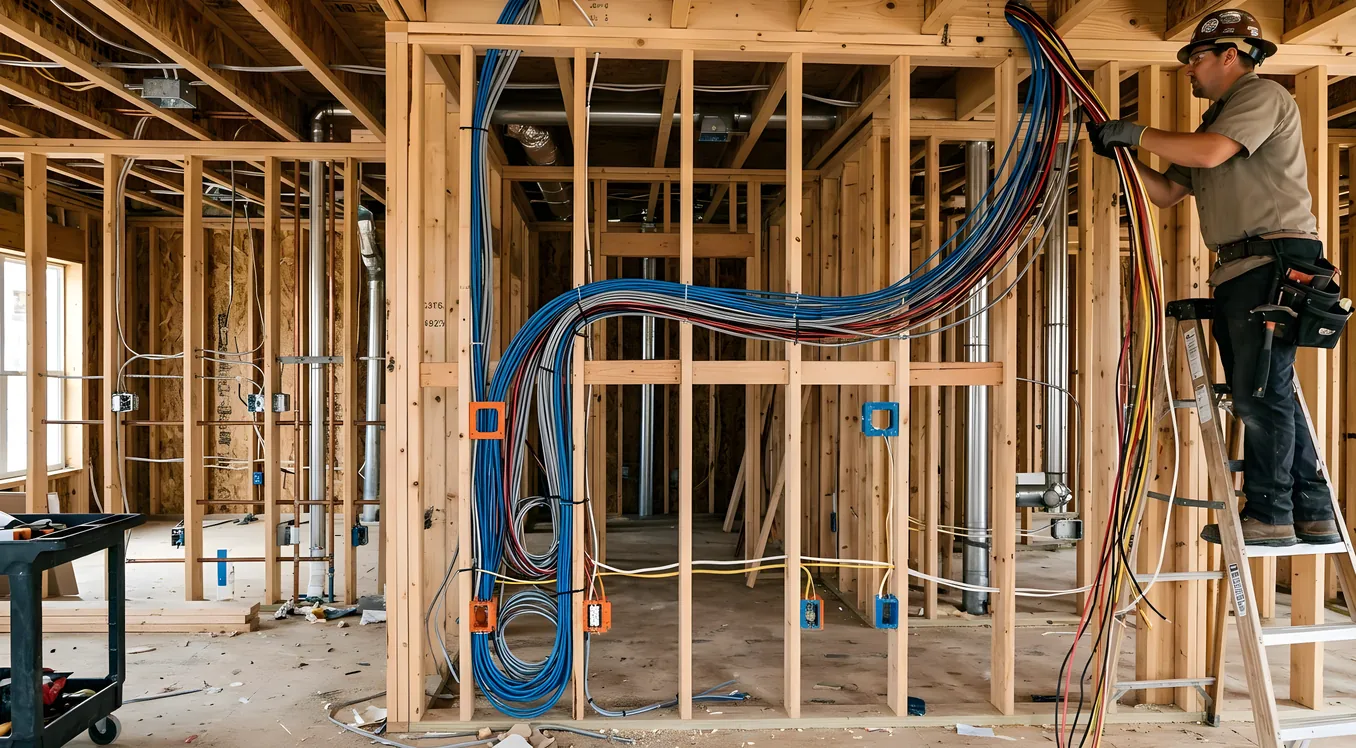
The window for smart home pre-wiring is narrow. Once the framing is up, you have a few weeks before drywall closes the walls and ceilings. Everything you run during that window costs a fraction of what it will cost later. Everything you skip will either require invasive, expensive retrofitting or remain permanently off the table.
This guide is for homeowners building new construction or doing a major renovation who want to make smart decisions during the rough-in phase. Not a product pitch, not a listicle. A specific breakdown of which cables go where, what they enable, and what the skipping price tag looks like down the road.
Why Pre-Wiring Is the Most Leveraged Decision in a Smart Home
Labor is the expensive part of any smart home install. A Cat6 cable run during framing takes 20 minutes and costs about $12 in materials. The same run after drywall is up, painted, and furnished can take 3 to 6 hours, require cutting access holes, patching and repainting, and moving furniture. That $12 run becomes a $300 to $800 project.
Multiply that across a 3,000-square-foot home and the math gets painful fast. Homeowners who skip pre-wiring and try to retrofit later often find themselves compromising on system capability or spending $10,000 to $30,000 more than they would have during construction for the same end result. You can read more about how retrofit costs compare in our guide to Retrofitting a Smart Home: What Works Without Rewiring.
The other thing pre-wiring buys you is optionality. Running cable before drywall doesn’t obligate you to install anything. You can wire for a Control4 or Savant system now and decide later whether to activate it. The cable sitting in the wall costs nothing to leave there. Pulling it after the fact costs real money.
The Non-Negotiables: What Every Smart Home Should Run
These are the categories where the regret rate is highest among homeowners who skip them.
Structured Wiring: Cat6A to Every Room
The backbone of any smart home is a structured wiring system centered on Cat6A Ethernet. Not Cat5e, not Cat6, and not Wi-Fi-only. Cat6A (the “A” stands for Augmented) supports 10-gigabit speeds at full 100-meter runs and provides the bandwidth headroom for 4K and 8K video streaming, whole-home audio, IP cameras, smart home controllers, and anything else you’ll add over the next 20 years.
Run a homerun to every room: bedrooms, living areas, home office, garage, covered patio. A homerun means each room’s cable runs back directly to a central distribution panel, not daisy-chained. This is what allows you to use a managed switch and control bandwidth per room.
Specific quantities to plan for:
- Bedrooms: 2 drops per room minimum (one for a smart TV location, one for a potential desk)
- Living room: 4 drops (TV wall, couch area, two spares)
- Home office: 4 drops minimum (two for desktop equipment, one for a Wi-Fi access point, one spare)
- Kitchen: 2 drops (one for a display or tablet, one spare near the counter)
- Garage: 2 drops (one for a smart door controller, one for a future NAS or camera)
- Covered patio or outdoor entertainment area: 2 drops in weatherproof boxes
Every drop needs to terminate at a central location. A 2U rack in a utility closet, a dedicated network closet, or at minimum a deep outlet box that can house a patch panel. The distribution point should be within 295 feet of every drop to stay within Cat6A spec.
Belden 10GX is a common contractor choice at around $0.22 per foot. Commscope and Southwire make comparable alternatives. Budget $400 to $1,200 in cable material for an average 2,500-square-foot home, plus labor.
Low-Voltage Home Run Panel Location
Before any cable is pulled, you need a dedicated home run panel location. This is where all your structured cabling terminates, where your router and managed switch live, where your smart home controller (if you’re going with Control4, Crestron, or Savant) will mount.
The ideal location is a climate-controlled interior closet, at least 12 inches deep, with a dedicated 20-amp circuit for rack equipment, and a second outlet for a UPS. A utility room, closet under a stairwell, or a purpose-built network closet all work. Garage installations are common but require managing temperature swings if you’re in a climate with hot summers.
Have your electrician rough-in a 2-inch conduit from the exterior of the home to this closet for the ISP service entry. Leave a pull string in it. This gives you flexibility when your fiber or cable provider shows up and needs to route their drop.
Coax: Still Relevant, Still Worth Running
Coax is not dead. Satellite, over-the-air antennas, and MoCA 2.5 (which lets you run a high-speed network backbone over existing coax at 2.5Gbps) all require it. Run RG6 to living rooms, master bedroom, and any room that might house a TV.
RG6 is cheap, under $0.10 per foot at volume. Running it now takes the same effort as leaving it out. Each homerun of RG6 should terminate at the same distribution panel as your Cat6A.
Speaker Wire for Whole-Home Audio
Wireless speakers have improved dramatically, but in-ceiling speakers still sound better in most cases, are invisible, and don’t require charging. Sonos Architectural (formerly Sonance), Klipsch, and Polk Audio all make in-ceiling speakers designed for invisible residential installs.
The cable is simple: 16/2 CL2-rated in-wall speaker wire. Two-conductor, 16-gauge. Run it from each speaker location to the equipment location where your amp will live.
Speaker locations to plan for:
- Kitchen (typically 2 speakers in a stereo pair)
- Living room (2 to 4 speakers depending on room size)
- Master bedroom (2 speakers, if desired)
- Covered patio (2 to 4 weatherproof speakers)
- Primary bathrooms (1 to 2 speakers each)
Sonos has an official architectural speaker line that integrates with the Sonos amp natively. Two Sonos Architectural in-ceiling speakers (model IHSUB-8) plus a Sonos Amp runs about $1,200 to $1,600 for a zone. That’s the complete end-to-end. You can run 2 to 8 zones off a single Sonos system.
If you’re considering a higher-end audio system later (Savant Audio, Autonomic, or Crestron-integrated multi-room), the same 16/2 speaker wire pre-wire works for all of them. The cable is agnostic to the amp.
Security Camera Conduit and Cable
Run Cat6 to every exterior camera location. Cameras in 2026 are almost entirely IP-based (Power over Ethernet), so the same Cat6A you’re running inside works for cameras. Plan for: front door, back door, driveway, side yards, garage entry, and any other angles relevant to your property.
Exterior cable runs should be in conduit where they exit the building. Use liquid-tight flexible conduit at penetration points. This protects the cable from UV degradation and makes future camera upgrades possible without re-fishing wire.
For doorbell cameras (Ring Pro 2, Nest Doorbell, Arlo Essential), you’ll need both Cat6 and a low-voltage 16/2 wire for the doorbell transformer. Modern video doorbells are mostly wired-power or PoE, not battery, for new construction. Run both and you have all your bases covered.
The Systems That Need More Thought
These categories require more coordination during rough-in and affect your future system choices.
Lighting Control Pre-Wire
This is where you have a real decision to make before the walls close. There are two wiring approaches for smart lighting control:
Neutral-wire required (most smart switches): Standard Lutron Caseta, Leviton, GE, and nearly all mainstream smart switches require a neutral wire at the switch box. Standard residential wiring often omits the neutral from switch legs. Make sure your electrician runs a full 3-wire (or 4-wire for 3-way) to every switch box if you’re planning smart lighting.
Lutron RadioRA 3 or Homeworks QSX: These Lutron systems use a centralized processor, so the switches themselves are communication devices rather than inline power controllers. For the highest-end installations, you run low-voltage wire (18/2 or 22/4 shielded) from switch locations to the processor rather than 14/2 or 12/2 line voltage. Your integrator needs to know in advance which approach you’re taking because it changes the rough-in completely.
The Lutron Homeworks QSX is the dominant choice for luxury new construction, used by most Control4 and Savant integrators as the lighting backbone. A 20,000-square-foot estate might have 200+ Homeworks keypads. A 3,000-square-foot home might have 40 to 60 switch locations. Getting the wiring wrong during rough-in means replacing everything later.
For the vast majority of homeowners who aren’t going full luxury integration, the practical answer is: have your electrician run neutrals to every switch box. It’s a minor upcharge during framing and it keeps every mainstream smart switch option available to you.
Control Wiring for HVAC and Thermostats
Smart thermostats like the ecobee Smart Thermostat Premium and Google Nest Thermostat E need a C-wire (common wire) to operate reliably. Most new construction HVAC systems include it, but confirm with your HVAC contractor before rough-in is done.
If you’re going with a whole-home system like Control4, Crestron, or Savant, your HVAC integration usually goes through the thermostat’s API or through a specialized driver. Ecobee has a well-developed Control4 driver. Nest integrates via Google Home, which is less direct. For premium systems, some integrators use Crestron’s own thermostats or Honeywell T6 Pro for tighter native integration.
One thing to flag: multi-zone HVAC with dampers and zone controllers will need 18/8 thermostat wire (8-conductor for zones with lots of signals). Standard 18/5 doesn’t have enough wires for complex zoning. Get your HVAC designer to coordinate with your smart home integrator early.
Shade and Window Treatment Pre-Wire
Motorized shades are one of the highest-impact smart home features: the combination of automated shades and lighting control accounts for most of the “wow” factor in a professionally integrated home. Hunter Douglas PowerView, Lutron Palladiom, and Somfy systems all require low-voltage power at each shade location.
The challenge: you don’t know your exact window treatment sizes until late in construction, so shade pre-wire often gets deferred. The compromise is to run conduit to valance locations above each window opening during framing, then pull wire through conduit once shade specs are confirmed. A 1/2-inch or 3/4-inch conduit above each window bank gives you what you need.
For Lutron Palladiom shades (which integrate natively with Homeworks QSX lighting), you’ll need power (120V) and potentially an Ethernet or RF communication path. Your integrator can spec this in detail, but the conduit infrastructure needs to be in place before rough-in is closed.
Rack and Equipment Room Infrastructure
Plan your equipment location for:
- Rack space: A 2-post open rack or a 4-post enclosed rack. Most residential installs use an open rack 12U to 24U deep. Control4 EA-series controllers, Crestron 4-series processors, and Savant hosts all mount in standard 1U or 2U rack form factors.
- UPS: An APC SMC1500 or Eaton 5SC1500 keeps your network and smart home online during power blips. These are 2U and need to be spec’d into your rack.
- Cooling: Equipment closets need ventilation. A simple through-wall vent fan is often enough. A rack-mount fan tray (1U, about $60 to $120) handles most residential loads.
- Dedicated circuits: Two 20-amp dedicated circuits for the equipment closet. One for the UPS feeding the network gear, one for other rack equipment. Your electrician needs to know this during rough-in.
How to Coordinate With Your Builder
Pre-wiring in new construction requires coordination between at least three parties: your general contractor, your low-voltage contractor, and your smart home integrator (if you’re using one). These handoffs are where things fall through.
The specific coordination issues that come up most often:
Scheduling the low-voltage rough-in: Low-voltage wire gets run after the electrical rough-in is done (or at the same time, separate walls). Your builder needs to schedule the low-voltage contractor before insulation goes in, not after. This sounds obvious, but it gets missed constantly.
Getting drawings to your integrator early: If you’re planning a Control4, Crestron, or Savant system, your integrator needs floor plans at least 60 to 90 days before rough-in starts. They’ll generate a pre-wire specification document that tells the low-voltage contractor exactly what to run and where. Building without that document means guessing, and guessing means revisiting. If you haven’t chosen an integrator yet, our guide to Choosing a Smart Home Integrator: Questions, Red Flags, References walks through what to look for.
Labeling everything: Every cable that goes into the wall should be labeled at both ends with a marker or label maker. “LR-1”, “LR-2” for living room drops 1 and 2. “MBR-1” for master bedroom. Labels applied at pull time take 10 seconds per run and save hours of troubleshooting later. Require this from your low-voltage contractor and verify it before drywall inspection.
Termination timing: Pre-wire is not the same as a finished install. Cables should be home-run to the equipment location and left with enough slack (18 to 24 inches) to be terminated later. Don’t let the low-voltage contractor terminate and punch-down patch panels until the system design is finalized.
What to Budget for Pre-Wiring
Pre-wiring costs vary by home size and scope, but here are realistic ranges for a 2,500 to 3,500 square foot new build in most U.S. markets (higher in Bay Area, NYC, or Seattle):
| Scope | Approximate Cost |
|---|---|
| Basic Cat6A + coax only | $2,500 to $5,000 |
| Cat6A + coax + speaker wire + camera conduit | $5,000 to $9,000 |
| Full pre-wire including shade conduit, control wiring, rack prep | $9,000 to $18,000 |
| Luxury full pre-wire with dedicated AV room and whole-home lighting rough-in | $18,000 to $35,000 |
These are rough-in and material costs only. Equipment is separate. For a fuller picture of what the complete system ends up costing at each budget tier, see our Smart Home Cost Breakdown: What Systems Actually Cost in 2026.
The labor-to-material ratio in pre-wiring is roughly 60/40. That means most of the cost is labor, and most of the labor savings happen when you do it before drywall. A smart home pre-wire that would cost $8,000 during construction could easily cost $20,000 to $30,000 after the fact, if it’s even feasible.
What You Can Skip for Now (And Add Later)
Not everything needs to happen at pre-wire. Some systems retrofit acceptably:
- Smart speakers (Sonos Era 100, Amazon Echo): Battery or plug-in, no pre-wire needed
- Smart plugs and outlets: Can be swapped into existing boxes without new wire
- Smart locks (Schlage Encode, Yale Assure): Retrofit into existing door prep
- Zigbee and Z-Wave devices: Many work on battery and retrofit into existing switch boxes if you have neutrals
- Wi-Fi access points: Can be ceiling-mounted with a surface-mounted Cat6 run, though in-wall drops are cleaner
The tradeoff is aesthetics and reliability, not pure capability. Retrofit options often involve visible cable management, junction boxes on ceilings, or battery devices that need servicing. For a new build, the question is always whether the tradeoff is worth what you save now.
The Specific Regrets to Avoid
After talking to homeowners who’ve been through this, the recurring regrets cluster around a few specific skips:
Skipping speaker wire in the master bedroom: People assume they don’t want speakers in the bedroom, then wish they had them for morning music or white noise. 16/2 speaker wire in a bedroom is $12 to $20 in materials.
Running only one Ethernet drop per room: Every room that gets a smart TV, a gaming console, and a desktop eventually needs more than one port. Run two drops minimum. A second cable in the wall during rough-in costs $8 more. Adding a second drop after drywall costs $200 to $500.
Not running neutrals to switch boxes: This is the single most common retrofit complaint from homeowners who built before 2015 to 2018. Smart switches almost universally need neutral wires. It’s a 5-minute conversation with your electrician during rough-in.
Skipping the equipment closet planning: Rack-mounting controllers, switches, and amplifiers in a hallway closet that’s 8 inches deep between the shelf and the wall doesn’t work. Plan for depth, dedicated circuits, and ventilation from the beginning.
Making the Most of the Pre-Wire Phase
The practical takeaway for homeowners in new construction: pre-wiring is not a luxury upgrade. It’s an insurance policy against future expense and a prerequisite for most serious smart home systems. The cost during construction is real, but it’s a fraction of what the same work costs after the fact.
Start by deciding whether you want to work with a professional integrator or go the DIY route. If you’re leaning toward Control4, Savant, or Crestron, bring your integrator into the conversation before your floor plan is finalized. They’ll add value to the room layout itself: equipment closet placement, panel room location, TV wall positioning. For homeowners with tighter budgets, a pre-wire that supports a DIY system like Home Assistant or Apple HomeKit still follows most of the same cable infrastructure recommendations. The wire doesn’t care what controller sends signals through it.
If a full-featured professional system is on the horizon but not immediately in the budget, the pre-wire investment puts you in position to activate it when you’re ready. That’s the core value of running cable before drywall: you’re not buying a system today, you’re buying the option to have any system, at any point, without demolishing walls.