Distributed Video: One Source, Every Screen in the House
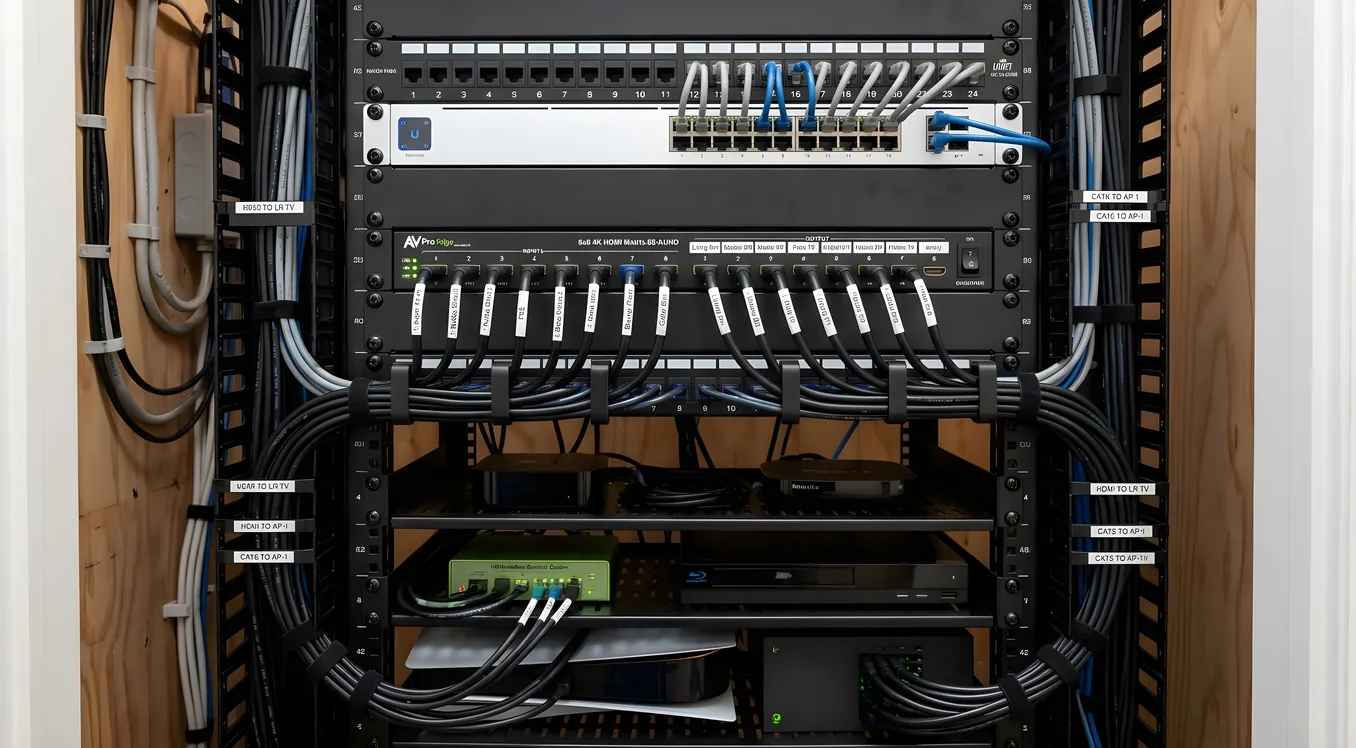
Pull up any TV in your house and the same movie keeps playing. Switch rooms, switch screen, the picture continues where you left off. Pause in the kitchen, resume in the bedroom. One cable box serves six rooms without six cable bills. That is the promise of a distributed video system, and in 2026 it is genuinely deliverable without a rack room full of proprietary gear the size of a refrigerator.
What changed is the shift from dedicated hardware matrices to IP-based video distribution, combined with streaming sources that are already networkable by nature. The hardware that used to cost $40,000 for an eight-zone system now has credible alternatives in the $8,000 to $15,000 range for professionally installed work, or in the $2,000 to $5,000 range for capable DIY-friendly solutions. The tradeoff between those categories comes down to latency, resolution, and how tightly the video layer integrates with the rest of your Audio-Video ecosystem.
This article covers the three main architectural approaches, what they actually cost with real equipment names, where each one fails, and how to choose based on what you’re actually trying to accomplish.
Why “Just Put a Streaming Stick on Every TV” Doesn’t Solve the Problem
The honest question to start with: why not just put an Apple TV 4K or a Fire TV Stick 4K Max ($49 at retail) on every television and call it distributed video? For some homes, that’s genuinely the right answer. But it comes with limitations that frustrate homeowners six months after install.
The first is source fragmentation. If you subscribe to cable, satellite, or have a media server running Plex or Emby with a large local library, you cannot easily push that signal to an independent streaming stick on each TV. You end up with some sources available on some screens and others not, depending on what app is installed and whether it’s logged in correctly. Managing that across eight TVs with four family members means a support call to yourself every weekend.
The second is control complexity. Each streaming device has its own remote, its own interface, and its own wake behavior. A unified smart home experience, where pressing a single button on a Crestron or Control4 panel starts a movie on any TV with the right source selected, the lights dimmed, and the shades down, requires that the video sources are controllable through a common system. Streaming sticks are partially controllable via HDMI-CEC and IP drivers, but the reliability varies significantly by device and firmware version.
The third is source sharing. If you want a single cable box, a single 4K Blu-ray player, or a single Apple TV to serve multiple rooms simultaneously, streaming sticks cannot do that. You need a distribution system.
That said, if your household is streaming-only, content is app-based, and you don’t need synchronized playback or unified control, individual streaming devices with a smart home platform doing basic source selection via IP control is a reasonable and low-cost path. Just go in knowing what it is.
Approach One: HDMI Matrix Switching
An HDMI matrix switch takes multiple video sources and routes them to multiple displays, with any source available to any output at any time. A 4x4 matrix handles four sources and four TVs; an 8x8 handles eight of each. Unlike a simple splitter that sends one source to all displays simultaneously, a matrix lets different rooms watch different things.
How it works physically: Sources connect to the matrix inputs via HDMI. Displays connect to outputs. Control is usually via RS-232, IP, or IR commands from whatever automation controller you’re using. Switching is handled in the matrix hardware, and the signal arrives at each TV as a standard HDMI feed.
The cable problem: HDMI has a practical run limit of about 25 feet for passive cables before signal degradation becomes an issue with 4K/HDR content. Longer runs require active cables, HDMI extenders over Cat6 or Cat6a, or fiber HDMI cables. Cat6 extenders are the most common solution for in-wall runs, adding $150 to $400 per zone for a quality transmitter/receiver pair like the Atlona AT-HDR-EX-100CEA-KIT (100-foot range, 4K/HDR support) or the Lightware EXT-HDMI-CAT5-TX/RX series for longer runs up to 230 feet. Fiber HDMI is used for very long runs (200 feet or more) without quality loss, typically $300 to $600 per run depending on length.
What quality gear looks like: Crestron’s DM NVX series and the older DM chassis-based systems are the gold standard for enterprise and high-end residential work. A Crestron DM-MD8X8 chassis with eight 4K/HDR input and output cards runs $6,000 to $10,000 for the core hardware, not counting cards or installation. At the professional mid-tier, the Kramer VS-88DT (8x8 HDMI over HDBaseT, built-in scaling, $2,800 to $3,500) and the Atlona AT-UHD-CLSO-824 (8x4, $1,800) are commonly specified. Binary (a D&H brand) and Wyrestorm offer installer-grade matrices in the $1,000 to $3,000 range for smaller configurations.
HDCP is the persistent headache: High-bandwidth Digital Content Protection causes compatibility issues in matrix systems, particularly with 4K content from streaming devices and cable boxes. Not all matrix switches handle HDCP 2.2 (required for 4K) cleanly across all input/output combinations. The higher-end products handle this correctly; cheap matrices from Amazon often don’t. This is one area where buying on price alone causes real problems.
Best for: Homes with five to eight screens, mixed streaming and local sources, and an existing structured wiring installation with HDMI or HDBaseT runs already in the walls. Budget $3,000 to $8,000 for hardware alone on a quality 8-zone system.
Approach Two: AV-over-IP (AVoIP)
AV-over-IP encodes video signals as IP packets and distributes them over a dedicated network. Each source gets an encoder; each display gets a decoder. Any encoder can send to any decoder, or to multiple decoders simultaneously. Scaling from four zones to twelve zones means adding encoders and decoders, not replacing a matrix chassis.
This architecture shift is why AV-over-IP has become the dominant approach for serious residential installs since about 2022. It eliminates the “you bought an 8x8 matrix and now need a 10-zone system” problem.
The network requirement: AVoIP systems need a dedicated managed switch that supports IGMP snooping (for multicast video handling) and has enough throughput to handle simultaneous 4K streams. A 24-port 1Gb PoE switch like the Netgear M4300 or the Cisco SG350-28P handles smaller installs cleanly. Larger installs or systems using uncompressed video (see below) need 10Gb switching. The network is the backbone; a cheap switch creates stuttering, latency, and audio sync issues that are maddeningly difficult to diagnose.
Compressed versus uncompressed: This is the core spec decision in AVoIP. Compressed systems (H.264, H.265, JPEG2000) squeeze the video into a manageable bit rate and transport it over standard 1Gb infrastructure. Visually lossless compression is good enough that most homeowners cannot distinguish it from uncompressed on a typical living room TV at typical viewing distances. Uncompressed or minimally compressed systems (like ZeroLatency products or SDVoE-based gear) send the full 4K signal with near-zero latency, which matters for gaming, video editing, and applications where every frame counts. Most residential video distribution is not latency-sensitive in the way a gaming rig is, and compressed AVoIP at 1Gb is the practical sweet spot.
What quality gear looks like: Atlona’s OmniStream series (ON-HDVS-200 encoder/decoder pair, roughly $2,800 per zone) and Wyrestorm’s NHD series ($1,800 to $2,400 per zone) are mid-tier professionals. Crestron NVX (NVX-E30 encoder, NVX-D30 decoder, approximately $2,000 per endpoint) integrates directly with Crestron’s control infrastructure. At the high end, ZeeVee ZyPer4K handles uncompressed 4K transport at 10Gb, typically $3,000 to $4,500 per encoder/decoder pair, used in installations where switching latency needs to be under 100 milliseconds. For installer-grade value, the Just Add Power (JAP) system has a loyal following and is priced around $600 to $900 per zone, with the tradeoff being a less polished control integration story than Crestron or Atlona.
Multicast advantage: AVoIP systems can send one encoder’s output to every decoder simultaneously without additional load. One Apple TV feeding twelve TVs simultaneously costs the same network resources as feeding two. This is something a hardware matrix cannot do cost-effectively.
Best for: New construction, major renovations, homes with more than eight screens, and projects where the homeowner might want to expand later. Per-zone hardware cost is higher than matrix switching but the system scales without a forklift upgrade.
Approach Three: Streaming-Native Distribution with IP Control
Rather than distributing HDMI video, this approach treats streaming sources as networkable endpoints and relies on the IP control capabilities of platforms like Apple TV, Sonos (for audio), and smart TVs to create a consistent experience. The “distribution” is logical rather than physical: the same Netflix account, the same Plex server, the same Apple TV app appear on every screen because they’re accessing the same account over the home network.
The distribution for sources that can’t be streamed natively (like a cable box or a 4K Blu-ray player) is handled by HDMI-connected devices in one room and ignored in others. This approach does not support true source sharing of physical devices, but for streaming-primary households, that limitation often doesn’t matter.
What control looks like: A Control4 EA-1 or EA-3 controller (street price $500 to $1,500) can send IP and IR commands to Apple TVs, smart TVs, and streaming devices across the house, creating a unified remote experience through a wall-mounted touchpanel or a dedicated Control4 remote. Pressing “Watch TV” on a Control4 SR-260 remote in any room wakes the TV, sets the correct input, and launches the correct source. Pressing “End” turns everything off and sets the room back to standby. The video distribution is handled by each device’s independent streaming capability; Control4 provides the unified interface.
Savant’s FLOW platform takes a similar approach but integrates more tightly with Apple HomeKit and uses Savant’s own app as the primary interface. A FLOW installation for six rooms runs $4,000 to $8,000 for hardware and programming, which is substantially less than a full AVoIP matrix system.
Best for: Streaming-primary households, smaller homes, renovation projects where running additional structured wiring is cost-prohibitive, and clients who want a unified control experience without the infrastructure cost of true video distribution. Not appropriate if cable, satellite, or local media servers are primary sources.
What Runs Alongside a Distributed Video System
Video distribution doesn’t exist in isolation. The infrastructure and control systems that support it overlap heavily with the rest of the smart home stack, and the decisions you make on video affect several adjacent categories.
Audio follows video, mostly. Most HDMI-based distributed video systems carry audio in the same signal. When you route video to a TV, the audio comes with it, playing through the TV’s speakers or through an AV receiver in that zone. This is fine for casual viewing rooms. For zones where you want real audio quality, the video system needs to be designed to extract audio and route it to a separate amplifier and speaker system. A whole-house audio architecture that integrates with distributed video, including multiroom audio, independent volume control, and the ability to play music separately from video content, is a related but distinct design consideration covered in whole-house audio systems and distributed sound.
Outdoor video is a separate challenge. Taking your distributed video signal to an outdoor screen means weatherproofing the display, handling ambient light for daytime viewing, and protecting the connection hardware from moisture and temperature swings. The physical requirements for outdoor audio and video installations are different enough from interior work that they’re usually designed and quoted separately, even when they share the same source infrastructure.
Structured wiring is the constraint. Every meaningful video distribution system depends on the in-wall cable plant. HDMI runs, Cat6a for HDBaseT or AVoIP, and fiber for long runs all need to be planned and installed before walls are closed. Retrofitting structured wiring into a finished home is possible but expensive ($300 to $800 per run depending on path difficulty). If you’re in a new build or major renovation, this is the moment to run more infrastructure than you think you need. Cat6a is inexpensive to run during construction ($150 to $250 per home run) and provides flexibility for both video and networking for decades.
What Distributed Video Actually Costs, Fully Installed
The range is genuinely wide, and the right number depends on the architecture and zone count.
Entry level (streaming-native with unified control, 4-6 zones): $4,000 to $8,000 installed. Includes a control system (Control4 EA-1 or Savant FLOW), programming for each zone, IP-controlled TVs or streaming devices, and a basic managed switch. No new structured wiring in this scenario.
Mid-tier (HDMI matrix, 6-8 zones, existing structured wiring): $8,000 to $18,000 installed. Includes an installer-grade 8x8 matrix, Cat6a extenders for each zone, control system integration, and commissioning. Assumes wiring is already in place or is straightforward to run.
Full AVoIP system (8-12 zones, new construction or major renovation): $18,000 to $40,000 installed. Includes encoders and decoders per zone, a dedicated managed switch, structured wiring, control integration with programming and commissioning, and ongoing support. This range covers quality systems from Atlona, Crestron, or Wyrestorm on a 10-zone project.
High-end uncompressed systems (10+ zones, Crestron NVX or ZeeVee): $40,000 and up for large homes where zero-latency switching, 4K/120Hz gaming, or deep integration with a full Crestron home automation system is the requirement.
Installation labor runs $75 to $150 per hour for residential AV work depending on market, and a 10-zone system typically takes 40 to 80 hours to install and commission, including programming and client training.
Choosing a Distributed Video System That Ages Well
The installs that hold up over five to ten years share a few characteristics worth looking for before you commit.
The source hardware is replaceable without rewiring. Apple TV 4K gets replaced with whatever comes next. A cable box becomes a streaming app. The best system designs put the intelligence at the source and the decoder and treat the distribution network as a dumb pipe. AVoIP architectures do this natively; matrix systems do it only if you design the source side to be modular.
The control system is not tied to the video hardware vendor. Crestron, Control4, and Savant can control any video distribution hardware through IP, RS-232, or IR commands. Proprietary control systems sold by matrix manufacturers lock you into their ecosystem and create problems when the manufacturer discontinues a product line or you want to add another platform.
The installer offers ongoing support. AV distribution systems fail. Firmware updates break things. A new streaming device adds HDCP complications. A professional integrator with a service contract is different from an installer who hands you a manual and leaves. For systems in the $15,000 and up range, clarify what support looks like after the warranty period and what the response time is for a complete video outage.
You’ve thought about the media room differently. Distributed video solves the “every room” problem, but the dedicated media room or home theater is a different design conversation. One-button scenes that dim lights, lower shades, start the projector, and queue the right source are part of what media room automation is designed around, and that zone often gets its own treatment separate from the broader distribution system.
The technology underneath distributed video has matured considerably in the last four years. What used to require a closet full of equipment and a proprietary control language now runs on standard networking infrastructure with open control protocols. The fundamental decisions, how many zones, what sources, how much control integration, and what your wiring situation allows, are the same questions they’ve always been. Getting those answers right before specifying equipment is what separates a system you’ll use daily for a decade from one that’s half-used and already creating workarounds three years after install.