Whole-House Audio Systems: Distributed Sound Done Right
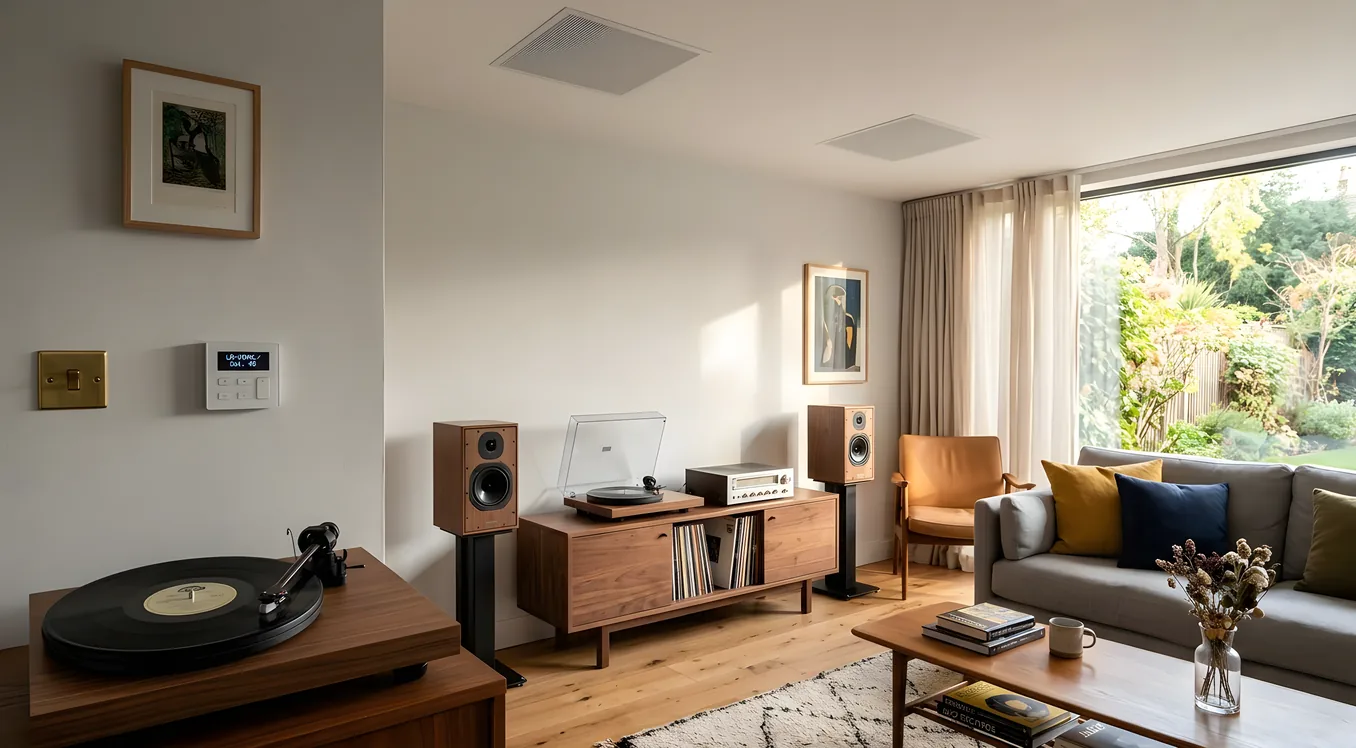
Streaming music from a phone to a Bluetooth speaker is not whole-house audio. It’s a workaround, and if you’ve lived with it long enough, you know exactly where it breaks down: someone needs to take their phone with them, the kitchen speaker is too loud to hear the backyard, there’s no audio in the master bath, and playing a different song in each room means managing three separate Bluetooth connections while cooking dinner.
A genuine whole house audio system treats music the way a smart home treats lighting: it follows you, responds to where you are, and behaves as a single coordinated system rather than a collection of independent devices. Getting there requires real planning, the right infrastructure, and an honest conversation about what you want it to do. This is that conversation.
What “Distributed Audio” Actually Means
Distributed audio refers to a system where a central source (or multiple sources) delivers audio to speakers located throughout a building across independent zones. Each zone can receive the same audio simultaneously, or completely different audio independently. The physical path from source to speaker can be wired (traditional speaker wire, Ethernet, or coax), wireless (Wi-Fi or proprietary RF protocols), or a hybrid.
The zone count is the core architectural variable. A 6-zone system serving a 2,500 square foot home looks very different from a 16-zone system in a 6,000 square foot home with a pool house and detached garage. Zones typically map to rooms or functional areas: kitchen, great room, master bedroom, master bath, kids’ rooms, patio, garage. But zones can also be subsets of rooms, a large living area split into a TV zone and a listening zone, for example.
The practical question is not how many zones you think you want today, but how many you might want in five years. Wiring zones you don’t activate immediately is cheap during construction and expensive after drywall. Running an extra four home runs of 16/2 or 14/4 speaker wire during a remodel or new build costs maybe $300 to $600 in materials and a few hours of labor. Adding those zones later means cutting walls, fishing wire, and patching drywall, which can easily run $500 to $1,500 per zone.
The Three Main Approaches (and What You’re Trading Off)
All-IP Streaming: Sonos and Its Competitors
Sonos has dominated the whole-home streaming market because it solved the hardest problem first: multi-room synchronization. Before Sonos, getting two wireless speakers to play the same audio without a noticeable delay between them was genuinely difficult. Sonos uses a proprietary mesh protocol (now running over Wi-Fi) that keeps zones synchronized to within microseconds.
The Sonos lineup covers most use cases. The Era 100 ($249) and Era 300 ($449) are self-powered units for rooms where you want a speaker on a shelf or table. The Amp ($699) and the older Connect:Amp can drive in-ceiling or in-wall passive speakers from a single chassis, which makes it a reasonable middle path between pure plug-and-play and full custom installation.
What Sonos gives you: ease of setup, a genuinely good app, broad streaming service support (Spotify, Apple Music, Tidal, Amazon Music, local library via Plex or SMB), and no professional installation required. What Sonos costs you: audio fidelity ceilings, limited integration with professional control systems, and a dependency on Sonos’s cloud infrastructure and software update decisions (a concern that became very real when Sonos’s 2024 app overhaul broke critical features for existing customers for months).
For a deeper comparison of where Sonos makes sense versus when to invest in a custom-installed system, Sonos vs Custom-Installed Audio: Convenience vs Performance works through that decision in detail.
Distributed Audio with a Matrix Amplifier
Traditional distributed audio architecture uses a central amp chassis or rack-mounted amplifier that drives passive speakers via speaker wire runs. Brands like Russound, Nuvo, Leviton, and Anthem have made this category for decades. Systems like the Russound MCA-C5 ($1,800) handle 5 zones with 50 watts per channel. Nuvo’s Essentia Series handles up to 12 zones from a single chassis.
The appeal: very high audio quality per dollar at the speaker level, since you can pair a solid amp with excellent in-ceiling or in-wall speakers at any price point. The tradeoff: more complex installation, source management requires thought (what plays through this amp, how do you control it), and integration with modern streaming services requires adding a streaming source like an Apple TV, a Sonos Port ($449), or an Elan or Nuvo streaming module.
This architecture is what most professional integrators default to for mid-tier jobs. A well-specced distributed audio system with a matrix amp, decent in-ceiling speakers, and a wall keypad or tablet controller in each zone might run $6,000 to $15,000 installed for 6 to 8 zones, depending on speaker quality and control complexity.
High-End Control Systems: Control4, Crestron, Savant
For larger homes, complex integration requirements, or clients who want audio as part of a unified smart home, Control4, Crestron, and Savant all offer audio distribution as a native subsystem within their broader automation ecosystems.
A Control4 EA-5 controller ($2,500 hardware) can manage audio zones, video switching, lighting, thermostats, security, and motorized shades from a single platform, with all of it addressable from a single app, a physical remote, or a touchscreen panel. The audio component is no longer a separate product from the home automation layer.
Savant’s approach leans harder into audio quality. Their Savant Music amplifiers use Class D amplification with audiophile-grade specs, and Savant has invested heavily in native Tidal integration and high-resolution audio playback (24-bit/192kHz). If you are serious about both smart home integration and audio quality, Savant is worth the conversation.
Crestron is the most customizable and the most expensive to program. Crestron NVX or DM NVX for video, and SWAMP (Sonnex and SWAMP for audio distribution) give professional integrators essentially unlimited flexibility, but the hardware cost and programming labor make Crestron the clear choice only for larger custom builds or commercial-adjacent residential projects.
Speaker Types: Choosing What Goes in the Walls and Ceilings
The amplifier handles signal delivery. The speakers handle the part you actually hear. For a distributed system, the dominant choices are in-ceiling, in-wall, and outdoor, with freestanding or surface-mount speakers filling gaps.
In-ceiling and in-wall speakers: invisible audio for smart homes covers the full selection guide, but the short version for distributed audio planning:
In-ceiling speakers are the default for most rooms because they disappear into the architecture and provide reasonably even coverage. A 6.5-inch two-way in-ceiling speaker is the workhorse of residential audio. Polk Audio Reserve R900 ($200/pair), Klipsch CDT-5650-C II ($350/pair), and Sonance Portrait Series ($600 to $900/pair installed) represent the price spectrum from competent to excellent.
Coverage geometry matters. A single 6.5-inch in-ceiling speaker can effectively cover about 150 to 200 square feet at moderate volumes. A 400 square foot great room likely needs two or three speakers positioned for overlap. Kitchens often need two small 4-inch units rather than one 6.5-inch to avoid dead spots near the counters and island.
Bathroom-rated speakers require a moisture rating for areas within 3 feet of a shower or tub. Polk Audio Atrium Series and Klipsch AW Series carry IPX4 or better ratings appropriate for bathroom applications.
Outdoor speakers are a separate category, not IP-rated versions of indoor speakers. Weatherproof outdoor speakers like the Polk Audio Atrium 8 ($199/pair), Sonance Landscape Series (from $400/pair), or Klipsch AW-650 ($300/pair) are purpose-built for temperature swings, UV exposure, and humidity. For the full outdoor audio picture including weatherproof video, outdoor audio and video: weatherproof entertainment systems covers placement, zoning, and weatherproofing standards.
Wiring: What to Run and When to Run It
This is the section most homeowners regret not reading carefully enough before construction or renovation.
Speaker wire gauge: 16 AWG is adequate for runs up to 50 feet with 8-ohm speakers. For runs over 50 feet, step up to 14 AWG or 12 AWG to avoid resistance-induced volume loss. The cost difference between 16 AWG and 14 AWG over an entire home run is trivial. The rework cost if you have to redo it is not.
Wire type: Use CL2 or CL3 rated wire for in-wall installation. CL3 is rated for higher voltages and is backward compatible. Standard bulk 14/4 speaker wire (two pairs in one jacket) is often used for zones where you want stereo from a single conduit run.
Control wiring: If you’re installing keypads or in-wall volume controls in each zone, you’ll need additional low-voltage wiring for the control signal, often Cat6 or a proprietary shielded cable depending on the system. Running Cat6 to every audio zone during construction is almost always the right call because it gives you flexibility to add IP-based control later regardless of which system you ultimately choose.
Home run topology: Each speaker zone should home-run its own wire back to the amplifier location, not daisy-chain room to room. This lets you independently control each zone and troubleshoot wiring issues without affecting other zones.
Infrastructure requirements: A whole-house audio system needs a central equipment location, typically in a utility room, basement, or dedicated AV rack location. This space needs power (at least a dedicated 20A circuit), ventilation (multi-channel amplifiers generate significant heat), and Ethernet connectivity. If you’re building a proper equipment rack, budget 4 to 6 rack units (RU) of space per 8 amplifier channels, plus space for network gear, streaming sources, and cable management.
What It Costs: Real Budget Ranges
Budget shopping and high-performance custom audio are different categories with different expectations. Here’s an honest breakdown:
Entry-level (Sonos-based, 4-6 zones): $2,500 to $5,000. Mix of freestanding Era units and in-ceiling speakers driven by Sonos Amp units. Self-installed or with light professional assistance. Good for homeowners who want multi-room audio without a full custom project.
Mid-tier (matrix amp + in-ceiling speakers + wall controls, 6-10 zones): $8,000 to $18,000 installed. Russound or Nuvo amplification, Polk or Klipsch in-ceiling speakers, IP-based control via a tablet or dedicated app. Professional installation with wire runs, rough-in, and commissioning. Most common category for new construction or renovation projects.
High-end (Control4, Savant, or Crestron integrated, 10+ zones, audiophile speakers): $25,000 to $80,000+. Custom programming, premium speakers from Sonance, Meridian, or Wisdom Audio, rack-mounted amplification, professional touchscreen controls, and integration with the full smart home layer. This is a project, not a product purchase. Expect a 3 to 6 month timeline from planning to final commissioning.
The biggest cost variable is always labor. Professional installation in a major metro market runs $85 to $175 per hour for AV technicians. A mid-tier 8-zone system might involve 40 to 80 hours of total labor between rough-in wiring, equipment installation, programming, and training. Don’t evaluate system quotes by hardware cost alone. A cheap amp with expensive installation often costs more than a mid-tier amp with efficient installation by an integrator who knows the platform cold.
Integration with the Rest of Your Smart Home
A whole house audio system that lives in isolation from your broader smart home is leaving value on the table.
The most practical integrations:
Occupancy and presence. When the system knows you’re home (via a smart lock event, a geofence trigger, or a motion sensor), it can start playing your preferred morning playlist in the kitchen automatically. When you leave, it fades everything out. This works well in Control4 and Savant, and is achievable in simpler form with Sonos plus a HomeKit or Google Home automation routine.
Lighting coordination. Lutron Caseta or RadioRA 3 integration with distributed audio systems means a single scene can dim the lights to 30%, lower motorized shades, and shift the music from the kitchen to the great room. These cross-system automations are where professional control systems justify their cost, the same logic applies to a media room automation: one-button movie night setup where the same single button sets the entire room.
Door and security events. A doorbell press (Ring, Nest Hello, or Ubiquiti Protect) can chime through in-ceiling speakers throughout the house rather than a single doorbell unit. A security alarm event can interrupt music and announce the zone that triggered.
Voice control. Amazon Alexa and Google Assistant both integrate with Sonos natively and with Control4 via the Control4 Voice Scene architecture. “Alexa, play jazz in the kitchen” works reasonably well in both ecosystems, though the implementation is more reliable and more flexible in a Control4 or Savant environment where the voice command can trigger more complex scenes.
For homes where video distribution is part of the project alongside audio, distributed video: one source, every screen in the house covers how the two systems share infrastructure and interact within a control system.
Common Mistakes Homeowners Make (and How to Avoid Them)
Underestimating zone count. The standard regret is not running enough zones during construction. Wire every room, even rooms you don’t plan to activate immediately. The incremental cost is minimal; the retrofit cost is significant.
Skipping the acoustics conversation. Room acoustic conditions dramatically affect how speakers perform. A kitchen with hard tile floors, glass cabinet fronts, and granite countertops will sound harsh with speakers tuned for a carpeted bedroom. A good integrator adjusts speaker placement, EQ settings, and sometimes adds acoustic panels or ceiling treatments. This is not an exotic concern, it’s the difference between music that sounds good and music you actually want to listen to.
Choosing the cheapest amplifier. Multi-channel amplifiers are not all equivalent. A 50-watt-per-channel rating on a budget amp and a 50-watt-per-channel rating on a QSC, Crown, or Anthem amp represent very different real-world performance, particularly at sustained volume levels. Budget amps clip earlier, run hotter, and fail sooner. In a system you’re planning to use for 10 to 15 years, the amp is not where to save $400.
Not testing before drywall closes. If you’re wiring during new construction or renovation, test every speaker run before the walls close. A multimeter check on speaker wire pairs costs 20 minutes. Discovering a broken run after the drywall is installed and painted costs $500 to $2,000 to fix.
Ignoring network infrastructure. IP-based audio systems require solid network infrastructure. A whole-house Sonos system or a Control4 audio setup will degrade on a consumer-grade router with poor Wi-Fi coverage. Investing in a proper Wi-Fi 6 or 6E mesh network (Ubiquiti UniFi, Eero Pro, or similar) before commissioning a distributed audio system prevents the majority of streaming reliability complaints.
Choosing a Professional Integrator
The hardware decision matters less than the integrator decision. A well-installed Russound system outperforms a poorly installed Savant system every time. When evaluating integrators:
Ask for a system diagram before they draw up a quote. An integrator who can show you the signal path, the zone layout, the wire topology, and the control architecture in a clear diagram is an integrator who understands what they’re building.
Ask about post-installation support. Distributed audio systems require occasional firmware updates, zone rebalancing as speakers break in, and troubleshooting when a streaming service changes its API. The integrator relationship doesn’t end at final walkthrough.
Ask for references from systems at least two years old. Anyone can install a system that works on day one. Ask to talk to a client whose system has been running for two or three years and see how the integrator handled problems along the way.
CEDIA (Custom Electronic Design and Installation Association) certification is not a guarantee, but it indicates an integrator who has invested in formal training and professional development. Searching CEDIA’s member directory is a reasonable starting point for finding qualified regional integrators.
Getting the System Right the First Time
A whole house audio system is not an upgrade you’ll swap out in three years. The wiring is permanent. The speaker cutouts are in your ceilings. The amp rack is mounted in a utility closet. Getting this right on the first installation requires investing in the planning phase, not just the product selection phase.
Work through zone requirements on paper before any quotes. Walk every room and outdoor space, assign it a zone, and note the acoustic conditions. Decide whether you want the system to be silent unless actively commanded or ambient and always-on. Think through how you actually listen to music in your home today and what would have to change for audio to follow you seamlessly.
The best whole-house audio systems disappear into the background of daily life. You stop noticing them as technology and just notice that your home sounds better. Getting to that point requires specificity up front, realistic budgeting, and an integrator who treats your home as a long-term project rather than a one-time sale.