Backup Power and Smart Generator Integration
The lights go out at 11 PM during a winter storm. Your Nest thermostat goes dark. Your Ring cameras lose their feed. The Control4 or Savant processor that orchestrates your entire home drops offline, and with it the schedules, scenes, and automations you built over months. By morning the garage door controller has lost its position, the smart locks have reverted to manual mode, and your sump pump ran dry because the float switch couldn’t trigger the alert.
This is not a hypothetical. It happens every storm season across the country. And the gap most homeowners discover too late is that smart home equipment is simultaneously more vulnerable to power loss than old-fashioned switches and more difficult to bring back online cleanly once power returns. A standard wall switch just works when the lights come back. A smart home system may need processors to reboot in sequence, Z-Wave or Zigbee meshes to rebuild, and cloud-dependent devices to re-authenticate.
Smart home backup power is not just about keeping the lights on. It is about keeping the automation itself intact.
The Two Fundamentally Different Approaches
Before getting into equipment and costs, it helps to be clear on what you are actually solving for. There are two separate problems, and they require different solutions.
The first is ride-through power: keeping critical loads running during short outages (minutes to a few hours) without any interruption. A battery-based uninterruptible power supply (UPS) or a whole-home battery system like the Tesla Powerwall 3 handles this. Transfer is nearly instantaneous, typically under 20 milliseconds, so sensitive electronics never even know the grid went down.
The second is extended backup: keeping your home habitable and functional during multi-day outages. This requires a generator, either a portable unit connected through a transfer switch or a permanently installed standby generator that starts automatically. Generators have a transfer delay (usually 10 to 30 seconds for an automatic standby unit), which can disrupt electronics unless you have ride-through power ahead of the generator.
The best systems combine both: a battery layer that provides seamless ride-through while the generator starts, and a generator that charges the battery and supplies loads over a multi-day outage. This hybrid approach is what serious smart home integrators build.
Standby Generators: What the Specs Actually Mean
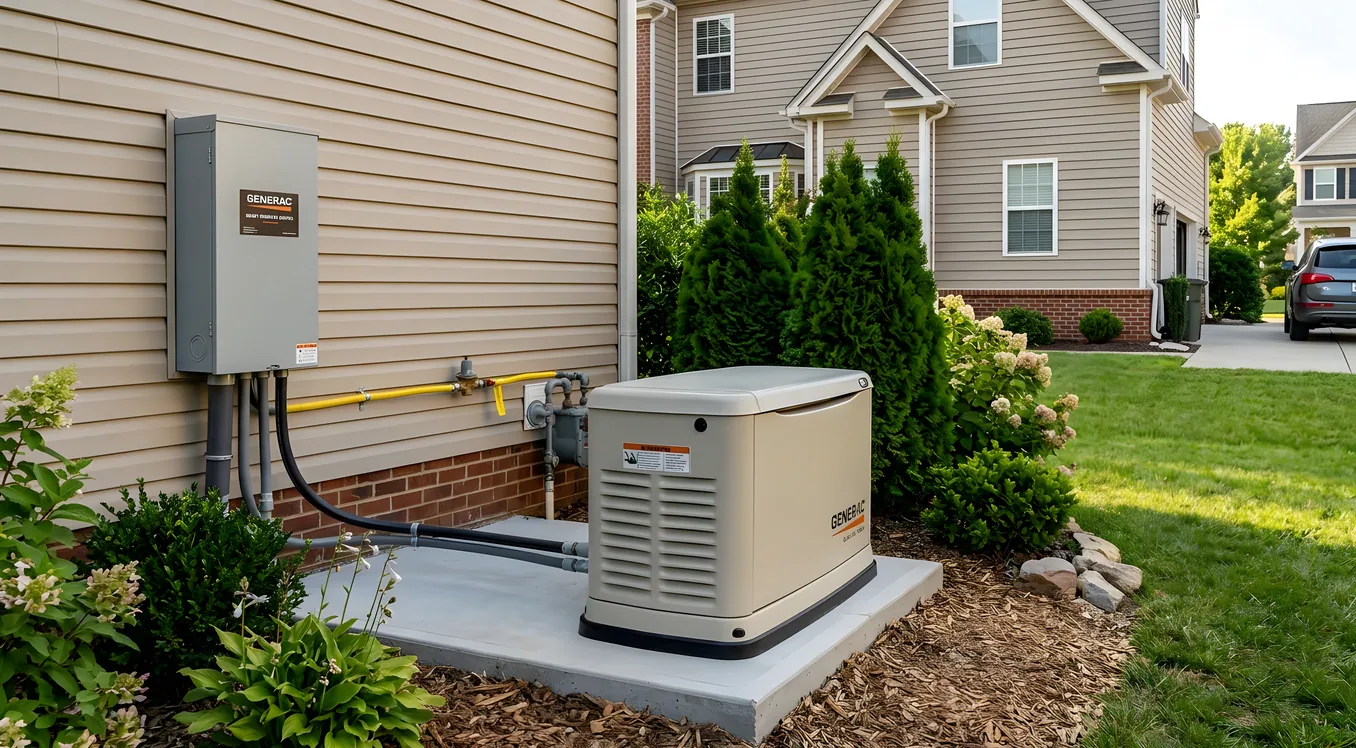
Permanently installed standby generators run on natural gas or propane and start automatically when they detect grid loss. The major brands in this space are Generac, Kohler, Briggs and Stratton (Standby Power), and Cummins. Each has a distinct line of home standby units.
Output rating: Generators are rated in kilowatts (kW). The rating you see on the box is the continuous output, not a peak figure. A Generac 22kW Guardian (around $5,500 to $7,000 for the unit alone) can run a 4,000-square-foot home with central HVAC, lights, appliances, and a full smart home system. A 10kW unit (around $3,200 to $4,500) is adequate for a smaller home where you are selective about what runs. The Kohler 20RESAL, one of the most popular contractor-grade residential units, lists for roughly $4,800 to $6,500 and is frequently specified by integrators because of its quiet operation (66 dBA at 23 feet) and clean power output.
Transfer time: Automatic standby generators use an automatic transfer switch (ATS) that senses grid loss and commands the generator to start. From grid loss to generator power delivery is typically 10 to 30 seconds depending on the unit. During that window, everything in your house is dark. This is why ride-through battery capacity between the grid and the generator matters for smart home equipment.
Clean power output: Smart home processors, AV equipment, and network hardware are sensitive to power quality. Older generators produced power with significant harmonic distortion. Modern inverter-based generators produce what’s called “clean sine wave” output that matches grid quality. If you’re running Control4, Crestron, or Savant equipment, confirm the generator produces total harmonic distortion (THD) below 5 percent. Generac’s Evolution series and Kohler’s units both meet this threshold. Cheap portable generators often run 10 to 25 percent THD, which can damage power supplies over time.
Installation cost: This is where homeowners are often surprised. The generator unit cost is only part of the budget. A full standby generator installation including the transfer switch, gas line extension, concrete pad, permit, and electrical work typically runs $3,000 to $6,000 in labor alone, on top of equipment. Budget $8,000 to $15,000 for a complete installed system in most markets.
Whole-Home Battery Systems
Battery storage has changed significantly in the last several years. The Tesla Powerwall 3, introduced in 2024, is a 13.5 kWh unit with a 11.5 kW continuous output and a 185A peak for starting large motors like HVAC compressors. At roughly $9,500 to $11,500 installed per unit, it represents a substantial investment, but it offers seamless ride-through (no transfer delay) and can be stacked for more capacity.
The Enphase IQ Battery 5P is another common choice, particularly for homes with Enphase solar. It provides 5 kWh of usable capacity per unit with 3.84 kW continuous output, and multiple units stack to whatever capacity you need. LG Energy Solution’s RESU16H Prime (16 kWh, approximately $8,000 to $10,000 installed) and the Sonnen eco 10 (10 kWh, roughly $12,000 to $14,000 installed) are popular in higher-end integrations.
For pure smart home backup purposes without solar, the Franklin Electric WH10 is worth evaluating. It delivers 10 kWh usable, 5 kW continuous, and has gained traction in integrator channels because of its more accessible pricing (around $7,000 to $9,000 installed) and straightforward integration with generator transfer switches.
Battery capacity math matters. A 13.5 kWh battery running a 3-ton HVAC system (roughly 3.5 kW running load), a networking closet and smart home equipment rack (roughly 500 watts), refrigerators and lighting (roughly 1 kW) will last about 3 hours under that load. For short outages, that’s enough. For extended outages, you need either more battery capacity or a generator to recharge.
How Smart Home Systems Respond to Power Loss
If you are running a professionally installed smart home system from Control4, Savant, or Crestron, the behavior during a power event depends heavily on how the equipment was installed. Most processors store their programming and state in non-volatile memory, so they survive power loss without losing their configuration. The question is how cleanly they come back online.
Unmanaged power restoration (everything comes back at once) can cause problems. Network switches boot before the router is ready. The router comes online before the ISP connection is established. The smart home processor tries to connect to cloud services before the network is stable. Certain devices, particularly those that rely on cloud authentication like Sonos, ecobee thermostats, and Ring cameras, may need several minutes to re-authenticate and re-establish their connections.
A properly designed backup power system solves this through sequenced restoration. The networking equipment (modem, router, managed switch) stays on a dedicated UPS that never loses power. The smart home processor comes up next, with enough delay built in for the network to stabilize first. Then the broader smart home loads come online.
This is why professional integrators almost always spec a managed UPS for the networking and control rack, separate from the whole-home battery or generator circuit. An APC Smart-UPS 1500VA (around $450 to $600), Eaton 5PX 1500VA (roughly $550 to $700), or Tripp Lite SmartOnline unit maintains the rack on battery during transfer events and provides enough runtime to bridge any gap between grid loss and generator power. Many integrators configure the UPS management software to send a notification to the smart home processor alerting it to begin a graceful shutdown sequence if battery reserves drop below a threshold, preventing filesystem corruption on embedded processors.
For homes with whole-home energy monitoring already installed, the monitoring system can also play a role here. Systems like Sense or Emporia Vue connected to the smart home platform can track generator fuel consumption, total load during backup operation, and alert when the generator is running above its rated capacity.
Integrating Generator Control with Your Smart Home
A standby generator is typically a standalone device. It starts, runs, and stops based on grid status. But for smart home users, deeper integration is available.
Generac’s Mobile Link module (roughly $200 to $300) connects the generator’s controller to the internet and exposes exercise schedules, status, runtime hours, fuel level (for propane), and fault codes. Through the Mobile Link app you can remotely start the generator for exercise runs, receive push notifications when it starts or stops, and monitor overall health.
For deeper integration into platforms like Control4 or Crestron, third-party drivers exist that pull Mobile Link data through the API and expose generator state as a variable within the smart home system. This allows the integrator to build automations: for example, when the generator starts, automatically set the thermostat to an energy conservation mode to reduce HVAC load, dim the lighting to 60 percent, and send a notification to the homeowner’s phone with a status summary.
Kohler offers a similar connected option through their OnCue Plus system. Cummins QuietConnect units work with Cummins Remote Monitoring.
For homes where the generator is paired with a battery system, the intelligence becomes even more useful. Systems like the Generac PWRcell or Kohler Kohler Power Reserve include their own energy management software that controls what loads are prioritized during backup operation, when the generator starts and stops to recharge the battery, and how to manage solar production if present.
If you are already researching solar and smart home integration, the overlap with backup power planning is significant. A solar-plus-storage system with a properly configured automatic generator backup is the most capable residential backup power setup available today.
Critical Loads vs. Whole-Home Backup
Not every home needs or can justify whole-home backup. A critical loads approach is often more cost-effective and sufficient.
A critical loads panel is a subpanel that contains only the circuits you absolutely need during an outage: the furnace or air handler, the refrigerator, the sump pump, the network closet, the smart home equipment rack, selected lighting circuits, and perhaps one or two outlets in each room for charging. This subpanel is wired through the transfer switch, so only these loads are powered by the generator or battery during an outage. The rest of the home’s circuits (dishwasher, electric range, non-essential outlets) are simply off.
A critical loads approach lets you use a smaller, less expensive generator. A 10kW unit that would struggle to power a whole home can easily handle a properly designed critical loads panel. It also reduces fuel consumption during extended outages.
For smart home integration, the critical loads panel should always include the full networking and control equipment rack, the smart home processor, and any powered smart home hubs (Z-Wave, Zigbee, lutron RadioRA bridge, etc.). If the hub loses power, the mesh loses its coordinator, and battery-powered sensors and devices may lose communication even though they have their own batteries.
The Lutron Caseta Pro Bridge and Lutron RadioRA 3 Main Repeater both require 24/7 power to maintain the wireless mesh. If these go down, smart switches and dimmers throughout the house lose remote control capability even though the switches themselves (once power is restored to them) will still function manually. The same is true of the Insteon hub (where still in use), Hubitat, and SmartThings hubs. Keep these on the critical loads circuit.
For climate control, smart thermostat behavior during outages is worth understanding in advance. The Nest Thermostat E and Nest Learning Thermostat will continue to operate and control heating and cooling as long as they have power (they draw from the common wire), but cloud-dependent features like remote access require the network to be up. The ecobee SmartThermostat Premium has a small internal battery that maintains settings and display for a brief period even if C-wire power is interrupted, but it cannot operate the HVAC without the C-wire current from the air handler or furnace.
Planning the Installation
Backup power installation requires coordination between multiple trades: an electrician for the transfer switch and panel work, a gas plumber or HVAC contractor for the fuel line (if running a gas generator), and possibly a concrete contractor for the generator pad. In most jurisdictions, a permit is required.
For homes with existing smart home systems, the integrator should be part of the planning conversation early, not at the end. The integrator needs to know:
- Which circuits contain smart home equipment so they can be included in the critical loads panel or confirmed as part of the whole-home backup
- Whether any smart home components (particularly large AV systems with rack-mounted amplifiers and displays) have large startup current draws that need to be managed during generator startup
- How the smart home platform handles power restoration events and what sequencing or delays need to be programmed
For homes still in the planning phase, the climate control planning conversation naturally includes backup power strategy. It is significantly less expensive to rough in the critical loads panel and generator connection point during initial construction than to retrofit it later.
Budget planning starting points for common configurations:
- UPS for networking and control rack only: $400 to $800 installed
- Portable generator (7,500 to 12,000 watt) plus manual transfer switch: $1,500 to $3,500 installed
- Whole-home battery (13 to 16 kWh) plus installation: $9,000 to $16,000
- 20kW standby generator plus ATS plus installation: $12,000 to $20,000
- Solar plus battery plus standby generator (full hybrid system): $30,000 to $55,000 depending on solar array size
Federal tax credits through the Inflation Reduction Act apply to battery storage systems (30 percent of installed cost through 2032) when the battery is charged at least partially by solar. Standalone battery storage installed after 2023 also qualifies regardless of solar. This credit has meaningfully reduced the effective cost of whole-home battery installations.
What a Well-Integrated System Actually Looks Like
At the high end of smart home backup integration, the system operates without any manual intervention. The generator starts within seconds of grid loss, the battery provides seamless ride-through during transfer, and the smart home platform receives a notification that backup power is active. Automations adjust the thermostat to a conservation setpoint to reduce generator load. Non-essential loads are shed automatically through smart switches. The homeowner gets a push notification showing estimated runtime based on current load and fuel level. When grid power returns, the system transfers back automatically, the generator cools down and shuts off on its own, and the smart home platform logs the outage event including duration and maximum load.
This level of integration requires upfront planning, the right equipment choices, and a professional integrator who understands both the power systems side and the smart home programming side. For homes with zoned HVAC across multiple systems, the load management during backup operation becomes particularly important: not all zones should run simultaneously on generator power.
Making the Decision
For most homeowners, the right starting point is a UPS on the networking and control rack (always), an assessment of how many outages the local area experiences per year and how long they typically last, and a conversation with an electrician about whether a critical loads panel or whole-home approach makes more sense given the existing electrical layout.
Backup power is one of those investments that feels unnecessary until the moment you need it, at which point you would pay almost anything to have it. The good news is that with modern battery systems and properly integrated standby generators, you do not have to choose between keeping your smart home functional and keeping your family comfortable. A well-designed system handles both, automatically, without you having to do anything.
The smart home part of this conversation is really about maintaining continuity: making sure the investment you made in automation, comfort, and convenience does not evaporate the moment the grid does.