Solar and Smart Home Integration: Batteries, Inverters, and Automation
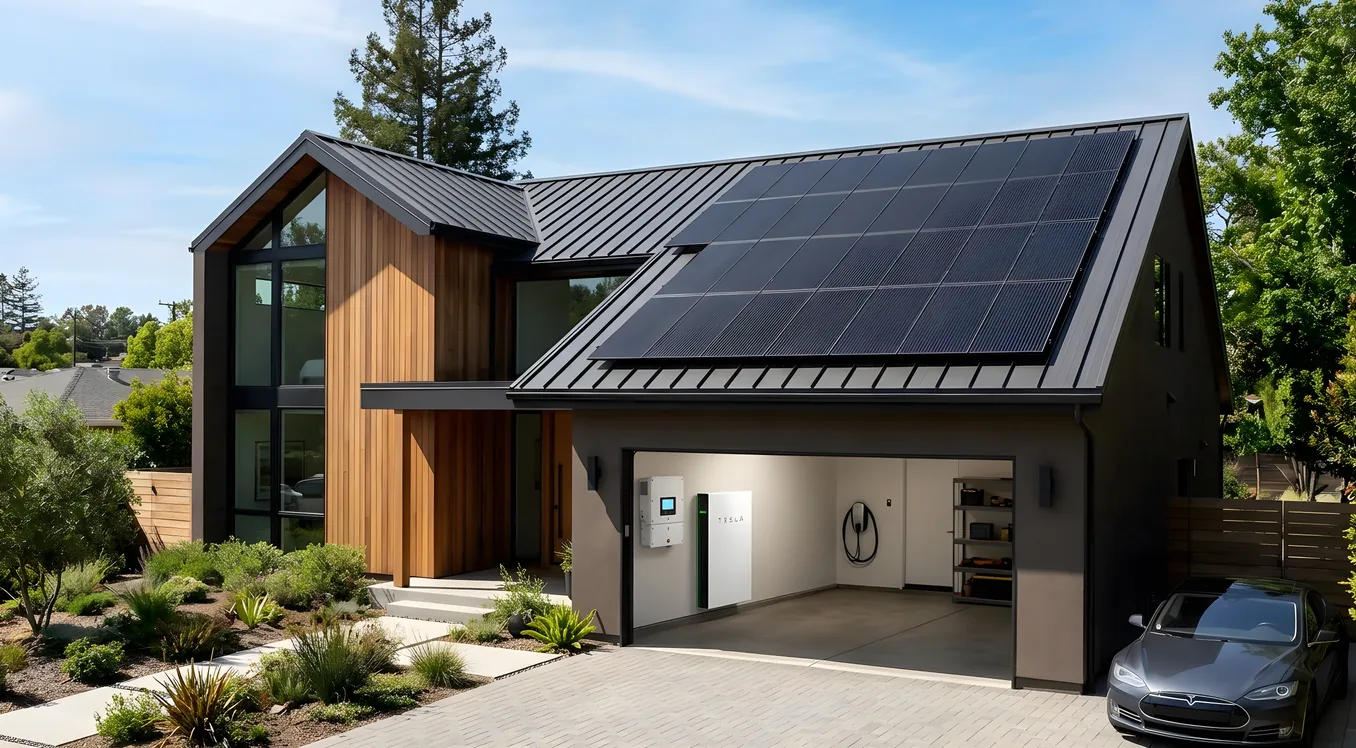
Most solar installations stop at the utility meter. Panels go on the roof, an inverter converts DC to AC, and the system ships excess power to the grid in exchange for credits. That arrangement made sense when panels were the main variable and everything else in the house ran the same way it always had. It makes considerably less sense when your thermostat, EV charger, HVAC system, and lighting are all network-connected and programmable.
The case for solar smart home integration is not primarily about technology for its own sake. It’s about money. A 10 kW solar array produces power on a curve that peaks around midday. Your household energy demand peaks in the morning when everyone is getting ready, and again in the evening when the HVAC is working hardest and dinner is being cooked. Without integration, you’re selling cheap power to the utility during the day and buying expensive power back at night. With integration, you can shift loads, charge batteries during peak production, and run high-draw appliances when solar is generating instead of when it’s convenient. That gap can represent $800 to $2,500 per year depending on your utility’s rate structure.
This article works through every layer of a properly integrated solar and smart home system: inverter selection, battery sizing, the communication protocols that tie everything together, and the automation logic that makes the whole thing run without daily intervention.
The Inverter Is the Nervous System
Homeowners tend to focus on panel wattage when comparing solar quotes. That’s understandable. 400W panels sound more capable than 350W panels, and the arithmetic is straightforward. But the inverter choice matters more for smart home integration than the panel wattage does, because the inverter is the device that will speak to your automation platform, respond to grid signals, and manage power flow between panels, batteries, grid, and loads.
String inverters are the traditional option. One central unit converts the DC output from all your panels combined. They’re reliable, relatively inexpensive (roughly $0.10 to $0.15 per watt for the inverter alone), and widely understood by installers. The limitation for smart home integration is that string inverters produce minimal data. You get total production figures, but not panel-level visibility. If one panel is shaded or underperforming, you won’t know without a separate monitoring device.
Microinverters, with Enphase IQ8 being the dominant product, mount under each panel and convert DC to AC at the panel level. The IQ8A handles panels up to 295W; the IQ8H handles up to 405W panels. Each microinverter reports individually to the Enphase Envoy communications gateway, which connects to the Enphase Enlighten cloud platform and (via API) to third-party systems including Control4, Home Assistant, Savant, and others. Panel-level data is the primary advantage for troubleshooting and optimization, but the smart home integration story is the bigger deal. The Enphase Envoy speaks REST and publishes real-time data locally on your network without requiring cloud access. That matters if you want sub-second response automation logic.
Power optimizers with a string inverter, as sold by SolarEdge, split the difference. DC optimizers mount under each panel and handle MPPT (maximum power point tracking) individually, then feed into a central string inverter. The SolarEdge Home Hub inverter, which starts around $2,400 for a 7.6 kW unit, includes EV charger control, battery management for the SolarEdge Home Battery, and a local Modbus TCP interface for third-party automation systems. This is a strong choice when you want the panel-level monitoring of microinverters but prefer a single central device for reliability.
For deep smart home integration, hybrid inverters (sometimes called battery-ready or storage-ready inverters) are the most capable option. The Fronius Gen24 Plus, SMA Sunny Boy Storage, GoodWe ET series, and SolarEdge Home Hub all qualify. These units handle AC coupling between panels, batteries, and grid simultaneously. They can operate in self-consumption mode, peak shaving mode, backup mode, or time-of-use optimization mode, and they can switch between them based on signals from your automation system or from the utility.
Battery Storage: Where the Integration Gets Real
A solar array without storage is a grid-tie system: you produce power, the grid absorbs your excess, and you draw from the grid when you’re not producing. Add a battery and the system gains memory. You can store midday production and deploy it during the evening peak, or hold capacity in reserve for grid outages.
The Tesla Powerwall 3, released in 2024 and now the current production unit, is a 13.5 kWh AC-coupled battery with an integrated 11.5 kW single-phase inverter. The Powerwall 3 can operate as a standalone system without separate solar hardware or integrate with an existing array. Its app is competent for scheduling and monitoring, but third-party automation integration is limited. Powerwall exposes a local REST API that tools like Home Assistant can query, but Control4 and Savant drivers are not officially supported, and the API has historically been fragile across firmware updates.
The Enphase IQ Battery 5P is a 5.0 kWh unit that stacks: you can install two, three, or more units to reach 10, 15, or 20 kWh. The integration story is stronger than Powerwall for smart home purposes because IQ Batteries connect to the same Envoy gateway as IQ microinverters. Your automation system sees panels, batteries, and grid consumption through a single API endpoint. A two-battery system (10 kWh) typically runs $7,000 to $9,000 installed, not counting incentives.
The Franklin Electric apower24 and apower5 deserve mention for their flexibility. The apower24 is a 24 kWh unit, and multiple units can stack to 100+ kWh for serious backup or off-grid scenarios. Franklin uses a CANbus communication interface and has certified drivers for Crestron, which makes it one of the few batteries with genuine deep automation platform integration rather than a cloud-dependent workaround.
Sizing the battery is where the math matters. A typical 2,000 to 2,500 square foot home with a gas furnace (so primarily AC loads, not resistance heat) uses 25 to 35 kWh per day. To cover an evening peak from 5 PM to 10 PM, you might need 8 to 15 kWh depending on your HVAC size and cooking habits. To cover a full-night outage with essential loads only (refrigerator, one HVAC zone, lights, devices), you need 10 to 18 kWh. To cover a full 24-hour outage at normal consumption, 25 to 35 kWh. The economics of battery sizing shift significantly if you’re in a time-of-use territory like PG&E, SCE, or ConEdison, where peak rates (typically 4 PM to 9 PM) are two to three times off-peak rates.
Communication Protocols: What Actually Talks to What
The frustrating reality of solar smart home integration is that there is no single standard. Inverters, batteries, and energy monitors speak different languages, and the home automation platforms have varying degrees of willingness to learn those languages.
Modbus TCP is the closest thing to an industry standard for inverter communication. Most commercial and prosumer inverters support Modbus over Ethernet or WiFi. A Modbus connection gives your automation system read access to real-time power production, consumption, battery state of charge, and grid import/export, and write access to operating mode changes. Crestron’s energy modules, Control4’s solar integration drivers, and Home Assistant’s Modbus integration all use this path. The gotcha is that Modbus polling has latency of 1 to 3 seconds per device, which limits how responsive automation logic can be.
SunSpec is a Modbus register mapping standard specifically for solar equipment. A SunSpec-compliant inverter stores its data in standardized registers, which means one universal driver can work with any compliant device. Adoption is partial: SolarEdge, Fronius, SMA, and ABB support SunSpec. Enphase does not (they use their own REST API).
IEEE 2030.5 (previously called SEP 2.0) is a utility-facing protocol designed for demand response programs. If your utility has a smart inverter program or a demand response incentive, they’ll communicate with your inverter via 2030.5. California’s Rule 21 requires new solar installations to use 2030.5-compliant inverters. From a homeowner automation perspective, this is largely invisible: the utility adjusts your system settings within programmed parameters, and you see the results in your utility credits.
Matter over Thread is beginning to reach energy devices, though adoption in 2026 is still limited. Some EV chargers support Matter, and a handful of energy monitors have Matter profiles. For inverters and batteries, Zigbee-to-Modbus bridges remain more practical than waiting for native Matter support.
For homeowners using professional automation platforms, the most reliable integration path is a dedicated energy management driver. Control4’s Solar Driver communicates with SolarEdge and Fronius inverters via Modbus TCP and exposes production/consumption data as variables within the Control4 OS. Savant’s Energy Management module takes a similar approach. Both require a dealer for setup, but the result is proper bidirectional data flow: the automation controller knows what the solar system is doing and can act on it.
Automation Logic: The Part Most Installers Skip
Hardware integration is the foundation. The automation logic is where the financial return actually materializes. Here’s what a well-configured solar smart home actually does.
Load shifting to solar production windows. Your dishwasher, clothes dryer, pool pump, and EV charger all run at some point during the day. Without integration, they run whenever you scheduled them, which is usually morning or evening. With solar integration, they run when production is highest, typically 10 AM to 2 PM for south-facing arrays. A Control4 or Home Assistant automation can monitor inverter output and trigger high-draw loads when production crosses a threshold (say, 4 kW or more) and cancel or defer them when production drops. For an EV charger pulling 7.2 kW, this alone can shift $80 to $150 per month in charging costs from grid to solar in California rate territories.
Battery charge/discharge optimization. The default behavior of most batteries is to charge from solar and discharge when the grid is needed. That’s fine, but it doesn’t account for time-of-use rates. A smarter configuration holds battery capacity during the morning, charges from solar during peak production, and then deploys battery power specifically during the highest-rate hours (typically 4 PM to 9 PM on most TOU schedules). The SolarEdge Energy Bank and Enphase IQ batteries support rate-based scheduling natively in their apps. For tighter integration, you can push schedule changes from your automation platform via API.
Thermal pre-conditioning. Your HVAC system is probably your largest single load. If you can cool your house to 68°F during peak solar production (say, noon to 2 PM), the thermal mass of the structure means you can let it drift to 75°F during peak rate hours while the battery handles other loads. This is where integration with a smart thermostat pays off significantly. An ecobee or Nest thermostat with a well-configured API connection can receive commands from your energy management system telling it to pre-cool when solar production and battery state allow. If you’re evaluating how thermostats fit into this picture, smart thermostats, from Nest to ecobee to professional HVAC control, covers the tradeoffs between consumer-grade and integrator-grade options in more depth.
Grid outage response. When grid power fails, a properly configured hybrid system with battery backup switches to island mode in milliseconds. The Enphase IQ System Controller 3 (the unit that manages grid switching for whole-home backup) performs this transition in 100 milliseconds or less. What the automation layer adds is intelligent load shedding: when battery state drops below 30%, non-essential loads (exterior landscape lighting, pool heater, EV charging) can be automatically suspended to extend runtime. When battery hits 20%, only life-safety loads (refrigerator, medical equipment, essential lighting) remain active. This is configurable in systems like Control4 and Home Assistant with appropriate drivers.
Demand response participation. Many utilities offer programs that pay you to reduce consumption during peak demand events. Participating manually means watching for utility alerts and adjusting your thermostat and EV charger by hand. Automated participation means your system receives the utility signal (via your smart thermostat’s built-in demand response enrollment or via IEEE 2030.5 if your inverter supports it), adjusts your HVAC setpoint by 2 to 4 degrees, defers your EV charging, and logs the event. Over a summer in California, this can generate $75 to $200 in utility credits with zero active effort.
The whole-home energy monitoring layer is what makes all of this actionable. Without circuit-level visibility into what’s actually consuming power, automation logic is working with blunt instruments. Whole-home monitors like the Emporia Vue 3, Sense, or Enphase Monitoring with individual load control give your automation platform the input data it needs to make good decisions.
What Professional Integration Looks Like vs. DIY
A DIY solar + smart home integration using Home Assistant, Enphase, and an ecobee thermostat is achievable and genuinely capable. Home Assistant’s Enphase integration pulls panel-level data, battery state, and grid status every 5 seconds. The ecobee integration allows setpoint commands. The combination can handle most of the automation logic described above, and the hardware cost is the same as any installation.
The tradeoff is setup time and maintenance. You’re the engineer, the support desk, and the firmware update manager. When Enphase releases an Envoy firmware update that breaks the local API (which has happened twice in 2024 alone), you’re the one debugging it.
Professional platforms offer a different value proposition. A Control4 or Savant deployment managed by an integrator means a unified interface for solar, HVAC, lighting, and security. The solar data appears on the same touchpanel as your thermostat and lighting scenes. Automation rules are maintained by the dealer when firmware changes break something. Energy dashboards show consumption, production, battery state, and projected savings in one view. The cost for professional integration is real: integrator programming hours typically add $2,000 to $6,000 to a project, depending on complexity.
For homeowners already invested in zoned HVAC or professional lighting control, the professional path makes sense because the solar integration becomes one more layer on a platform that’s already being managed. If you’re evaluating how solar fits into a zoned climate system, the zoned HVAC and smart damper discussion covers how room-by-room climate control interacts with whole-home energy budgets in ways that affect solar sizing and battery decisions.
Real Costs and What to Expect
A complete system for a 2,500 square foot home in a solar-favorable market like Arizona, Texas, California, or the Southeast might look like this:
- 10 kW array using 25 x 400W panels with Enphase IQ8H microinverters: $28,000 to $34,000 before incentives
- Two Enphase IQ Battery 5P units (10 kWh total): $14,000 to $18,000 installed
- Enphase IQ System Controller 3 for whole-home backup: $2,500 to $3,500
- Federal Investment Tax Credit (30% of total system cost): reduces the above by $13,000 to $16,500
- State incentives vary: California’s SGIP rebate can add $2,000 to $4,000 for battery systems
- Smart home integration programming (if using Control4 or Savant): $2,000 to $6,000
- Net all-in after incentives: approximately $25,000 to $40,000
Payback period on solar alone in most markets runs 7 to 12 years. Battery adds 3 to 6 years to payback depending on your rate structure and how aggressively you use it for TOU arbitrage. The smart home automation layer doesn’t add to payback; it accelerates return by making better use of what the hardware can already do.
Ongoing costs are modest. Inverter and microinverter warranties run 25 years for Enphase, 12 to 25 years for string inverters depending on manufacturer. Battery capacity warranties (typically 70% of original capacity at end of warranty) run 10 years for most residential products. Panel degradation is typically 0.5% per year, so a 10 kW system is producing roughly 9.5 kW at the 10-year mark. These are not dramatic maintenance burdens.
Making the Most of What You Install
The homeowners who see the best returns from solar smart home integration are not necessarily the ones who spent the most. They’re the ones who took the time to understand their rate structure, sized their battery for their actual TOU profile rather than marketing copy, and set up automation logic that runs loads when production is highest rather than when it’s convenient.
Start with your utility bill. If you’re on a flat rate structure, solar ROI is straightforward and battery ROI is primarily about backup, not arbitrage. If you’re on time-of-use rates with a meaningful spread between peak and off-peak pricing, battery + automation has significant additional value. If your utility has demand charges (more common in commercial accounts but appearing in some residential tiers), peak shaving with a battery can eliminate charges that would otherwise negate most of your solar savings.
The smart HVAC filter and air quality monitoring question also ties into solar efficiency in ways that aren’t obvious: a clean, well-monitored air filtration system reduces HVAC runtime and pressure drop, which directly reduces the single largest electrical load in most homes. Reducing HVAC consumption by even 15% meaningfully changes how long your battery lasts overnight and how much excess solar you have to work with.
Solar smart home integration works best when treated as a whole-system optimization problem rather than a hardware installation. The panels produce energy. The battery stores it. The inverter manages flow. The automation platform applies intelligence to all three. None of those pieces fully delivers on its potential without the others.