EV Charger Smart Home Integration: Load Management and Scheduling
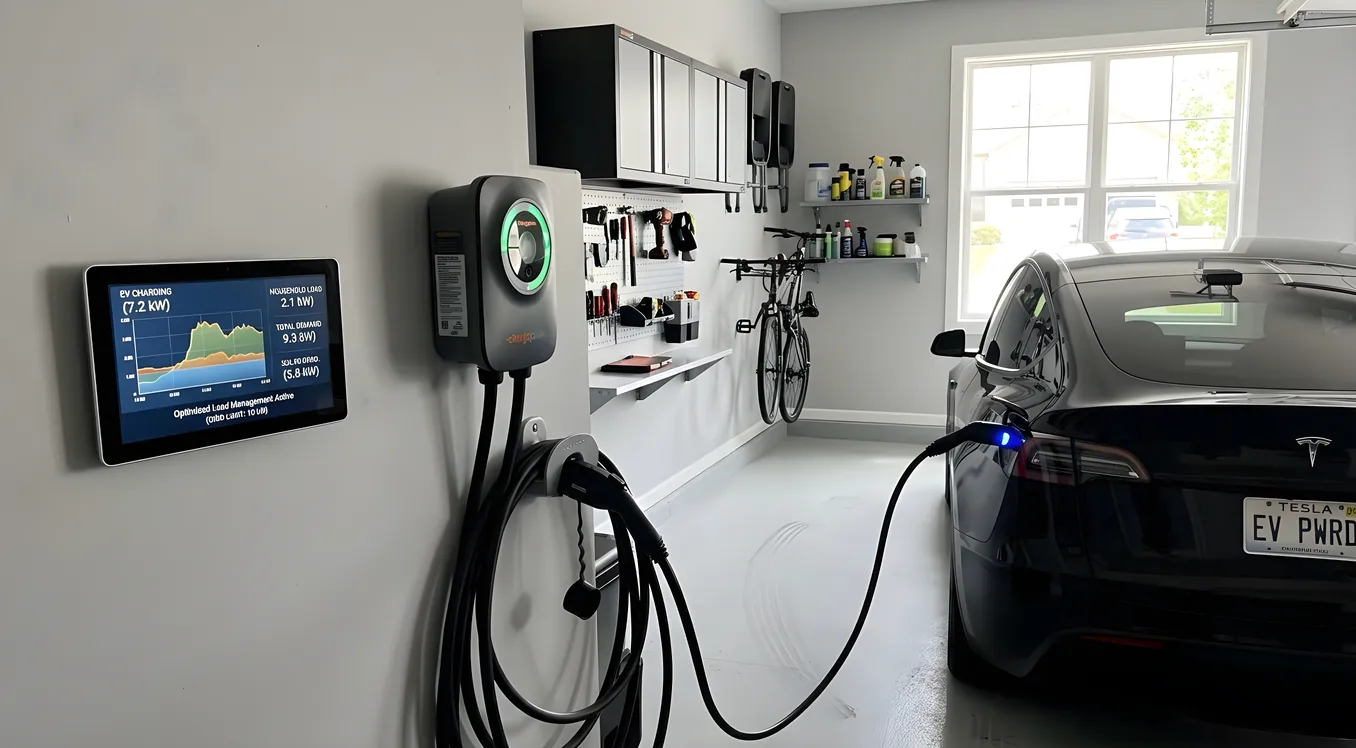
Adding an electric vehicle to a household is straightforward until you look at your electrical panel and realize a Level 2 charger pulls 48 amps continuously, which is more than most home air conditioners. For homeowners with smart home systems, an EV charger that operates in isolation is a missed opportunity. Integrated properly, your charger becomes a coordinated piece of the whole-home energy picture: it charges when grid rates are lowest, steps back when other loads spike, and works in concert with your solar production rather than fighting it.
This is not theoretical. The hardware to do this has matured, and the payoff in terms of lower electricity bills and grid resilience is measurable. What follows is a practical look at how EV charger integration works, what it costs, and which products and protocols make the most sense for different home setups.
Why Smart Charging Integration Matters
The average Level 2 charger operates at 7.2 kW to 11.5 kW, depending on the circuit size. A 48-amp, 240-volt circuit delivers about 11.5 kW. Run that for six hours overnight and you’ve added roughly 70 kWh to your daily consumption. For a home already running on a 200-amp service panel, adding an EV charger without thinking about total load can push you toward the service limits, especially during summer evenings when the air conditioning is working hardest.
The case for smart integration breaks into three practical benefits.
Rate arbitrage is the most immediate one. Most utilities now offer time-of-use (TOU) rates where electricity costs two to three times more during peak hours (typically 4 to 9 PM on weekdays) than during off-peak hours (midnight to 6 AM). A 70 kWh charge session costs roughly $14 at a $0.20/kWh off-peak rate. At a $0.50/kWh peak rate, the same session costs $35. Automated scheduling that consistently moves charging to off-peak windows saves $700 or more annually for a typical EV owner on a TOU plan.
Load management keeps your home’s total demand from exceeding your service capacity or triggering demand charges. Demand charges are rare for residential accounts but common on commercial rates, and some utilities are starting to apply them to high-consumption residential customers. More practically, load management prevents nuisance tripping of breakers and protects against panel overload during high-usage periods.
Solar coordination is where integration gets genuinely interesting. If your home has a photovoltaic system, a smart charger can be instructed to charge the car only when the solar array is producing more than the home is consuming, effectively using surplus solar that would otherwise be exported to the grid at a low net-metering rate. Given that solar and smart home integration is increasingly common in new construction and retrofits, this use case matters to a growing share of homeowners.
What You Need for Smart EV Charger Integration
Three things have to work together: the charger itself, a way for it to communicate with the rest of the home system, and something to orchestrate the decisions.
Level 2 Charger Hardware
Not every Level 2 charger is smart-home-capable. Many are dumb units that pull full power whenever a car is plugged in. For meaningful integration, you need a charger with network connectivity and an API or supported protocol.
ChargePoint Home Flex (model CPH50) is the most widely integrated residential charger on the market. It supports Wi-Fi and has a robust cloud API that allows third-party integrations. The CPH50 handles 16 to 50 amps (adjustable via the app), charges at up to 37 miles of range per hour at 50 amps, and retails for $699 to $799. It works natively with Amazon Alexa, Google Home, and has unofficial but well-supported integrations with Home Assistant via the ChargePoint integration.
Wallbox Pulsar Plus is a strong competitor at $649 to $799. It supports Wi-Fi and Bluetooth, handles up to 48 amps, and includes OpenADR compatibility for utility demand response programs. The Wallbox app offers granular scheduling, and its API is accessible to third-party platforms. The Pulsar Plus is also UL Listed and ENERGY STAR certified, which matters for some utility rebate programs.
Tesla Wall Connector (Gen 3) is the obvious choice for Tesla owners at $400 to $450 installed by an electrician. It integrates tightly with the Tesla app for scheduling and vehicle-side control. For smart home integration beyond the Tesla ecosystem, a third-party CT clamp and energy monitor setup is needed, since Tesla’s API access for third parties is more restricted than it used to be.
Emporia Vue Smart Home EV Charger deserves mention for budget-conscious buyers. At $299, it supports 48-amp charging, includes built-in energy monitoring, and integrates with Home Assistant and the Emporia app. For homeowners who want to pair a charger with a whole-home energy monitor, Emporia’s ecosystem handles both affordably.
Enphase EV Charger (model EVSE-EN-240V-2.8) is purpose-built for homes with Enphase solar and IQ batteries. At $699, it talks natively to the Enphase IQ system and enables solar-first charging without any third-party configuration. For an Enphase solar customer, this is the cleanest integration path.
Load Management Hardware
Unless your charger has built-in load management, you’ll need either a smart panel or an energy monitor with load management capability.
Span Smart Panel ($3,500 to $4,500 installed) is the most capable residential solution here. It replaces your main electrical panel with a smart panel that monitors every circuit in real time and allows per-circuit on/off control. Span’s app shows live power consumption and lets you set priorities, so the EV charger automatically throttles when high-draw appliances (dryer, oven, heat pump) are running simultaneously. Span integrates with Tesla Powerwall, SunPower, and several EV chargers. It also supports demand response from utilities.
Leviton Load Center with Smart Breakers offers a less disruptive path. You keep your existing panel but add smart breakers on key circuits. Leviton’s Decora Smart Load Center supports circuit-level monitoring and can be programmed to manage loads across circuits.
Sense Energy Monitor ($299 installed) uses current transformers clamped on your main service wires to monitor whole-home consumption and identify individual devices. It integrates with ChargePoint, Tesla, Ford, and several other EV chargers to enable solar divert charging. Sense identifies when your home has excess solar and signals the EV charger to begin or increase charging.
For homeowners who are already tracking energy with a dedicated monitor, integrating that data into EV charging decisions is a natural next step. The whole-home energy monitoring article covers the full monitoring hardware landscape, including how Sense, Emporia, and Neurio compare.
Automation Platforms
This is where the home automation context matters most. The charger and energy monitor need to talk to each other through some platform that can apply logic to the data.
Home Assistant is the most capable and flexible option for EV charger integration. It has native integrations for ChargePoint, Wallbox, Emporia, Tesla (via community integration), Sense, and the Enphase IQ gateway. An automation in Home Assistant can monitor solar production, check the grid’s hourly rate schedule, watch household load from an energy monitor, and adjust the EV charger’s charge rate accordingly, all in real time. This is free software, but it requires a home server (a Raspberry Pi 4 at $80 to $100 works fine) and a willingness to configure automations.
Control4 handles EV charger integration in high-end projects through its Energy Management module and driver library. A Control4 dealer can write a driver for ChargePoint or Wallbox that exposes charging state, session energy, and charge rate to the Control4 system. This allows EV charging status to appear on in-wall touchscreens, be visible in the Control4 app, and trigger whole-home events. If a visitor triggers the front door camera, Control4 can announce charging status on nearby keypads. The tradeoff is cost: a Control4 integration with EV management adds $1,000 to $3,000 to a project, not counting the charger hardware.
Savant takes a similar professional approach with its Energy module, which provides whole-home power visibility and can coordinate EV charging within a larger automation strategy. Savant’s strength is in homes where the energy system, AV, lighting (often Lutron), climate, and security are deeply integrated.
Google Home and Amazon Alexa both support ChargePoint and Wallbox through their respective ecosystems. You can voice-command charging stops and starts, and both platforms support simple scheduling automations. These platforms don’t handle dynamic load management, but they’re adequate for homeowners who just want basic scheduling without a dedicated home automation controller.
Setting Up Off-Peak Scheduling
The simplest and most impactful integration is automatic off-peak scheduling. Here is how to set it up across common platforms.
On ChargePoint alone: Open the ChargePoint app, go to Settings > Charging Schedule, and enter your off-peak hours. The charger will delay charging when you plug in during peak hours and start automatically when your off-peak window opens. No smart home integration required. This works reliably but doesn’t account for real-time load conditions.
On Home Assistant with ChargePoint: Create an automation that checks the current time, verifies household consumption from your energy monitor is below a threshold (say, 8 kW), and sends a command to start charging. Add a second automation that checks during peak hours and pauses charging if a high-draw appliance turns on. A basic configuration handles this in about 20 lines of YAML.
On Enphase with the Enphase EV Charger: Go to the Enlighten app, navigate to EV Charging, and set Solar Priority mode. The system will automatically charge from solar surplus first, then from the grid during off-peak hours when solar is insufficient. This is as close to plug-and-play EV integration as currently exists for a solar home.
Solar Divert Charging: The Most Valuable Use Case
Solar divert charging, also called solar export divert, is the pattern where the home automation system detects that the solar array is producing more energy than the home is consuming and redirects that surplus to charge the car rather than exporting it to the grid.
The value depends on your net metering rate. If your utility pays you $0.08/kWh for exported solar but charges $0.25/kWh when you buy from the grid, every kWh you divert to the car instead of exporting saves $0.17. A daily surplus divert of 10 kWh during sunny months saves about $600 per year on that rate difference.
To implement solar divert charging:
- You need a whole-home energy monitor or solar inverter with an API that exposes real-time net export in watts.
- Your EV charger must support variable charge rate via API (ChargePoint, Wallbox, Juicebox, and Emporia all support this).
- An automation platform reads the net export figure every 30 to 60 seconds and adjusts the charger’s output to match.
Home Assistant handles this natively if you have the right energy monitoring hardware. Platforms like Solar-Log and Fronius also offer built-in solar divert without a separate home automation hub for their respective inverter ecosystems.
One detail that trips people up: Level 2 charging has a minimum current requirement, typically 6 amps (1.4 kW). If your solar surplus drops below that threshold, the charger must pause entirely. A well-designed solar divert automation handles this gracefully by pausing and resuming as cloud cover comes and goes, rather than rapidly cycling the charger on and off, which stresses the charging hardware.
Integration with Broader Climate and Energy Systems
An EV charger is a large variable load, which means it interacts with the home’s heating and cooling systems in ways worth managing explicitly.
If your home uses a heat pump for heating or cooling (increasingly common, and the dominant technology in new all-electric homes), the heat pump and EV charger combined can easily reach 15 to 20 kW. On a standard 200-amp residential service (48 kW total capacity), this is manageable, but adding an electric dryer, range, and water heater into the mix brings you close to service limits.
The solution is load coordination. Smart thermostats from Nest or ecobee can be integrated with load management systems to pre-cool or pre-heat the home before the EV charging window begins, then allow the thermostat setpoint to drift slightly during charging hours. For a home pre-cooled to 73°F before 9 PM, the heat pump may not need to run again until midnight, leaving full electrical capacity for the EV charger during the off-peak window.
For homes with zoned HVAC systems, load coordination is even more refined. Zones serving bedrooms can be held at setpoint while zones in common areas are allowed to drift during peak charging periods, since those rooms are unoccupied late at night anyway.
Costs and What to Budget
Here is a realistic cost breakdown for EV integration at different levels of sophistication.
Basic scheduling only ($700 to $900 total) ChargePoint Home Flex CPH50 ($699) plus electrician installation ($150 to $300 on a prepared circuit). Schedule through the ChargePoint app. No additional hardware needed.
Scheduling with whole-home energy monitoring ($1,200 to $1,600) Wallbox Pulsar Plus ($699) plus Sense Energy Monitor ($299) plus installation for both ($200 to $400). The Sense app integrates with Wallbox to enable solar divert and load awareness.
Full solar divert integration ($2,000 to $3,500 above solar system cost) Enphase IQ system with Enphase EV Charger ($699) plus Enphase IQ8 microinverters (priced separately as part of the solar install). Solar-first charging is handled natively. Alternatively, ChargePoint plus Emporia Vue ($299) plus Home Assistant on a Raspberry Pi ($100).
Professional integration with Control4 or Savant ($5,000 to $15,000) Includes dealer design, programming, driver licensing, and integration into the whole-home system. Charger hardware is separate. Best for homes already on a Control4 or Savant platform where EV charging should appear alongside lighting, climate, and security on the same interface.
Utility Demand Response: Getting Paid to Manage Your Charger
Many utilities now offer demand response programs where they pay you to allow them to temporarily reduce your EV charger’s output during grid stress events. ChargePoint, Wallbox, and Emporia all participate in some utility demand response programs.
Enrollment typically earns a credit of $50 to $150 per year, and the actual curtailment events are short (usually 15 to 60 minutes) and infrequent (10 to 20 events per year). Your car continues charging at a reduced rate during events, so range impact is minimal if you maintain a habit of plugging in when you get home.
OpenADR (Open Automated Demand Response) is the protocol that enables this. Wallbox Pulsar Plus and several other chargers support OpenADR natively. For homeowners who want the utility integration to happen automatically without app intervention, OpenADR-capable chargers are the right specification to look for.
Making the Integration Decision
For most homeowners, the path of least resistance is a ChargePoint Home Flex or Wallbox Pulsar Plus paired with their utility’s TOU rate and the charger’s built-in scheduling. That handles the biggest financial benefit (rate arbitrage) with zero additional hardware.
The next step up is adding a whole-home energy monitor. If you have solar, adding Sense or Emporia alongside the charger makes solar divert practical and adds visibility into your total energy picture.
For homes on Control4, Savant, or Crestron, add the EV charger to the existing integration list when the system is being programmed or updated. The marginal cost is a driver license and a few hours of dealer time, and the result is a charger that is visible and manageable from the same interface that runs everything else.
The main thing to avoid is a high-draw charger operating in complete isolation from the home’s other systems. A charger that runs at 48 amps regardless of what else is happening in the house is a missed opportunity for cost savings and, in some cases, a practical problem for panel capacity. The hardware to coordinate it properly is affordable and increasingly mature. It is worth the setup time.