Smart Landscape Lighting: Automated Outdoor Lighting Systems
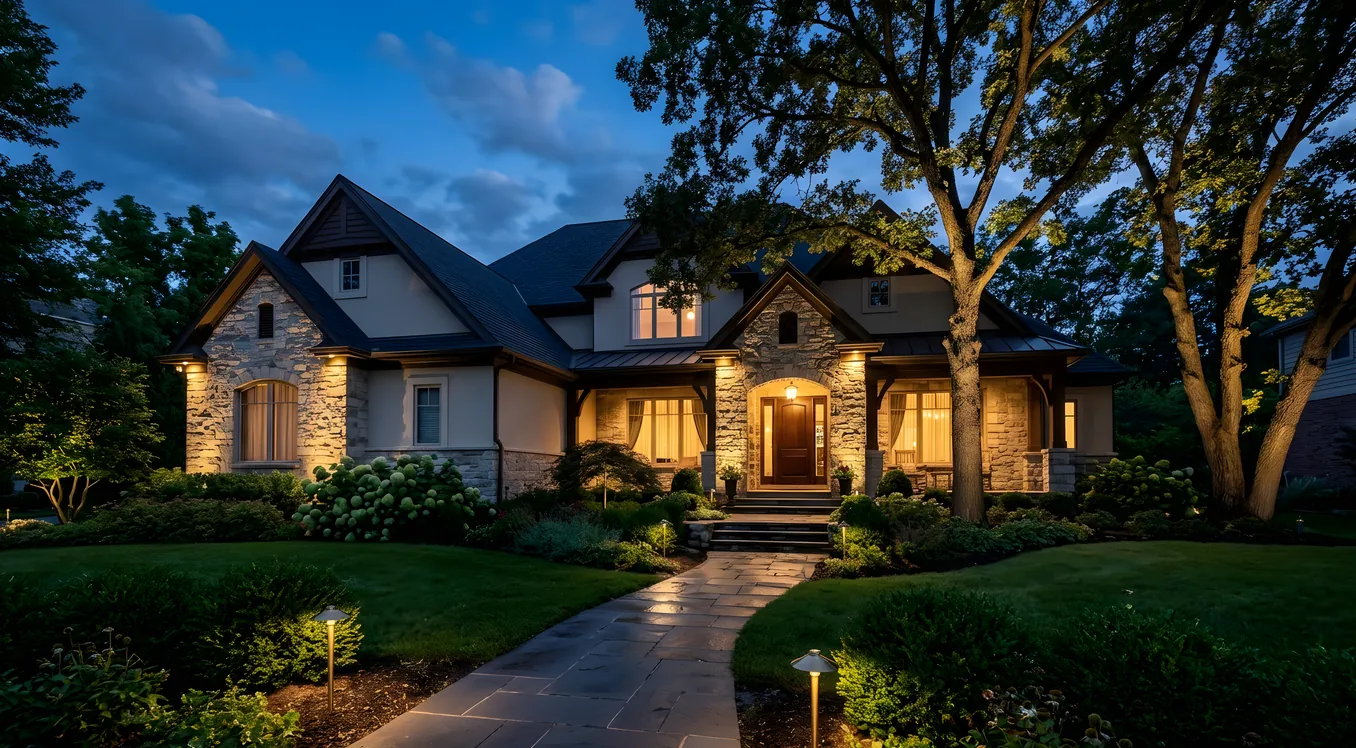
Outdoor lighting is one of the most overlooked parts of a smart home build. Homeowners spend months selecting the right indoor lighting controls, then throw in a basic timer on their landscape lighting and call it done. The result is a yard that turns on at sunset and off at sunrise whether you’re home or not, whether the patio is full of guests or empty, and whether it’s a clear summer evening or a rainy November night.
Smart landscape lighting changes that. Not because technology for its own sake is interesting, but because automated outdoor lighting does specific things that timers and manual switches cannot: it responds to conditions, integrates with the rest of your home, reduces energy waste, and creates scenes that actually match how you use your outdoor space.
This article covers how these systems work, what the major platforms and products actually cost, and how to think through the decision if you’re planning a landscape lighting project or upgrading an existing one.
How Smart Landscape Lighting Systems Are Built
Most residential landscape lighting runs on low-voltage 12V AC systems. A transformer (typically 150W to 600W) steps down line voltage and distributes power through buried 12-gauge or 10-gauge wire runs to individual fixtures: path lights, uplights, floodlights, deck lights, and step lights. The smart control layer can enter this system at a few different points.
The transformer level is the simplest entry point. Manufacturers like Kichler (their Integrated LED Landscape Transformer line, around $150 to $350) and Cast Lighting offer Wi-Fi-enabled transformers that let you schedule zones and control brightness from a phone app. These are the easiest upgrades for an existing landscape system. You swap the transformer, connect to Wi-Fi, and gain scheduling and dimming without rewiring anything else. The limitation is that you’re controlling zones, not individual fixtures, and the “smart” layer ends at the app.
Addressable fixtures are the more capable approach. Products like the Kichler Integrated LED Smart Fixtures (compatible with their Integrated Control system) or the VOLT Smart series use RF or Zigbee to allow individual fixture control. You can turn on just the front walk path lights without triggering the uplighting on the oak trees. You can dim specific zones to 40% for a dinner party ambiance without lighting up the entire yard. The trade-off is cost: addressable fixtures run $80 to $250 each versus $30 to $80 for standard low-voltage fixtures.
Professional systems from companies like FX Luminaire (now owned by Hunter Industries) and Unique Lighting Systems sit at the top of the capability stack. FX Luminaire’s ZDC (Zonal Digital Control) system uses a proprietary digital protocol over standard two-wire cable to control individual fixtures from a central controller. Each ZDC fixture has a built-in receiver; the controller can address hundreds of individual lights. FX Luminaire’s Luna Series uplights run $120 to $280 each, and the controller hardware starts around $400. These systems require professional installation and are typically specified by landscape lighting designers or AV integrators.
Connecting Outdoor Lighting to Your Smart Home
The value of smart landscape lighting multiplies when it connects to the rest of your home automation system. A standalone app for your outdoor lights is marginally better than a timer. Landscape lighting that talks to your security cameras, your front door lock, your indoor lighting scenes, and your automation controller is genuinely useful.
The major platforms handle outdoor integration differently.
Lutron offers outdoor control through its RadioRA 3 and Homeworks QSX systems, primarily via outdoor-rated keypads and relay-based load controls. Lutron’s protocol extends naturally outdoors because the RadioRA 3 mesh RF works through walls and across distances that cover most residential lots. For homeowners already running Lutron indoors, adding outdoor relay controls for landscape transformer zones or 120V exterior fixtures is a logical extension. If you’re evaluating whether Lutron Caseta is sufficient or whether RadioRA 3 is worth the upgrade, outdoor control is one scenario where RadioRA 3’s repeater mesh and programmable zones offer real advantages over the simpler Caseta system.
For whole-home projects, Control4 and Savant integrate with landscape lighting through relay modules and driver support for specific brands. Control4’s IO Extender ($250 to $400) adds relay outputs that can trigger transformer zones or 12V contactors. Control4 has certified drivers for FX Luminaire, Cast Lighting, and Kichler systems, meaning the AV integrator can fold landscape control into the same programming environment as your HVAC, security cameras, and indoor lighting scenes. A single scene can turn on landscape lights, set indoor ambient lighting, activate outdoor speakers via Sonos, and arm specific Ring cameras to recording mode.
Savant approaches outdoor integration similarly, though its vertical integration story is less complete outdoors than indoors. Savant’s strength is the user interface and scene management; the actual landscape fixtures are typically third-party, connected through relay controls or brand-specific integrations.
Home Assistant is worth mentioning for the DIY-capable homeowner. With the right setup, Home Assistant can control Zigbee-based outdoor fixtures, integrate with Z-Wave relay modules for transformer switching, and connect to FX Luminaire’s newer Wi-Fi-enabled products through community integrations. The trade-off is setup complexity and ongoing maintenance. For homeowners comfortable with a Raspberry Pi and some YAML configuration, Home Assistant is a capable and low-cost hub. For everyone else, it’s a frustrating path.
What Smart Landscape Lighting Actually Costs
There’s a wide range here, and the honest answer is that costs depend more on the number of fixtures and whether you’re doing new installation or retrofit than on which smart platform you choose.
Entry-level smart outdoor lighting (transformer upgrade only): $150 to $500 for a Wi-Fi transformer from Kichler or VOLT, plus any app subscription costs (most are free). This works if your existing fixtures are in good shape and you only need zone-level scheduling and dimming. No electrician needed if your transformer is 120V plug-in.
Mid-range system with addressable zones (new or retrofit): $2,000 to $8,000 for a professionally specified and installed landscape system using FX Luminaire or Cast Lighting with zonal digital control. This includes the controller, wire runs, and 10 to 20 fixtures. Most landscape contractors or AV integrators can handle this.
Integrated professional system tied to whole-home automation: $8,000 to $25,000+ when landscape lighting is folded into a Control4, Savant, or Lutron Homeworks project. At this level, you’re paying for programming labor, the integration work, and the ability to create unified scenes that cross indoor and outdoor. The landscape lighting hardware itself may be $5,000 to $10,000 of that total; the rest is integration and commissioning.
Custom high-end installations (estate-scale projects with 50+ fixtures, architectural uplighting, color-changing fixtures, and automation integration) can run $50,000 to $150,000. These are niche, but they exist, and they typically involve a dedicated landscape lighting designer working alongside an AV integrator.
Scene Design for Outdoor Lighting
Smart outdoor lighting is only as good as the scenes you build. The technology is the easy part; knowing what you actually want the lights to do takes more thought.
Most well-designed landscape lighting projects end up with three to five primary scenes:
Arrival/Welcome: A full-brightness scene that triggers when someone approaches or unlocks the front door. This typically includes path lights at 100%, entry porch lights at full, and driveway lighting active. Ring and other video doorbell integrations can trigger this scene when motion is detected in the driveway zone, giving you illumination before you even reach the door.
Evening Ambient: A reduced scene designed for when you’re outside on the patio or deck. Path lights at 60%, accent uplights on trees and architectural features, patio string lights or step lights active, perimeter security floods off or at very low levels. The goal is functional but not harsh.
Security/Away: Full perimeter lighting triggered when the security system arms in Away mode. This might mean every fixture at 100%, or it might mean strategic lighting of entry points while leaving other zones dimmed to simulate occupancy. This scene often integrates with your alarm system or smart lock departure routine.
Night Mode: A minimal scene for late-night hours when full lighting is unnecessary. Perhaps just step lights and one or two path lights at 20% so the yard isn’t completely dark. Some homeowners use this for overnight guests or late arrivals.
Off/Sleep: Full landscape off. Some systems add an exception to leave one or two security-relevant lights at a very low level.
Building these scenes requires either good programming from an integrator or time spent in your app. The advantage of connecting to a system like Control4 or Lutron Homeworks QSX is that scenes can incorporate location (time of sunset changes daily), presence detection, and weather data. A scene that dims automatically when outdoor sensors detect rain, or that adjusts warmth as the evening progresses, moves from “scheduled timer” to something that actually feels smart.
Fixture Selection and Compatibility Pitfalls
Not all LED landscape fixtures dim well, and this creates real headaches in smart systems. Traditional 12V landscape transformers don’t dim the same way that phase-cut dimming on 120V circuits works. Low-voltage dimming over 12V wiring requires either pulse-width modulation (PWM) at the transformer level or addressable fixtures with their own dimming receivers.
Before buying fixtures, confirm dimming compatibility with the control system you’re using. FX Luminaire’s ZDC fixtures only dim properly with ZDC controllers; you can’t mix them with a generic Wi-Fi transformer and expect smooth performance. Kichler’s Integrated LED series requires Kichler’s own transformer for full smart functionality.
Also watch for fixture color temperature consistency. A mix of 2700K and 3000K fixtures in the same scene will look mismatched, particularly on hardscape surfaces where the color shift is obvious. Specify a single color temperature (2700K is typically preferred for warm residential landscape lighting) across the entire project.
For homeowners interested in color-tunable outdoor lighting, options exist but are limited compared to indoors. Philips Hue has outdoor color-changing fixtures (the Hue Econic Outdoor and Hue Lily series run $80 to $150 per fixture) that work with the Hue Bridge and support full RGBW color. These integrate with most major smart home platforms through API or HomeKit. The fixture quality is adequate for accent and entertainment use, though landscape lighting designers generally prefer professional-grade single-color uplights for architectural lighting and reserve color capability for specific applications like holiday scenes or entertainment areas.
The intersection of color tuning and circadian lighting principles is beginning to appear in outdoor contexts too. Some homeowners use warmer evening outdoor light (2200K to 2700K) and brighter cooler tones for task and safety lighting, shifting automatically as the evening progresses. This is currently more art than science for outdoor applications, but it’s worth knowing as a direction the technology is moving.
Sensors, Triggers, and Automation Logic
The difference between a scheduled outdoor lighting system and a truly smart one is in the triggers. Scheduling lights to sunset/sunrise using location-based astronomical data is table stakes; every decent smart transformer does this today. What moves the needle is dynamic triggering.
Motion and presence detection is the most common trigger layer. Ring and Nest Cam (now Nest Cam with Google Home integration) can trigger lighting zones when motion is detected in specific camera zones. Lutron offers outdoor occupancy sensors (the LRF2-OUTZ for RadioRA environments, around $120 to $180) that can trigger specific zones rather than the whole property. The practical benefit is energy savings and security: lights only come on when they need to, but they come on reliably when they do.
Door and lock integration is straightforward in any modern system. Control4, Savant, and Home Assistant all support triggers from smart locks (Yale, Schlage, Kwikset Halo), garage door controllers (MyQ, Genie), and contact sensors. Walking out the back door after 8pm triggers the deck and patio lighting. Locking the front door at night triggers the security lighting scene and turns off the welcome pathway lights.
Weather integration adds another useful dimension. SmartWeather or OpenWeather integrations in Control4 and Home Assistant let you skip the pathway scene if it’s raining, extend exterior lighting on high-wind evenings when foliage blocks fixture coverage, or suppress certain zones during thunderstorm conditions.
Voice control via Alexa, Google Assistant, or Josh.ai works for on-demand scene changes when you’re outside and don’t have a phone handy. Alexa-connected outdoor lighting through Ring Smart Lighting (their solar-powered outdoor lights and bridge ecosystem, starting around $30 per light) is a budget-accessible entry point if you’re not ready for a full landscape system but want voice and app control over a few key areas.
What Professional Installation Gets You
The case for professional installation isn’t just convenience. It’s the difference between a system that works the way you imagined it and one that you’re constantly adjusting or fighting.
A qualified landscape lighting designer or AV integrator brings fixture placement expertise that’s hard to replicate from a product manual. They understand beam angles, throw distances, and how light interacts with specific plant species and architectural materials at different seasons. An uplight placed 18 inches from a Japanese maple in June may be completely blocked by foliage by August. A designer accounts for this.
From the automation side, a certified Control4 or Savant dealer handles the programming that makes scenes behave predictably. They can set hysteresis on motion triggers so the lights don’t flicker with every passing car. They can build conditional logic that accounts for time of day, alarm state, and which doors are open. These details are the difference between a system you show off and one that quietly does its job every night without requiring attention.
When evaluating integrators, ask specifically about their outdoor lighting experience. Many AV integrators are excellent at indoor automation and mediocre at landscape design. Look for companies that have relationships with dedicated landscape lighting brands (FX Luminaire, Cast Lighting, Unique Lighting) rather than just offering to connect your transformer to Control4.
Making the Decision: Where to Start
If you’re starting from zero, the most useful first question isn’t “which smart platform should I use?” It’s “how many zones do I actually need to control independently?”
A small suburban property with a front walk, driveway, and backyard patio might need three or four zones. A mid-size lot with architectural features, pool lighting, and a gate entry might need eight to twelve. An estate with specimen trees, a water feature, sport courts, and multiple building facades might need twenty or more individually addressable zones.
Zone count drives fixture selection, controller complexity, and whether you need a professional system or a consumer-grade smart transformer. For fewer than five zones with basic scheduling needs, a Kichler or VOLT Wi-Fi transformer is a reasonable starting point. For anything with integration ambitions, occupancy logic, or more than six controllable zones, you’re in the territory where a professional lighting controller or AV system integration starts to pay for itself in reliability and usability.
The broader conversation about smart switches versus dedicated control systems applies outdoors too. For outdoor fixtures, the equivalent question is transformer-level control (zone switching, PWM dimming) versus fixture-level addressable control. The right answer depends on your scene complexity requirements and budget, not on which approach sounds more sophisticated.
Getting the Most Out of an Automated Outdoor System
The homeowners who get the most from smart landscape lighting are the ones who spend time on scene design upfront. The technology is ready to do whatever you ask; the gap is usually in knowing what to ask for.
Start by walking your property at night and noting what you actually want to see lit, and when. Photograph it. Bring those observations to your integrator or designer before any fixtures go in the ground. Changes to fixture placement after installation mean excavating wire runs.
Plan for future expansion. Run conduit during initial installation even if you’re not running wire through it yet. Adding wire to buried conduit is a one-hour job. Digging up hardscape to add a new run is a significant expense.
Test scenes seasonally. Foliage changes, tree growth, and seasonal planting affect how outdoor lighting looks and behaves. A scene you set in fall may need adjustment in summer when the landscape fills in.
And integrate purposefully. Connecting your landscape lighting to every possible trigger sounds appealing, but a system with too many conflicting automations becomes something homeowners disable and ignore. Three well-designed scenes that work reliably beat fifteen clever ones that occasionally behave unexpectedly. The goal is a yard that looks exactly how you want it to, every night, without you thinking about it.