Smart Under-Cabinet Lighting: Kitchen and Workspace Automation
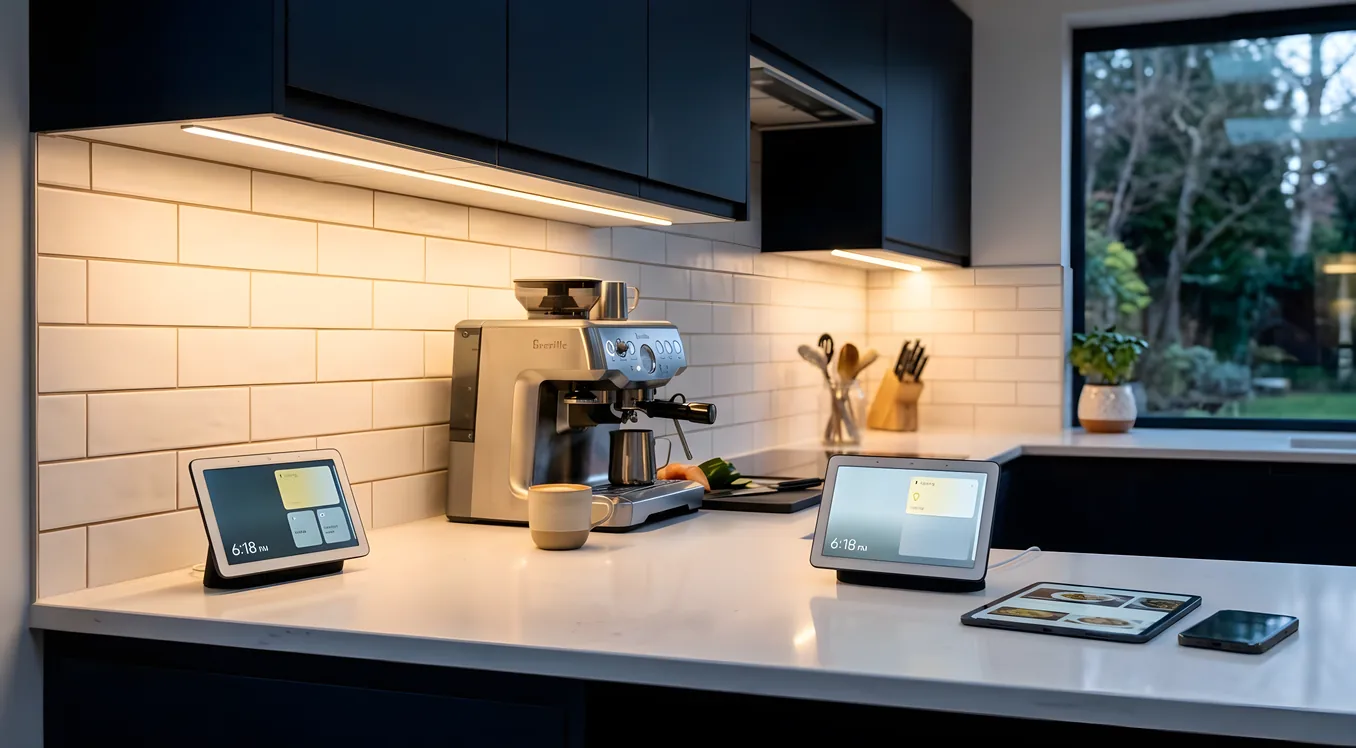
Under-cabinet lighting is one of the most underrated upgrades in a smart home. It sits at the intersection of practical task lighting and architectural ambiance, and it gets used every single day. The counter next to your sink, the prep area beside the range, the workspace in your home office: these are the surfaces where you actually need directed light, not just ambient fill from recessed cans eight feet overhead.
The question for most homeowners is not whether to add under-cabinet lighting but how to do it right. Slapping a strip of LED tape under your upper cabinets and plugging it into an outlet is easy. Getting smart under-cabinet lighting that dims smoothly, shifts color temperature through the day, integrates with your broader lighting system, and looks like it was always supposed to be there takes more planning. This guide covers the real decisions: fixture types, wiring, integration options from budget to professional-grade, and what separates a kitchen lighting upgrade that ages well from one you quietly regret.
Why Under-Cabinet Lighting Is Different from Other Smart Lighting Projects
Most smart lighting decisions involve replacing a switch or swapping bulbs. Under-cabinet lighting is a fixture decision first, and in most kitchens it means running new wiring or at minimum hiding power sources behind cabinetry. That upfront complexity is the reason a lot of homeowners skip it or settle for plug-in puck lights that look fine from a distance and terrible up close.
The smart home opportunity here is real, though. Under-cabinet lighting that integrates with your overall lighting system can respond to scenes automatically. A “morning” scene can bring the kitchen up to bright, cool-white task light for cooking. An “evening” scene can shift the under-cabinet fixtures to a warm 2700K amber glow that pairs with low recessed can levels. A “dinner party” scene can set a specific dim level without anyone touching a dimmer.
That kind of coordination only works if your under-cabinet fixtures are on a circuit that your automation platform can actually control. So the fixture choice and the control choice have to be made together.
Fixture Types: LED Strip, Puck, Linear, and Bar
The market has converged on four main form factors, each with real tradeoffs.
LED strip tape is the most flexible option and the most commonly misused. A high-quality LED strip like the Lumileds LUXEON strip or the strips sold through professional channels runs $8 to $20 per foot before connectors, power supplies, and mounting hardware. Consumer-grade strips from Amazon at $0.50 to $2.00 per foot use lower-binned LEDs with poor color consistency and cheap drivers that flicker when dimmed. For smart home use, flicker matters because it interacts badly with scene transitions and slow dim curves. If you are spec’ing LED strip for a quality kitchen, minimum 90 CRI and a bin tolerance of 3 SDCM (that is the color consistency measurement) are the specs to insist on.
Linear bar lights from manufacturers like WAC Lighting, Kichler, and Legrand are purpose-built under-cabinet fixtures in lengths ranging from 9 inches to 36 inches. They hide wiring better than strip, they are easier to install without an electrician, and many are available in both 120V hardwired and low-voltage configurations. WAC’s Undercabinet Bar (around $45 to $120 per unit depending on length) is a solid mid-range option with good CRI and multiple color temperature choices. These are also available in “linkable” versions where you connect multiple units end-to-end on a single circuit.
Puck lights are the oldest under-cabinet form factor and remain popular for retrofit installs where running new wiring is not feasible. They create visible hot spots on the counter surface rather than even wash of light, which is a cosmetic issue that bothers some homeowners and not others. Hardwired pucks from companies like Halo or Juno are better than plug-in versions, but the hot-spot problem is inherent to the form factor regardless of brand.
Integrated cabinetry lighting systems, offered by companies like Hafele and Blum, build low-voltage LED lighting into the cabinet structure itself. These are primarily specified at build time or during full kitchen renovations. Control is typically through a proprietary driver unit, but many integrate with 0-10V dimming control that third-party smart home systems can drive.
For a smart home application where you want smooth dimming, scene integration, and good light quality, LED strip (properly specified) or quality linear bar lights are the right choices. Puck lights are an acceptable retrofit compromise, not a premium answer.
Dimming: The Detail That Makes or Breaks the Installation
Under-cabinet lighting that flickers or pops when dimmed is worse than no smart control at all. Dimming problems are almost always a compatibility mismatch between the driver, the LED load, and the dimmer.
The fundamental issue is that most LED fixtures require a constant-current or constant-voltage driver, and dimmers work by cutting power in ways that older incandescent dimmers were never designed to handle with LEDs. A Lutron Caseta dimmer rated for incandescent loads will often work fine with LEDs on a desk lamp but produce visible flicker with under-cabinet strip lighting on the same circuit.
There are two clean solutions to this:
0-10V dimming uses a separate low-voltage signal wire to tell the driver how bright to run, rather than chopping the AC power supply. Professional-grade LED drivers from Mean Well (the HLG series, starting around $25 to $80 per driver) and Inventronics support 0-10V control natively. Lutron’s Ecosystem dimmers and many Control4-connected relay modules can send 0-10V signals. The result is silent, flicker-free dimming from 100% down to less than 1%. For anyone building a kitchen with a real smart home system, 0-10V is the wiring method worth asking your electrician about.
PWM (Pulse Width Modulation) dimming is what LED drivers do internally and what many smart strip controllers use externally. Quality PWM at 1,000Hz or above is visually flicker-free. Cheaper controllers at 100-200Hz produce flicker that is visible to many people and is the source of most “my under-cabinet lights buzz and flicker” complaints on home improvement forums. Govee and similar consumer-grade smart strip controllers often use PWM at low frequencies and are fine for accent lighting in closets, not for task-critical kitchen lighting you will use for an hour every morning.
The decision point: if you are integrating under-cabinet lighting into a Lutron Caseta or RadioRA 3 system, check Lutron’s compatibility list before buying fixtures. Lutron maintains a database of LED fixtures that have been tested with their dimmers. If your fixture is not on that list, do not assume it will work. You can find more on how Lutron’s system tiers differ in the Lutron Caseta vs RadioRA 3 comparison, which also covers which dimmer protocols each system supports and where the capability ceiling is.
Color Temperature and Tunable White
Standard under-cabinet lights ship in fixed color temperatures: 2700K (warm white), 3000K (soft white), or 4000K (neutral/cool white). Which one you choose matters more than most homeowners realize before they install.
Kitchen task areas generally work best at 3000K to 4000K. The neutral color helps with food prep and reading labels, and it does not make white surfaces look yellow. But at 9 PM when you are making a cup of tea, 4000K under-cabinet light feels harsh. A warm 2700K at low dim level feels much better.
This is the use case for tunable white (also called CCT adjustable) fixtures. Tunable white LEDs contain two separate channels, one warm and one cool, and mix them electronically to produce any color temperature in between. A quality tunable white strip can shift from 2700K to 6500K. A more typical residential range is 2700K to 5000K.
For smart under-cabinet lighting, tunable white unlocks scene-based color shifting: bright and cool for morning cooking, warm and dim for evening. Lutron’s Ketra platform, which is designed for this kind of use, takes it further with biological tuning that tracks the time of day and shifts the spectrum automatically. If you are interested in how this integrates into a whole-home lighting plan, the Ketra tunable lighting overview explains the technical approach and what it costs to implement at a residential scale.
Tunable white fixtures cost more than fixed-temperature options. A quality 16-foot roll of tunable white LED strip with separate channels runs $120 to $250 before the driver and controller. That is roughly 2x to 3x the cost of single-channel strip. For a kitchen renovation where you are already running new wiring, that cost difference is worth it. For a simple retrofit with plug-in smart controllers, fixed 3000K is a more practical choice.
Integration Options: From Standalone to Whole-Home
Under-cabinet lighting sits on a spectrum from completely standalone to fully integrated into a professional automation platform. Here is how the tiers actually work.
Standalone smart strip controllers (consumer grade): Products like the Govee H6054 LED Strip ($30 to $60), Philips Hue Gradient Lightstrip ($130 for 6.6 feet), and LIFX Z Strip (discontinued but still available used) pair with a smartphone app and voice assistants. They work for renters or homeowners who want smart control without electrical work. The tradeoffs are real: app latency, cloud dependency, proprietary ecosystems that may not be supported in five years, and dimming quality that varies significantly.
Lutron Caseta with compatible fixtures: If your kitchen already has Lutron Caseta switches (available at Home Depot and online starting around $45 to $65 per dimmer), adding Caseta-compatible under-cabinet dimmers brings your under-cabinet lighting into the same app and scene system as your overhead lights. Lutron’s MRF2S-6ANS or the newer PD-5NE-XX Caseta in-wall switches work well for switched 120V lighting loads. This is a solid mid-tier option that gives real scene integration without a professional automation system.
Lutron RadioRA 3 or HomeWorks QSX: For homes with a full Lutron professional system, under-cabinet lighting becomes another zone in a unified whole-home plan. A Lutron HomeWorks QSX-capable home (typically $20,000 to $60,000+ for the lighting system alone) can coordinate under-cabinet zones with motorized shades, overhead dimmers, pathway lighting, and landscape lighting in a single scene. The Lutron HomeWorks QSX article covers the controller architecture and how large-scale Lutron systems are programmed and maintained. For a kitchen build-out in this tier, you would typically spec 0-10V LED drivers wired to Lutron QSX-compatible panels rather than using Caseta dimmers on the individual circuit.
Control4 or Savant integration: Professional systems from Control4, Savant, or Crestron do not directly dim LED drivers at the fixture level in most residential installations. Instead, they use Lutron as the lighting control layer and send scene commands to the Lutron system over an IP or RS-232 integration. A Control4 “Good Morning” scene can trigger a Lutron scene that includes under-cabinet brightness and color targets. This two-layer architecture is standard in professional installs and is one of the reasons pairing a full automation system with Lutron lighting is common practice.
Home Assistant with PWM or 0-10V controllers: For DIY-inclined homeowners, Home Assistant paired with Shelly Dimmer 2 ($20 per unit) or Athom WLED controllers ($15 to $30) can produce sophisticated under-cabinet automation at low cost. WLED in particular runs on ESP32 microcontrollers and supports 0-10V-equivalent PWM dimming with high-frequency output. The tradeoff is setup time, ongoing maintenance, and the absence of professional support. This is an excellent path for someone who enjoys the work. It is not the right recommendation for someone who wants something that just works reliably for a decade.
Wiring Considerations for New Installs and Retrofits
The wiring question is often what separates a good smart under-cabinet installation from an okay one.
In new construction or a full kitchen renovation, the right approach is to rough in dedicated low-voltage wiring to each cabinet section and bring 120V power to a driver location inside the upper cabinet run. The driver converts 120V AC to 24V DC and sends 0-10V signals to control brightness and color temperature. Each section of LED strip or linear bar connects to the 24V output. The 0-10V control wires run back to a compatible dimmer panel or smart controller.
This adds maybe $200 to $400 to the electrical rough-in depending on kitchen size, and it gives you a clean, professional result with no exposed wire, no visible controllers, and full compatibility with professional dimming systems.
For retrofits where opening walls is not feasible, the most practical approach is to use linkable linear bar lights with an in-cabinet driver and a Lutron Caseta in-wall dimmer replacing the existing counter outlet circuit switch. You will not get 0-10V dimming quality, but Lutron’s circuit dimmers with compatible LED loads produce acceptable results. The limiting factor is finding linear bar lights that Lutron has validated for smooth dimming, which requires checking the compatibility list.
Workspace Applications Beyond the Kitchen
Kitchen is the primary application, but under-cabinet lighting matters equally in other workspace contexts.
Home offices with built-in shelving benefit from the same approach: a linear bar or LED strip under each shelf tier provides directed task light on the desk surface without glare from the fixture body. For a standing desk with a bookshelf above, a single 18-inch bar at the bottom of the lowest shelf replaces overhead lighting completely for focused work.
Craft and hobby rooms with workbenches follow the same logic. Here, color temperature matters more: 4000K to 5000K is better for detail work where color accuracy helps (painting, sewing, electronics). Tunable white fixtures let you use warmer tones when relaxing in the same room and shift cool for focused work.
Bathroom vanities use under-cabinet lighting in a specific way: under the vanity cabinet to illuminate the countertop surface. This is more of a design element than task lighting, but it integrates into the same smart home ecosystem. A 2700K warm strip at low dim level on an “evening routine” scene creates a very different bathroom environment than the bright vanity mirror lights.
For any workspace application, the integration with circadian lighting schedules is particularly valuable. Knowing that your desk lighting will automatically cool and brighten at 9 AM and warm and dim at 6 PM reduces decision fatigue and supports the kind of consistent light exposure that affects focus and sleep.
What to Expect to Spend
Cost varies significantly by approach, but here are realistic ranges based on typical residential projects:
Consumer-grade smart strip retrofit (no electrician): $80 to $200 per kitchen. Includes smart LED strip, plug-in power supply, app-controlled. Tradeoffs: outlet visibility, dimming quality, no integration with broader lighting system.
Lutron Caseta with professional linear bars (light electrical work): $400 to $900 for a typical kitchen. Includes 2 to 4 linear bar fixtures, Caseta dimmer, professional installation of a dedicated circuit if needed. Good dimming, Lutron app integration, expandable.
Full professional integration with tunable white and 0-10V drivers (new construction or renovation): $1,500 to $4,000 for the kitchen, depending on linear footage and fixture quality. Includes drivers, quality LED strip or bar fixtures, wiring, and integration into a Lutron or Control4 system. This is the version that matches the quality of a full custom home lighting plan.
The question of which tier to invest in depends on whether your under-cabinet lighting is a standalone project or part of a broader smart home build. If you are replacing everything and working with an integrator, the cost per fixture drops as it rolls into a larger project. If you are upgrading the kitchen independently, the Caseta-based approach gives you real smart control at a price that makes sense.
Making the Right Specification Decision
The reason under-cabinet lighting projects go wrong is usually that the fixture decision and the control decision are made separately by different people at different stages of a project. An electrician runs conduit and installs whatever LED strip the cabinet manufacturer included. A homeowner later discovers those fixtures cannot dim smoothly and are not compatible with the smart switches they bought.
The fix is to specify everything together: fixture type, driver, wiring method, and dimmer compatibility. Get the fixture’s dimming compatibility data sheet, confirm it matches your chosen dimmer protocol, and if you are using Lutron, verify the fixture is on the compatibility list. If you are working with an integrator building a full smart lighting system, they will typically handle this coordination as part of the design process.
The outcome is worth the planning. Smart under-cabinet lighting that works properly is one of those features that people use every day without thinking about it, which is exactly the benchmark a well-executed smart home should meet.