Fiber vs Cat6 vs Cat6a: What to Run in the Walls
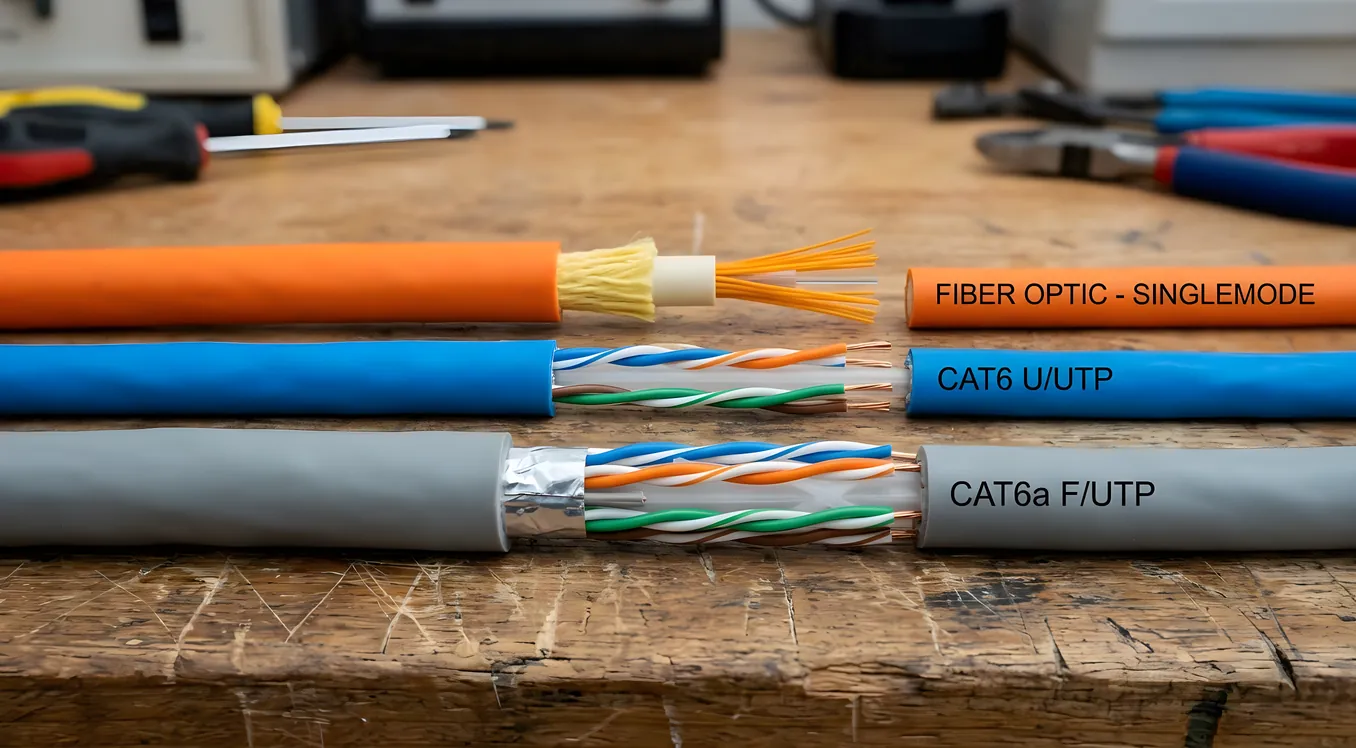
The conversation about in-wall cabling almost always starts too late. By the time a homeowner is asking whether they should have run fiber instead of Cat6, drywall is up, insulation is in, and the answer has already been made by whoever pulled wire six months ago. Getting this right requires thinking about it during framing, not after move-in.
The good news is the choices are not as complicated as the cable industry sometimes makes them sound. Fiber, Cat6, and Cat6a each have a home in residential infrastructure, and once you understand what each does and where it fails, the right call for each location becomes fairly obvious. This article works through the technical differences that actually matter for smart home deployments, the cost tradeoffs on a per-run basis, and the practical answer to the question most integrators get asked every week: what should I put in the walls?
Why the Cable You Install Today Defines What Your Home Can Do in 2035
Before getting into the specs, it helps to understand why this decision feels higher stakes than it used to be. A decade ago, most residential networking discussions centered on streaming video and maybe a security camera or two. Today a serious smart home might have 30 to 80 network-connected devices: access points, IP cameras, smart locks, video doorbells, Control4 or Crestron controllers, Lutron keypads, Sonos players, ecobee thermostats, in-ceiling speakers with DSP processors, 4K streaming clients in every room, and a growing list of sensors feeding into automation logic. Each of those devices wants bandwidth, reliability, and latency it can count on.
The difference between a home that handles that load gracefully and one that constantly frustrates its occupants usually traces back to the physical layer: what’s in the walls, how it’s terminated, and how it’s organized at the patch panel. Structured wiring forms the backbone of every smart home, and fixing it after construction is expensive enough that it’s worth slowing down and getting it right the first time.
Running cable costs roughly the same whether you’re pulling Cat6, Cat6a, or fiber. The material cost difference per 1,000-foot box is real (Cat6 runs around $85 to $110, Cat6a around $160 to $220, and OS2 single-mode fiber around $120 to $180 for pre-terminated bundles), but it’s small compared to the labor of pulling and terminating. What costs money is having to open walls later. Think about cable selection as a one-time decision that amortizes over 20 years.
Cat6 vs Cat6a: The Actual Differences That Matter
Most homeowners have seen the term Cat6a and wondered if the “a” is worth paying for. It is, in most cases, but not for the reasons that are usually cited.
Cat6: The safe baseline
Cat6 cable is rated for 10 Gigabit Ethernet (10GbE) up to 55 meters, and 1 Gigabit Ethernet (1GbE) up to 100 meters. In residential contexts where most runs from a centralized network closet to a wall outlet are under 30 meters, Cat6 technically supports 10GbE. The problem is that Cat6 at 10GbE is susceptible to alien crosstalk (interference from adjacent cables in the bundle), which makes performance inconsistent in dense cable runs.
Cat6 diameter runs around 0.190 to 0.205 inches unshielded. It terminates with standard RJ45 keystones and plugs, works fine with any 1GbE or 10GbE switch, and requires no special tools beyond what any competent low-voltage installer already carries.
For the average bedroom or small room with one or two drops, Cat6 is perfectly adequate today and for the foreseeable future. Where it starts to show limitations is in high-density environments, long runs near the 55-meter threshold, and situations where cables are bundled tightly together.
Cat6a: The right call for most runs
Cat6a (the “a” stands for “augmented”) is specified to run 10GbE reliably up to 100 meters. It eliminates the alien crosstalk problem through tighter construction tolerances and, in shielded variants (F/UTP or S/FTP), physical shielding around the pairs or the entire cable.
The practical differences in a home run this way:
- Cat6a runs are reliable at 10GbE across the full 100-meter spec, not just the first 55 meters
- Shielded Cat6a (specifically F/UTP, foiled unshielded twisted pair) handles interference better in environments near HVAC equipment, electrical conduit, or tightly bundled cable runs
- Cat6a is slightly larger (0.270 to 0.300 inches diameter), which matters for conduit fill calculations and keystone compatibility
- Cat6a terminators and patch panels exist in every major line from Leviton, Panduit, and Belden, and cost about 40 to 60 percent more than Cat6 equivalents
The cost delta from Cat6 to Cat6a on a full home pull is not enormous when you’re doing new construction. If you’re running 25 drops at 75 feet average, the cable upgrade from Cat6 to Cat6a adds roughly $200 to $400 in material cost. The labor is identical. That delta buys you reliable 10GbE headroom on every run, which matters if you’re deploying wireless access points that support Wi-Fi 6E or Wi-Fi 7 (both of which can saturate a 2.5GbE uplink, and 10GbE uplinks are increasingly common in high-performance AP installations).
For a smart home that includes enterprise-class access points like Ubiquiti UniFi U6 Pro or similar hardware, any AP location is a strong candidate for Cat6a. The AP backhaul is one place where the upgrade pays back immediately.
Where Fiber Actually Belongs in a Residential Install
Here’s where most discussions of fiber go sideways: fiber gets presented as either the premium option for everything, or as overkill that only professionals need. Neither framing is right.
Fiber has two distinct use cases in residential networking, and they’re different enough that conflating them causes confusion.
Use case 1: ISP entry point to distribution
If your home has a centralized network closet or equipment rack, and your ISP delivers fiber to a demarc point (typically a small ONT device), you have a short fiber run from the ONT to your router. This is already happening in most fiber internet installations. The ISP handles this run, and you don’t make choices about it.
Where integrators sometimes add fiber here is when the network closet is not physically adjacent to the demarc. If your ISP’s fiber entry point is at one end of the house and your equipment rack is at the other, a 100-foot or longer copper run between router and ISP demarc introduces latency and potential interference. A single-mode fiber run from ONT to rack solves this cleanly. OS2 single-mode fiber for this purpose (terminated with LC connectors) runs about $3 to $6 per foot installed, and the media converter hardware (fiber SFP modules for a managed switch, or a dedicated fiber-to-copper converter) adds $40 to $200 depending on speed and vendor.
Use case 2: Building-to-building or long horizontal runs
The real residential use case for fiber is connecting detached structures: guest houses, garages, pool houses, workshop buildings, or ADUs. Copper Ethernet has a hard 100-meter (328-foot) limit regardless of category rating. If your main house is 150 feet from a detached garage that you want to include in your network, you’re beyond the reach of any copper solution.
A single run of OS2 single-mode fiber between buildings handles this cleanly, supports distances of multiple kilometers, and eliminates the ground loop issue that plagues copper runs between separate electrical systems. The cost for a single run in conduit between structures is typically $800 to $2,500 depending on distance and whether conduit is already in place. You’ll need SFP+ modules at each end and a compatible managed switch on the receiving end.
What fiber is not, for most residential runs, is a replacement for structured copper throughout the house. The reasons are practical: fiber is harder to terminate in the field (fusion splicing requires specialized equipment, pre-terminated runs must be planned ahead), fiber doesn’t carry power (no PoE, which matters for cameras, access points, and smart devices), and fiber endpoints require a media converter or SFP-equipped switch rather than a standard RJ45 port. In a typical wall outlet situation, the complications outweigh the benefits.
Power over Ethernet: The Decision Driver Everyone Forgets
One of the most important networking decisions for a smart home is often invisible in cable discussions: PoE (Power over Ethernet). A lot of smart home devices can be powered through the network cable rather than needing a separate power outlet nearby. Cameras, access points, Lutron Radio RA 3 dimmers (with specific interfaces), VoIP phones, and intercoms all commonly run on PoE. This changes the calculus on cable selection.
Power over Ethernet in smart homes covers cameras, access points, and more, but the key point for cable selection is this: PoE+ (802.3at, 30W per port) and PoE++ (802.3bt, up to 90W per port) both generate heat in the cable under load. The IEEE 802.3bt specification explicitly recommends Cat6a or better for high-power PoE applications because Cat6a’s construction handles the thermal load better, and Cat6a’s specifications account for temperature-induced resistance changes that Cat6 doesn’t address.
If you’re planning to run access points, IP cameras, or any high-wattage PoE devices on structured cable, Cat6a is the appropriate choice for those runs specifically, regardless of any other considerations.
The Cost of Running This Right, Per-Run
Let’s put real numbers on this, because cable decisions often get made without an honest accounting.
Materials per 100-foot run (approximate, 2026 pricing):
- Cat6 cable: $8 to $12
- Cat6 keystone jack (x2): $4 to $10
- Cat6a cable: $14 to $22
- Cat6a keystone jack (x2): $7 to $16
Labor per run in new construction: $40 to $80 per drop depending on difficulty and market. Retrofit through finished walls: $120 to $250 per drop.
A full home pull of 24 drops, all Cat6a, typically costs between $2,800 and $5,500 for materials and installation combined in a new construction scenario. That same pull in Cat6 costs roughly $2,400 to $4,500. The difference is $300 to $1,000 across the entire home.
Fiber for a detached structure adds $800 to $2,500 on top of the house pull, depending on distance and whether trenching is needed.
Compare that to the cost of retrofitting a single cable run through finished walls: $120 to $250 per drop, minimum. If you need to add five drops to a finished home because the original cable spec didn’t account for where devices ended up, you’re looking at $600 to $1,250 just to fix what cheaper upfront decisions caused.
The math strongly favors doing Cat6a (or better) in new construction, and using fiber for any run that exceeds 100 meters or connects separate structures.
How Smart Home Integration Systems Change the Picture
A smart home built around a control system like Control4, Savant, or Crestron has additional cable requirements beyond what a basic networking discussion covers, and the cable spec matters more, not less.
Control4 dealers commonly specify a minimum of two Cat6a runs to each AV location: one for the control system touchscreen or controller, one for the display. Savant systems using TrueControl processors have similar recommendations. These systems rely on consistent, low-latency network connections for control signals that have to be near-instantaneous from a user perspective. A half-second delay on a light control command is noticeable and frustrating in a way that a streaming video buffer rebuffer is not.
Crestron’s DM NVX AV-over-IP systems, which distribute 4K video across the network, specifically require Cat6a to achieve full 4K60 performance. Running DM NVX on Cat6 at longer distances produces artifacts, stream dropouts, and performance issues that are often misdiagnosed as network configuration problems when they’re actually cable problems.
If any part of your smart home plan involves audio/video distribution over IP, Cat6a is not optional for those runs.
What a Structured Cable Plan Looks Like in Practice
A practical cable plan for a 3,000-square-foot new construction home with a full smart home system might look like this:
From network closet to each room:
- Two Cat6a runs per bedroom (one for AP if ceiling mount, one for devices)
- Two Cat6a runs per main living area
- One Cat6a run per bathroom (for smart mirror or controller)
- Cat6a to every camera location (PoE cameras)
- Cat6a to each Lutron or Control4 keypad location
- Cat6a to all AV equipment locations (TV walls, rack locations, outdoor AV)
Fiber:
- Single OS2 run if detached garage or ADU is planned
- Possible run from ISP demarc to network closet if distance exceeds 50 feet
Total drops in this scenario: 30 to 50 runs, almost all Cat6a, 1 to 2 fiber runs if applicable.
Network rack and closet design for residential systems covers how to organize the termination end of all this cable, which is equally important to the cable itself. A well-pulled set of Cat6a runs terminated sloppily at a patch panel performs worse than a mediocre cable spec terminated carefully.
Common Mistakes That Show Up in Retrofits
Integrators who do retrofit work see the same problems repeatedly when earlier cable work wasn’t spec’d correctly:
Mixing Cat6 and Cat6a on a segment. The link negotiates to the lowest rated component. One Cat6 patch cable on a Cat6a run degrades the whole segment.
Using Cat6 for AP backhauls. Wi-Fi 6E access points increasingly have 2.5GbE or 10GbE uplinks. A Cat6 run over 55 meters can’t reliably support 10GbE, which caps the AP’s potential.
No conduit in finished walls. Future-proofing is much cheaper when conduit exists. Even 1-inch EMT or schedule 40 PVC conduit from the network closet to a few key locations means future cable upgrades don’t require wall work.
Unshielded cable near HVAC ducts. Low-voltage cable running parallel to HVAC ductwork and in the same stud bays as electrical runs can pick up interference. Shielded Cat6a (F/UTP) costs marginally more and eliminates this variable.
Skipping home runs in favor of daisy-chains. Every run should go home to the central patch panel. Daisy-chaining drops through walls causes maintenance nightmares and limits what’s possible with managed switching and VLAN segmentation for IoT devices.
The Bottom Line on Cable Selection
For most smart home installs, the right answer is Cat6a throughout the home and fiber for any run that crosses between separate structures or exceeds the copper distance limit.
Cat6 is acceptable for short runs in secondary locations where cost pressure is real and future 10GbE isn’t a priority. It’s not the right call for AP locations, camera runs, AV over IP infrastructure, or anything carrying high-power PoE.
Fiber is the right call for detached structures, potentially for ISP demarc-to-rack runs over 50 feet, and in any situation where ground loops between separate electrical systems are a concern. It’s not a replacement for copper in standard wall-outlet-to-network-closet runs.
The upgrade from Cat6 to Cat6a costs somewhere between $300 and $1,000 across a typical home pull, which is a rounding error compared to the total cost of a smart home installation. The cost of getting it wrong and retrofitting later is substantially more, and in finished homes, some runs simply can’t be improved without major disruption.
Pull Cat6a now. It’s a decision that holds up for the life of the home.