Power over Ethernet in Smart Homes: Cameras, APs, and More
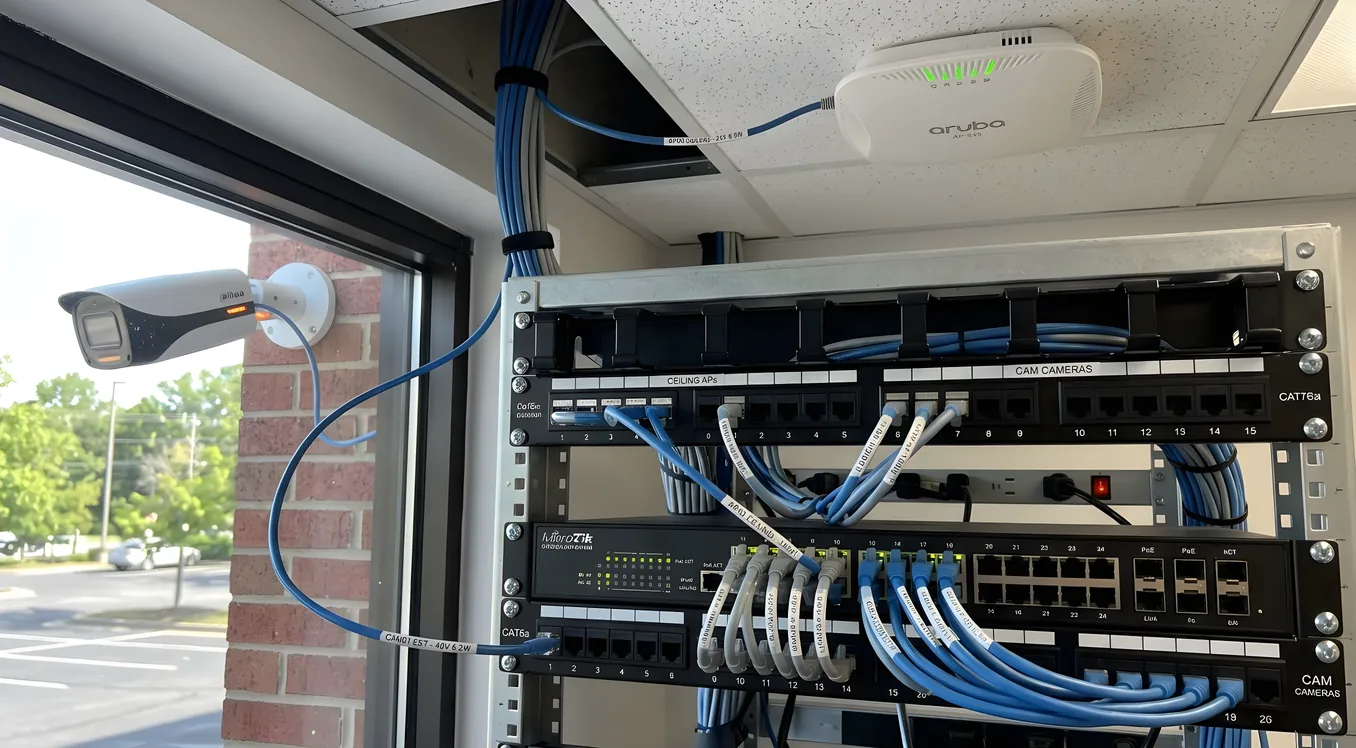
Running a separate power cable to every camera, access point, and smart device in a home creates a mess that grows more unmanageable as the system expands. Power over Ethernet solves that by delivering both data and electrical power through a single Cat5e or Cat6 cable, eliminating the outlet requirement entirely. For homeowners building a serious smart home, PoE is one of those foundational decisions that shapes how clean and reliable the installation ends up being, and it pays to understand it before committing to equipment.
This article covers how PoE actually works, the standards and power limits that determine compatibility, which devices make the most sense to power this way, what it costs to build out a PoE infrastructure, and where the technology genuinely saves effort versus where it adds unnecessary complexity. The Networking section covers the broader infrastructure decisions; this piece focuses specifically on what PoE does and how to deploy it well.
How PoE Works (and Why It Matters More Than the Spec Sheet Suggests)
Standard Ethernet cables carry data as differential signals over twisted pairs. PoE takes advantage of the same cable to deliver DC power by using unused pairs (in 10/100 Mbps implementations) or by superimposing power on the data pairs (in Gigabit implementations). The receiving device, called a Powered Device or PD in the spec, includes circuitry that detects and negotiates the power delivery, so you can’t accidentally damage a non-PoE device by plugging it into a PoE-capable port. The switch performs a handshake first.
The power source is called a Power Sourcing Equipment, or PSE. That’s usually a PoE switch or a PoE injector, which is a small inline device that adds PoE capability to a single port on a standard switch. Injectors make sense for retrofits; switches with built-in PoE make more sense for new installations.
The cable does create a real constraint: PoE is typically limited to 100 meters (328 feet) per run, which is the same limit as standard Ethernet. Beyond that, power degrades and signal quality drops. In a large home with a centralized network closet, this matters for runs to outbuildings, gatehouse cameras, or devices at the far end of a long property. Long runs are manageable but require planning. See Structured Wiring: The Backbone of Every Smart Home for how to plan cable routing that keeps runs within spec.
The PoE Standards: 802.3af, 802.3at, and 802.3bt
The IEEE standards define how much power gets delivered, and the distinctions are practical, not just academic.
802.3af (PoE): The original standard, ratified in 2003. Delivers up to 15.4 watts per port at the switch, with up to 12.95 watts available at the device after cable loss. This covers most IP cameras, basic wireless access points, VoIP phones, and smaller control system components. If you’re powering older Axis, Hikvision, or Dahua cameras, most of them operate comfortably within 802.3af.
802.3at (PoE+): The 2009 update doubled available power to 30 watts at the switch and 25.5 watts at the device. This is where the majority of modern smart home devices land. Higher-resolution cameras with pan-tilt-zoom motors, current-generation Wi-Fi 6 access points like the Ubiquiti UniFi U6 Pro (which draws around 13 watts) or the Cisco Meraki MR46 (around 30 watts), and multi-function touchscreens all require PoE+. When buying a switch today, PoE+ should be the minimum spec you consider.
802.3bt (PoE++ or 4PPoE): The 2018 standard comes in two sub-tiers. Type 3 delivers up to 60 watts at the device; Type 4 goes up to 100 watts. This tier covers devices that couldn’t previously run on PoE at all: higher-end PTZ cameras with integrated IR illuminators, video conferencing endpoints, thin-client computers, and some LED lighting systems. The Axis Q6135-LE PTZ camera, for instance, draws up to 50 watts. If you’re planning for any of these devices, make sure the switch supports 802.3bt, and budget for Cat6 cabling rather than Cat5e, since higher power delivery benefits from the lower resistance of 16-AWG conductors in Cat6.
One practical note: the per-port wattage adds up fast. A 24-port PoE+ switch with a 370-watt power budget sounds generous until you realize 12 cameras at 25 watts each consumes all of it. Always calculate total wattage before selecting a switch, not just port count.
PoE Cameras: The Primary Use Case
Security cameras are the most common PoE application in residential smart home installations, and for good reason. A wired PoE camera with an ethernet cable is more reliable than any wireless alternative, produces higher sustained video quality, and doesn’t suffer from the range and interference issues that affect Wi-Fi cameras in large homes or thick-walled construction.
The most widely deployed PoE cameras in residential integrator work fall into a few categories:
Bullet cameras are cylindrical and typically fixed-angle. The Hikvision DS-2CD2T47G2-L (ColorVu, 4MP, around $80 to $120 per unit) provides excellent low-light color imaging using a 2.8mm or 4mm lens and draws under 12 watts, well within 802.3af. These are common for driveways, garages, and perimeter coverage.
Dome cameras mount flush to ceilings and soffits. The Axis M3106-L Mk II runs about $220 and produces 4K resolution with Lightfinder 2.0 technology that handles challenging indoor lighting. Dome cameras are the standard choice for interior spaces like entryways, living areas, and garages where aesthetics matter.
PTZ cameras add pan, tilt, and optical zoom capabilities. The Reolink RLC-823A PTZ runs around $130 and covers up to 355 degrees of pan travel with 5x optical zoom. Higher-end professional PTZ units from Axis, Hanwha, or Bosch start around $500 and scale into thousands for long-range IR illuminated models. These almost always require 802.3at or 802.3bt power.
Doorbell cameras were historically WiFi-only, but wired PoE doorbells like the Axis A8207-VE Network Video Door Station ($1,200 to $1,500) are becoming more common in high-end integrations. The Doorbird D2101V PoE ($499) is more accessible and integrates cleanly with Control4, Crestron, and Savant platforms via their respective drivers.
For integrations with Control4 or Savant home automation controllers, camera manufacturers that publish official drivers include Axis, Hanwha, LTS, and most major NVR brands. The driver handles the two-way communication so doorbell events trigger lighting scenes, gate openers, or announcements over Sonos speakers, all of which require reliable wired infrastructure to work dependably.
Wireless Access Points: Why PoE Is the Right Approach
Consumer mesh systems like Eero or Google Nest WiFi use power adapters and communicate over their own wireless backhaul. That creates limitations in larger or more demanding smart homes: interference between the mesh backhaul and client devices, inability to place APs in optimal locations without outlet proximity, and vendor lock-in that makes future upgrades painful.
Enterprise-grade access points designed for residential integration universally use PoE for power delivery, with a wired Ethernet uplink to a managed switch. This lets you place an AP exactly where signal coverage calls for it, whether that’s at the far end of a hallway, in a ceiling above a home theater, or in an outdoor soffit, without worrying about outlet placement. The result is a cleaner installation with better coverage and easier troubleshooting.
The Ubiquiti UniFi line dominates mid-tier residential deployments. The UniFi U6 Lite (around $100) works for standard rooms and draws 12 watts, well within 802.3af. The U6 Pro ($200) handles high-density environments with 6-stream WiFi 6 capability and 2.5GbE uplink, drawing around 13 watts under 802.3at. For outdoor coverage, the U6 Mesh ($190) has IP67 weatherproofing and handles everything from pool areas to detached garages.
For higher-tier projects, Ruckus Networks (now owned by CommScope), Cisco Meraki, and Extreme Networks offer access points that integrators use in estate-level deployments. Ruckus R750 APs run $700 to $900 per unit but provide industry-leading range and signal quality through BeamFlex+ adaptive antenna technology. These systems pair naturally with the network closet design covered in Network Rack and Closet Design for Residential Systems.
One critical reason to choose wired PoE APs over consumer mesh in a smart home: the ability to put IoT devices on a dedicated VLAN. Consumer mesh systems make this difficult or impossible. Managed switches and enterprise APs support multiple SSIDs mapped to separate VLANs, so your Ring cameras, Lutron lights, and ecobee thermostats can communicate on an isolated network segment that never touches your primary computers. For a full breakdown of why this matters and how to implement it, see VLANs and IoT Network Segmentation: Securing Smart Devices.
Beyond Cameras and APs: What Else Runs on PoE
The category is broader than most homeowners initially expect.
VoIP phones are the classic PoE use case outside the smart home world, but they appear in home offices and dedicated phone rooms in higher-end builds. Polycom and Cisco desk phones have run on PoE for 20 years.
Control system keypads and touchscreens: Control4 touchscreen controllers (the 7-inch CA-T7 tabletop unit, for example) can use 802.3at PoE, eliminating power adapter requirements in wall-mount configurations. Crestron’s TSW-770 7-inch touchscreen also supports PoE power delivery. This makes wall-mounted keypads cleaner to install in new construction because only a single Cat6 run is needed per keypad location.
PoE lighting: Companies like Molex, Igor, and Platformatics offer PoE-powered LED lighting fixtures designed for commercial and high-end residential use. The appeal is unified control over data and power from a single infrastructure, simpler installation in retrofit situations, and software-defined scenes without traditional dimmer switches. The power limitations (typically 12 to 20 watts per fixture at 802.3at) work well for downlights and accent fixtures but can’t power high-output fixtures. This is an emerging category that high-end integrators occasionally specify for commercial-adjacent residential projects, though it remains a premium niche rather than standard practice.
IP intercoms and access control readers: AXIS A1001 network door controllers, HID Mercury hardware, and Doorbird intercoms all use PoE. For a home with a gate, entry kiosk, or multiple secured access points, PoE infrastructure handles all the cabling from a central closet without separate power circuits at each reader location.
Environmental sensors: Some CO2 monitors, occupancy sensors, and air quality monitors intended for commercial building integration support PoE. These appear in higher-end smart home builds where the automation controller monitors air quality for HVAC decisions or conference room scheduling.
Selecting and Sizing a PoE Switch
The switch is the core infrastructure decision. Getting this wrong creates headaches later, either because ports run out, power budget is exhausted, or the switch lacks management features needed for VLAN configuration.
Key specifications to evaluate:
Port count: Count every PoE device you plan to deploy, then add 25 percent for growth. An 8-port switch makes sense for smaller deployments. 16- or 24-port switches cover most mid-size homes. A 48-port switch suits large estates or multi-building properties.
PoE budget: Total wattage available across all ports. A 24-port PoE+ switch with 185-watt budget can run about seven devices at 25 watts each simultaneously, even though it has 24 ports. More expensive switches carry 370 watts or more. Calculate your expected load before assuming the switch can handle it.
Management capability: Unmanaged PoE switches (common cheap options on Amazon from TP-Link and Netgear) don’t support VLANs, QoS, or port monitoring. For any smart home installation where you want proper security segmentation, managed switches are not optional. Ubiquiti UniFi switches, Cisco Catalyst series, and Netgear M4250 series all offer Layer 2/3 management at different price points.
Uplink speed: Access layer PoE switches should connect to the core switch or router via a 10GbE uplink if you’re aggregating significant camera or video traffic. Most enterprise-grade 24-port switches include at least two SFP+ slots for 10GbE fiber uplinks.
Specific models worth considering:
- Ubiquiti UniFi USW-24-PoE ($400): 24 ports, 195W PoE budget, 802.3at, managed. The standard choice for mid-size residential installations.
- Ubiquiti UniFi USW-Pro-24-PoE ($600): 24 ports, 400W budget, 802.3bt capable, Layer 3. Better for deployments with demanding PTZ cameras or touchscreens.
- Netgear M4250-26G4F-PoE+ ($900): 24 PoE+ ports plus 2 SFP+ uplinks, 480W budget. Often specified by integrators who need AV-specific QoS features built in (it has dedicated AV-over-IP profiles for SMPTE 2110).
- Cisco Catalyst 9200L-24P-4X ($3,000+): Enterprise-tier with Cisco’s IOS-XE, robust VLAN and security features, and long hardware support lifecycles. Common in estate-level projects where the client expects commercial-grade infrastructure.
Installation Realities and What Integrators Do Differently
Homeowners sourcing their own PoE equipment often miss a few things that experienced installers handle as second nature.
Cable quality matters more than the spec suggests. Cat5e is rated for PoE, but high-power 802.3bt installations produce meaningful heat in cables, particularly in bundled runs through conduit. Cat6 with solid copper conductors (not copper-clad aluminum, which is common in cheap cables) handles heat better and maintains stable resistance. If you’re specifying Cat6A for 10GbE future-proofing anyway, the PoE benefit is a bonus.
Injectors versus switch ports: A single PoE injector (like the TP-Link TL-PoE160S at $25, which provides 802.3at 30W) works fine to power one device where you can’t justify a full PoE switch. But in a closet powering six cameras, individual injectors become a tangle. The economics flip fast: a managed 8-port PoE switch at $150 is cleaner and cheaper than six injectors.
Grounding at outdoor locations: PoE cameras mounted outside are connected to your network over copper cable. Lightning surges travel that cable back to the switch. PoE Ethernet surge protectors, such as the ETH-SP-G2 from Ubiquiti ($20 each) or the Altronix NETWAY1 units integrators prefer, go inline between the outdoor cable run and the indoor switch port. In lightning-prone regions, this is not optional.
Heat management in the closet: PoE switches generate significant heat from power conversion. A 370-watt switch that’s 90 percent efficient is still dissipating 37 watts of heat inside your network closet. Closet ventilation and rack cooling matter more when PoE switches are present.
Distance extenders: For runs approaching or exceeding 100 meters, PoE extenders (also called PoE repeaters) can extend the run by another 100 meters while maintaining power. Ubiquiti’s EXT-SW-100W ($80) is a single-port extender that handles 802.3at at 30W. These are useful for gate cameras, pool equipment, or outbuilding coverage without running new home-run cable to the main closet.
What a PoE Build Costs at Different Scales
Budget planning for PoE infrastructure varies significantly by scale.
Entry-level (4 to 8 cameras, no managed switch):
Unmanaged 8-port PoE switch (TP-Link TL-SG108PE): $65
Four Hikvision 4MP PoE cameras at $80 each: $320
Cable and connectors: $100 to $200
Total infrastructure: $485 to $585, plus labor
Mid-tier (8 to 16 cameras, 4 to 6 APs, managed switch):
Ubiquiti USW-24-PoE switch: $400
Six Hikvision cameras at $100 each: $600
Four UniFi U6 Lite APs at $100 each: $400
Cable (1,000 ft Cat6 spool): $130
Total infrastructure: $1,530, plus labor
Typical integrator installed cost for this tier: $4,000 to $8,000 depending on complexity
High-tier (24+ cameras, 8+ APs, 802.3bt, managed VLAN infrastructure):
Ubiquiti USW-Pro-48-PoE or Cisco Catalyst: $900 to $3,500
Axis or Hanwha cameras at $200 to $400 each: $4,800 to $9,600 for 24 units
Ruckus or Ubiquiti AP hardware for large footprint: $1,500 to $5,000
Total infrastructure hardware: $7,200 to $18,000+
Installed project cost: $20,000 to $50,000+ at integrator pricing
These ranges don’t include NVR storage, licensing fees for managed platforms, or labor, which typically runs $75 to $150 per hour for qualified low-voltage installers and higher for Control4, Crestron, or Savant-certified integrators.
Getting PoE Right from the Start
The most expensive PoE mistakes are the ones that require pulling cable after construction is closed up. Running home-run Cat6 to every camera location, every AP location, and any position where a touchscreen or intercom might ever go is the right move during construction or major renovation, even if you don’t populate those ports immediately. Conduit makes future additions practical; without it, wall fishing in finished drywall is a multi-hour job per run.
For a home being built or renovated today, the structured wiring specification should include at minimum: two Cat6 runs to each camera location (for future redundancy or higher-bandwidth codecs), one Cat6 per AP location, and a home-run Cat6 from the network closet to each room that might ever host a control keypad. That cabling investment during rough-in costs a fraction of what it costs to add later.
PoE infrastructure also pairs naturally with the Mesh WiFi vs Access Points decision because once you’ve committed to wired Cat6 home runs, the access point question largely answers itself. Wired AP placement beats any wireless mesh backhaul on both performance and long-term reliability, and the same cable infrastructure that powers your cameras powers your access points, making a second parallel system unnecessary.
Building a Reliable Foundation
PoE isn’t a feature; it’s a design philosophy for how power and data flow through a home. When done right, it means a network closet with a small number of managed switches controlling every camera, access point, and connected device in the house, with clean cable runs and no outlet hunting. When done wrong, it means mismatched standards, overloaded power budgets, and cameras that drop offline in bad weather because the surge protector was skipped.
The decisions that matter: correct PoE standard for each device (af versus at versus bt), realistic power budget calculation before switch selection, managed switch infrastructure for VLAN capability, proper cable grade and grounding for outdoor runs, and enough cable installed during construction to cover future growth. Get those right and PoE becomes one of the most reliable, maintainable pieces of the smart home infrastructure.