Mesh WiFi vs Access Points: What Smart Homes Actually Need
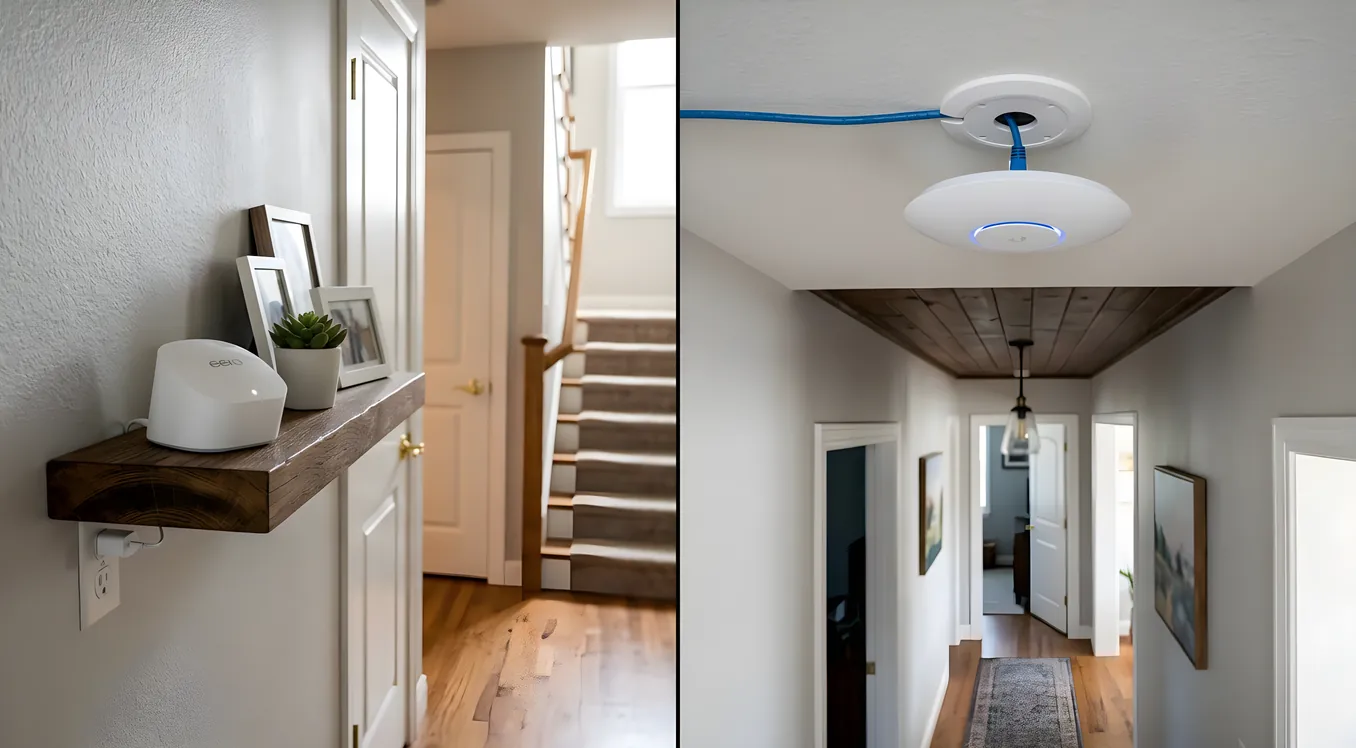
The question comes up in almost every smart home project: should you use a mesh Wi-Fi system or install dedicated wireless access points? The marketing copy on both sides makes strong claims. Mesh vendors sell simplicity. Access point vendors sell performance. Neither of them fully addresses what actually matters in a home with 80, 150, or 300 connected devices.
This article is for homeowners who are about to wire (or rewire) a home network and want to make the right call before spending money. It covers what the two approaches actually are, where each one performs well and where it fails, and why the answer for most serious smart home projects is not as complicated as the debate suggests.
The Actual Difference Between Mesh and Access Points
Mesh Wi-Fi systems like Eero Pro 6E, Google Nest WiFi Pro, Orbi RBK863S, and Ubiquiti AmpliFi Alien are consumer-grade products that bundle the router, access point, and network management into a single ecosystem. Multiple mesh nodes communicate with each other to extend coverage, and from your phone’s perspective, the whole home appears as one network with one name.
Dedicated wireless access points (APs) are separate devices that require a router and usually a network switch to function. They handle Wi-Fi signal only; routing decisions happen upstream. Popular options range from prosumer gear like Ubiquiti UniFi AP U6 Pro ($199) and TP-Link EAP670 ($150) to professional-grade hardware from Cisco Meraki, Ruckus, and CommScope. These APs do not include a router and are not plug-and-play out of the box. They require configuration, either through a controller application or a cloud dashboard.
The core operational difference is where intelligence lives. In a mesh system, each node makes its own decisions about how to route traffic, how to hand off a client device moving through the home, and how to manage band steering between 2.4 GHz and 5 GHz. In a dedicated AP system, a central controller makes these decisions across all APs simultaneously. The controller has the full picture. Individual mesh nodes do not.
For a two-bedroom apartment with a smart speaker, a thermostat, and a few light bulbs, this distinction is irrelevant. For a 4,000 square foot home with Control4 running 200 devices across security cameras, motorized shades, distributed audio, and lighting control, the distinction is everything.
Where Mesh Systems Perform Well
Mesh systems earn their place in the right context. A three-node Eero Pro 6E setup costs around $600 to $700 and can cover 5,000 to 6,000 square feet with reasonable coverage if the nodes are positioned well. Setup takes 15 minutes via a smartphone app. There are no VLANs to configure, no controller to maintain, and no need to touch a command line. For renters, homeowners with a modest device count, and situations where professional installation is not in the budget, this is a real advantage.
Mesh systems also handle roaming adequately in homes where devices move (phones, tablets, laptops). Modern mesh systems use 802.11r and 802.11k protocols to facilitate client transitions between nodes without noticeable interruption. The Orbi RBK863S uses a dedicated 6 GHz backhaul band, which means the communication between nodes does not compete with the 2.4 and 5 GHz bands your client devices use. This is a meaningful engineering improvement over earlier mesh systems where backhaul congestion was a serious problem.
Nest WiFi Pro, released in late 2022, includes Wi-Fi 6E support (starting at $499 for a two-pack) and a Google-managed cloud controller, which gives it some fleet management capabilities beyond what earlier consumer mesh offered. Eero Pro 6E similarly has a competent app and reasonable band-steering intelligence.
So mesh is not junk. The problem is that smart homes place demands on a network that consumer mesh systems were not designed to handle.
The Smart Home Problem Mesh Systems Do Not Solve
A home running a real smart home platform, whether that is Control4, Savant, Crestron, or even a well-configured Home Assistant setup, is not a typical Wi-Fi environment. It is a dense IoT network where reliability requirements are strict and where certain devices have non-negotiable network dependencies.
First, device count. A serious smart home may have 200 to 400 wireless clients. A Sonos whole-home audio system with 10 speakers adds 10 devices. Every Lutron wireless shade is a device. Ring cameras, Nest thermostats, ecobee sensors in every room, smart plugs on every outlet, Z-Wave and Zigbee devices bridged through hub devices that also need IP connectivity: it adds up fast. Residential mesh systems typically advertise support for 100 to 200 devices per node on paper, but real-world performance at high device counts depends heavily on the radio hardware inside the node, and consumer-grade radio hardware is not the same as what goes inside enterprise access points.
Second, interference management. IoT devices predominantly operate on 2.4 GHz because range matters more to them than throughput. Mesh nodes broadcasting 2.4 GHz into the same space as dozens of Zigbee devices (which also operate at 2.4 GHz), Z-Wave Plus devices, Bluetooth sensors, and other wireless protocols creates a spectrum crowding problem. Consumer mesh systems cannot perform the kind of precise channel planning and transmit power management that a professional access point controller can. The result is interference that shows up as intermittent connectivity drops, delayed responses from automation devices, and the kind of “it usually works but sometimes doesn’t” behavior that makes smart home systems feel unreliable.
Third, VLAN support. Best practice for smart homes is to segment IoT devices onto their own network, separated from the devices you trust (laptops, phones, work computers). This is not paranoia; IoT devices have poor security track records. A Nest camera or ecobee thermostat does not need to be on the same network segment as your NAS drive or your laptop with work files. The networking fundamentals of IoT segmentation using VLANs require a router and switches that support 802.1Q VLAN tagging, and access points that can broadcast multiple SSIDs mapped to different VLANs. Some mesh systems (Eero Pro, Google Nest) offer a guest network, but a guest network is not the same as a properly segmented IoT VLAN with its own firewall rules. Most consumer mesh systems do not support full VLAN tagging in a way that integrates cleanly with upstream switches and routers.
How Dedicated Access Points Solve These Problems
Enterprise-grade and prosumer access points, deployed with a proper network architecture, handle smart home scale differently at every level.
The Ubiquiti UniFi AP U6 Pro ($199) is a ceiling-mounted 802.11ax (Wi-Fi 6) access point with 4x4 MIMO radios and a 2.5 GbE uplink port. It is wired via Ethernet to a PoE (Power over Ethernet) switch, which means it draws power over the same cable carrying data. No power outlet required near the ceiling. The AP is managed through the UniFi Network Controller (free software, can run on a local server or cloud), which gives you a single dashboard for all APs, clients, and traffic across the home. One controller manages RF environment across all APs simultaneously, sets transmit power, assigns channels, handles client steering, and applies QoS policies.
If your home is properly wired with in-wall Ethernet runs to locations where APs make sense, each AP gets a direct wired backhaul to the network closet. There is no wireless hop between APs and the router, which means backhaul bandwidth is not a variable. Every client device gets the full AP throughput budget. A single UniFi U6 Pro supports up to eight SSIDs, meaning you can broadcast a main network, an IoT VLAN network, and a guest network simultaneously from a single AP, all properly tagged with VLAN IDs that match your switch and router configuration.
For larger deployments, Ruckus R750 access points ($450 to $550 each) include BeamFlex+ technology that adjusts antenna patterns per-client rather than broadcasting omnidirectionally. In a home with thick walls or irregular floor plans, this matters. Cisco Meraki MR36 ($500 to $700 depending on licensing) offers cloud-managed control with enterprise-grade client steering and RF optimization. These are the products professional integrators use on serious projects, and they are overkill for most homes, but they exist on a spectrum with UniFi and TP-Link Omada at the accessible end.
TP-Link’s Omada line deserves specific mention as the clearest budget alternative to UniFi. The EAP670 ($150) is a Wi-Fi 6 ceiling AP with 4x4 MIMO, supports multiple SSIDs with VLAN tagging, and is managed through the Omada Controller (free software). Performance is slightly below UniFi U6 Pro but meaningfully better than any consumer mesh node at the same price point. For a homeowner willing to learn basic controller configuration, Omada at $150 per AP versus Eero Pro at $225 per node is a compelling comparison, especially since the Omada AP does not include a router (which you want to separate from your APs anyway in a proper architecture).
The Wiring Requirement and Why It Changes Everything
This is where the honest conversation has to happen. Dedicated access points wired via Ethernet are substantially better than consumer mesh for smart homes. That statement comes with a precondition: the Ethernet has to exist in the walls.
Running new Ethernet through finished walls in a home that was not pre-wired for structured cabling is a real cost. Depending on the home’s construction, attic access, crawl space, and how many locations need wiring, a professional low-voltage contractor might charge $150 to $300 per drop (a single Ethernet run to a single wall plate location). A four-AP deployment in a 3,500 square foot home with four to six runs might cost $600 to $1,800 in labor and materials before you buy a single AP.
If your home is under construction or in a major renovation, the cost drops dramatically. Cat6A runs during rough-in, before drywall, cost $30 to $75 per drop in most markets. This is why the structured wiring conversation should happen before any other smart home conversation. Wiring is exponentially cheaper during construction.
In existing homes where running new wire is prohibitive, some hybrid approaches exist. Mesh systems with dedicated wired backhaul (TP-Link Deco XE75 Pro, around $350 for two nodes) can be deployed with some nodes wired and some wireless, taking advantage of the wired runs that do exist (often in living rooms and home offices) while extending wirelessly to areas that cannot be reached. This is not as clean as a fully wired AP deployment, but it is meaningfully better than a fully wireless mesh. The wired nodes carry backhaul without competing with client traffic; only the wireless-to-wireless hops degrade overall performance.
What the Network Rack Looks Like in Practice
A properly designed smart home network follows an architecture that consumer mesh cannot replicate. The network rack and closet design for a residential system typically includes a router (pfSense, Ubiquiti UniFi Dream Machine Pro, or comparable), a managed PoE switch (UniFi USW-Pro-24-PoE at $400 to $500, or TP-Link TL-SG2428P at $200 to $250), and the APs connected back to that switch via in-wall Ethernet.
The router handles DHCP, firewall rules, VLAN routing, and often VPN. The switch distributes power and data to APs, cameras, VoIP phones, and other wired or PoE devices. The APs handle wireless client connections. Each piece has one job. This separation of function is what makes the system reliable at scale.
Using Power over Ethernet eliminates the need for power outlets at every AP location. A UniFi U6 Pro draws 13W. A 24-port PoE switch with 370W total PoE budget can power 24 APs, cameras, VoIP adapters, and other PoE devices simultaneously. In a home where cameras, intercoms, doorbells, and APs are all PoE-powered, the cable infrastructure does double duty: one Cat6A run per device provides both data and power. This is the architecture that makes a professional smart home installation clean, reliable, and maintainable.
When Mesh Is the Right Answer
Mesh is the right answer in specific, honest circumstances:
Apartments and rentals where wall penetration is not permitted. Consumer mesh is the only option, and modern mesh (Eero Pro 6E, Orbi RBK863S) handles typical device counts well. Keep device count under 75, avoid putting critical automation on Wi-Fi without a backup communication path, and the experience is generally acceptable.
Small homes under 2,000 square feet with moderate device counts. A two-node Eero Pro 6E system covers a compact home effectively. If the home does not run a professional control system and has under 100 devices, the marginal improvement from professional APs may not justify the setup complexity and cost.
Temporary or transitional situations. If you are moving in two years, investing in structured cabling and a proper AP deployment is hard to justify financially. Mesh gives you a capable network for the interim.
Homeowners who genuinely cannot or will not maintain a controller-based system. UniFi and Omada are not difficult, but they require occasional software updates, understanding of basic networking concepts, and willingness to log into a dashboard when something needs adjustment. Mesh systems are nearly maintenance-free. For some homeowners, that tradeoff is worth significant performance and flexibility.
The Professional Integrator Perspective
Most experienced smart home integrators treat the wired AP question as settled. When Control4, Savant, or Crestron is on the table, the network design is almost always Ubiquiti UniFi, Ruckus, or Cisco Meraki with wired backhaul, depending on budget and feature requirements. Consumer mesh is treated as a liability in these installations because its behavior is less predictable, its VLAN support is inconsistent, and its device capacity under load is unknown in ways that a manufacturer-specified enterprise AP is not.
This is also an installation reality. A professional integrator who wires a home for a full Control4 system is already running structured cabling. Adding AP locations during that process costs marginal additional labor. The wire is already being run; adding a Cat6A home-run from each AP location to the network closet during rough-in adds perhaps $50 to $100 per location in incremental cost. The case for not doing it is almost always “we are retrofitting an existing home and running new wire is too disruptive,” which is a legitimate constraint, not a preference.
Making the Decision for Your Home
If your home is under construction or undergoing a significant renovation: specify wired AP locations in every major zone of the home. Living room, kitchen, master bedroom, home office, outdoor patio, and wherever a large concentration of IoT devices will live. Plan four to six AP locations for a typical 3,000 to 4,000 square foot home. Budget $150 to $250 per AP (Ubiquiti U6 Pro or TP-Link EAP670), plus a managed PoE switch and router. This is a one-time infrastructure investment that supports the home for 10 to 15 years. The enterprise Wi-Fi approach covers the full architecture in detail, including why consumer routers fail under smart home demands.
If you are retrofitting an existing home: assess which locations already have Ethernet runs (often home offices, entertainment rooms, older structured cable panels from the 2000s). Wire additional AP locations where attic or crawl space access makes it feasible. Consider a hybrid approach using wired APs in covered areas and a wired-backhaul mesh node to extend to areas that cannot be reached without major wall work.
If you are choosing between two specific products today: a single UniFi U6 Pro ($199) on a wired connection outperforms three Eero Pro 6E nodes ($600) in terms of device capacity, VLAN support, and controller manageability. The UniFi will require an additional investment in a small switch and a router if you do not already have them, bringing real cost to $300 to $500 for the entry-level setup. But that architecture scales. Adding a second UniFi U6 Pro costs $199. Adding a fourth Eero node when three are already not enough costs another $225 and still does not add VLAN support.
The Question Behind the Question
Most homeowners asking “mesh or access points” are really asking something else: “How much infrastructure do I need to make this work reliably?” The honest answer is that smart homes with serious device counts and professional control systems need real infrastructure: managed switches, a proper router, wired APs, and someone who has thought through VLAN design and RF planning.
Consumer mesh systems are genuinely good products for what they were designed to do. They were not designed to be the network backbone for a home running Control4, Sonos in seven rooms, 40 Lutron shades, a Ring camera system, and ecobee sensors in every room. The access point architecture was.
The good news is that prosumer access points are now accessible enough in both price and configuration complexity that a homeowner willing to spend a weekend learning the basics can deploy a system that a professional would not be embarrassed by. Ubiquiti UniFi is the right starting point for most: a large community, extensive documentation, and hardware that performs at a level consumer mesh cannot match. That is where most serious smart home networks begin.