UPS and Power Protection for Network Equipment
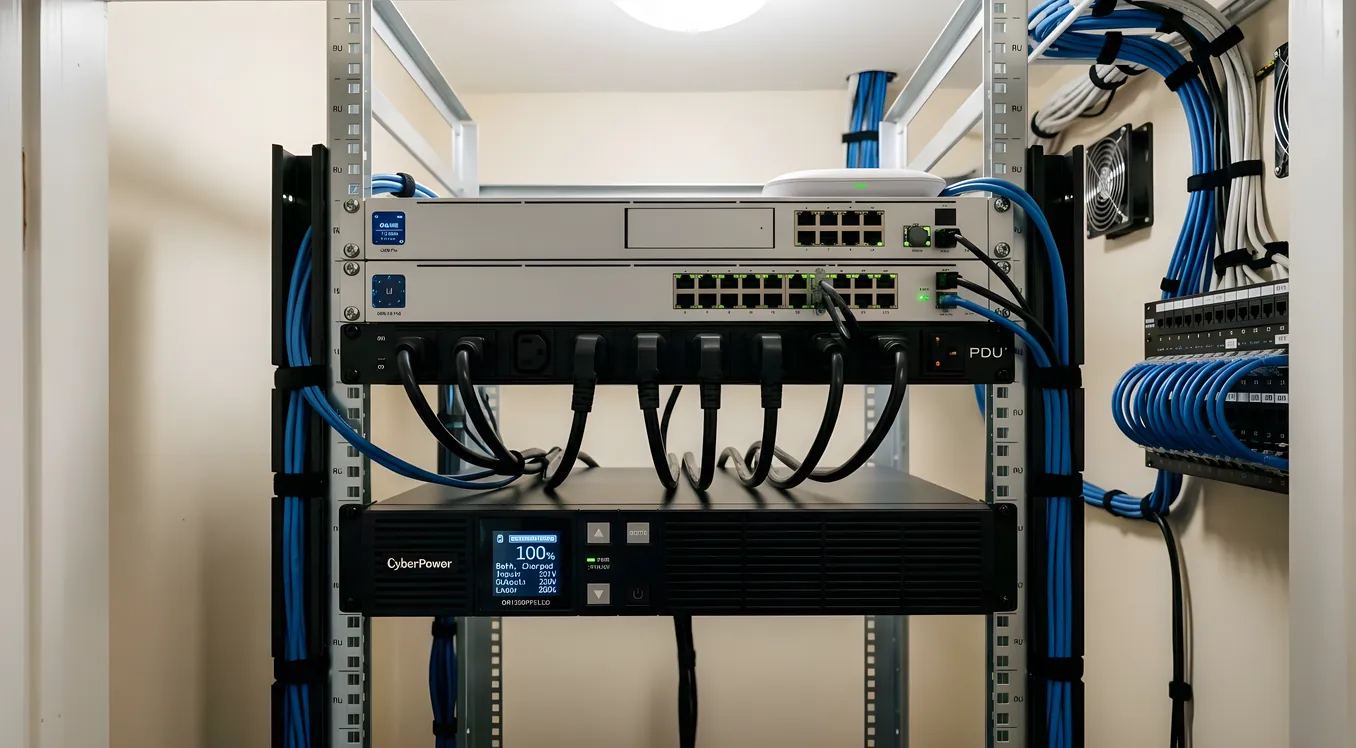
Your smart home is only as reliable as the power feeding it. A Control4 or Crestron system with meticulously designed programming, a rack of well-configured Ubiquiti switches, and a whole-home Sonos audio setup can all go completely dark during a brief power blink that lasts less than a second. When the power comes back, everything that was running on unprotected outlets has to reboot, re-authenticate, reconnect, and resync. Depending on your system, that process takes two to eight minutes. During that time, no lighting scenes respond. No locks report status. No cameras record. The automation system your integrator spent weeks commissioning behaves as if it does not exist.
A properly sized uninterruptible power supply (UPS) eliminates that failure mode entirely. This is not a nice-to-have for a sophisticated smart home; it is fundamental infrastructure. Understanding how UPS systems work, what specifications actually matter for network equipment, and how to size and configure one for your specific setup will save you from a category of frustration that most homeowners only discover after they have already spent significant money on automation hardware.
Why Network Equipment Specifically Needs UPS Protection
Not all smart home devices are equally sensitive to power interruptions. A Lutron Caseta switch will come back online and resume normal operation within seconds of power returning. A Nest thermostat recovers gracefully. But the devices that sit in your network rack and closet are different, and understanding why matters for making smart purchasing decisions.
Routers, switches, and access points need time to boot and re-establish their connections before any downstream device can reach the internet or communicate across your local network. A managed switch running firmware that performs a disk check on startup can take 60 to 90 seconds to come online. Your WiFi access points need to associate with the controller, download their configuration, and begin broadcasting SSIDs. During that window, your Control4 or Savant processor is sitting in isolation, unable to reach any cloud-dependent service and unable to confirm the status of any network-connected device.
Control system processors (Control4 EA-series, Crestron CP4, Savant SSP-10) are essentially embedded computers running Linux or a proprietary real-time OS. They maintain persistent TCP connections to drivers, services, and cloud APIs. When power drops, those connections terminate. The reconnection sequence after power returns requires the processor to cycle through its programming logic, re-establish driver connections, and perform a handshake with any cloud services. For a complex Control4 project with 200+ connections, this can take four to six minutes even when the underlying network is fully available. If the network equipment is also rebooting, add that time on top.
NAS devices and network storage used for camera recording or media serving face the most serious risk. File systems on NAS devices expect a clean unmount sequence before power loss. Repeated abrupt shutdowns can cause file system corruption, requiring a fsck repair cycle that takes hours and occasionally results in data loss. APC and CyberPower both publish guides on NAS-specific runtime requirements that are worth reading before you configure shutdown parameters.
PoE switches powering access points, IP cameras, and PoE-connected devices can cause a cascade of reboots even when the switch itself boots quickly, because every downstream device draws power from the switch and reboots whenever the switch restarts. A single managed PoE switch going through a two-minute boot cycle takes every camera, every access point, and every PoE-powered device with it.
The practical argument for UPS protection on network equipment is not about exotic scenarios. It is about the reality that power blips, brownouts, and outages happen multiple times per year in most US residential environments. A $300 to $600 investment in a properly sized UPS eliminates a recurring source of frustration for the life of the smart home system.
UPS Technology Types: Which One Belongs in Your Network Rack
Three technologies dominate the residential UPS market, and the differences between them matter for networking applications specifically.
Standby (offline) UPS is the technology in most entry-level units. During normal operation, power passes through directly from the wall. When a power failure is detected, an internal relay switches the load to battery in 4 to 10 milliseconds. For most computing equipment this is fine, because power supplies have capacitors that can ride through the switchover. For control system processors running real-time logic, even 10ms can sometimes cause a processor glitch, though this is uncommon with modern hardware. APC’s Back-UPS series and CyberPower’s CP series use standby topology. These are the units you find at Best Buy and on Amazon for $80 to $200.
Line-interactive UPS adds an automatic voltage regulator (AVR) that corrects brownouts and overvoltages without switching to battery. The transfer time to battery is still in the 2 to 4ms range. For residential smart homes, line-interactive units hit the sweet spot of price, protection, and efficiency. APC’s Back-UPS Pro series (starting around $200), Eaton’s 5S and 5SC series (starting around $150), and CyberPower’s PFC Sinewave series (starting around $180) all use line-interactive topology. The AVR functionality is worth paying for if your area sees frequent brownouts or if you have a long run from the panel to your network equipment location.
Online double-conversion UPS provides the cleanest power output by continuously converting incoming AC to DC and back to AC, which means zero transfer time to battery because the load is always running from the inverter. The downside is 10 to 20% higher heat generation and a 20 to 30% price premium. For most residential rack applications, online double-conversion is overkill unless you have a UPS for a large rack serving a home theater or server room in addition to networking equipment. Liebert’s GXT series and APC’s Smart-UPS Online series start around $600 to $800 for 1000VA units.
The honest recommendation for a residential network rack: line-interactive with pure sine wave output. Pure sine wave matters because some power supplies, particularly those in Control4 EA-series processors and higher-end Crestron hardware, have active power factor correction (PFC) that can behave erratically on simulated (stepped approximation) sine wave output during battery operation. The APC Back-UPS Pro 1500 (BR1500MS2) at around $220 and the CyberPower CP1500PFCLCD at around $200 are both solid choices that check all these boxes.
Sizing Your UPS: The Math That Actually Matters
Buying a UPS based on marketing claims or price tiers is the most common mistake homeowners make. The correct approach is calculating your actual load and then selecting a UPS with appropriate VA (volt-ampere) rating and watt rating.
Step 1: List every device that will be on protected power. For a typical residential network rack this might include a router (15 to 25W), a managed 24-port PoE switch (100 to 300W under load), one or two access points connected to the switch (budget 15W per AP in your switch load), a patch panel and keystone connections (negligible), a control system processor like Control4 EA-5 (30 to 45W), and a NAS device (30 to 60W idle, 90 to 120W under load).
Step 2: Add up the watts. Do not use VA ratings from device spec sheets; look for the actual watt draw. If a spec sheet only lists VA, multiply by 0.6 to get a conservative watt estimate (actual power factor is usually 0.6 to 0.9). A representative residential rack might total 200 to 400 watts of actual draw under normal operating conditions.
Step 3: Add 25% headroom. If your rack draws 300W, you want a UPS rated for at least 375W continuous. This headroom protects against momentary spikes and leaves room to add equipment over time.
Step 4: Calculate desired runtime. Most residential installations need 10 to 20 minutes of battery runtime, which is enough to ride out the vast majority of power interruptions and give a NAS device time to complete a graceful shutdown sequence. For 300W load, achieving 15 minutes of runtime typically requires a UPS in the 1500VA to 2200VA range, depending on battery capacity. Use the manufacturer’s runtime charts, not their claimed maximums, since those are measured at 25% or 50% load and do not reflect your actual draw.
A practical example: A rack with a Ubiquiti UniFi Dream Machine Pro (20W), a US-24-250W PoE switch drawing 180W, a Control4 EA-5 (40W), and a Synology DS923+ NAS (45W idle) totals around 285W. With 25% headroom, you need a UPS rated for at least 360W. The APC BR1500MS2 is rated for 900W (1500VA), giving you substantial headroom and approximately 18 to 22 minutes of runtime at 285W load. That is more than adequate for the rebooting scenario and for graceful NAS shutdown. Price: approximately $220.
For larger racks serving whole-home audio, enterprise WiFi infrastructure, and extensive camera systems, step up to 2200VA units like the APC SMT2200RM2UC (rack-mounted, $600 to $700) or the CyberPower OL2200RTXL2U (online double-conversion, around $900). These also accept external battery packs if you need extended runtime.
Network Management and Shutdown Integration
A UPS is not just a battery; it is a monitoring device that should integrate with your network management infrastructure. Every UPS worth buying in the 1000VA and above range includes a data port for monitoring and shutdown coordination.
USB monitoring is the baseline. Connect the UPS to a Raspberry Pi, NAS device, or server via USB, and run Network UPS Tools (NUT), a widely used open-source daemon that monitors UPS status and triggers graceful shutdowns when battery reaches a configured threshold. Synology NAS units include UPS monitoring software built into DSM that works with any USB-connected UPS. Configure a 5-minute shutdown warning threshold when battery drops below 30% to give the NAS time to complete writes and unmount cleanly.
Network management cards are available for rack-mounted UPS units like the APC Smart-UPS series and the Eaton 5PX series. These add an Ethernet port to the UPS, enabling monitoring via SNMP, web interface, and integration with network management systems. For a managed network environment, this is worth the $80 to $150 cost of the add-on card (APC AP9630 or AP9631) because it lets you monitor UPS status from the same dashboard you use for switch and router management. You can also configure email or push notification alerts for power events without relying on a locally connected device.
Control4 and Crestron UPS integration exists through specific drivers. Control4 dealers can add an APC or Eaton UPS as a controlled device within a Control4 project, allowing the automation system to monitor battery status, receive alerts about power events, and trigger specific programming logic when on battery (for example, dimming non-essential loads or sending a notification to the homeowner’s phone). This integration requires a UPS with a network management card or a USB connection routed to a machine running NUT with the appropriate Control4 driver.
Graceful shutdown sequencing matters for complex racks. If power has been out for 10 minutes and the UPS is approaching its cutoff threshold, you want equipment to shut down in the right order: NAS first (longest shutdown time), then servers or processors, then switches, then the router last. Most NUT configurations can handle staged shutdowns, but you have to configure them intentionally. The default behavior is to shut everything down simultaneously when the threshold is reached, which defeats the purpose for NAS protection.
Installation Considerations for Residential Racks
Physical placement and installation decisions affect both UPS performance and the aesthetics of your structured wiring and network closet environment.
Tower vs. rack-mount form factors. If your network equipment lives in a proper 19-inch rack, rack-mount UPS units like the APC SMT1000RM2UC (2U, $450) or CyberPower OL1000RTXL2U (2U, $600) are cleaner installations that keep everything contained. Tower units like the APC BR1500MS2 can be placed on a shelf below the rack or adjacent to it. Most residential integrators prefer rack-mount for rack-based installations and tower for smaller patch panel shelves in a closet.
Ventilation. UPS units generate heat during charging and, more significantly, during battery operation. In a sealed network closet, a 1500VA UPS under load can raise ambient temperature by 5 to 8 degrees Fahrenheit over 20 minutes. Ensure your closet has adequate ventilation, particularly if the UPS and a PoE switch are both running hot simultaneously. APC publishes thermal output specifications (BTU/hour) for all their units.
Battery replacement scheduling. Lead-acid batteries in most UPS units degrade over 3 to 5 years under normal cycling. Plan for battery replacement at the 3-year mark to avoid discovering that your UPS has essentially no runtime left during an actual outage. Replacement batteries for the APC BR1500MS2 cost approximately $40 to $60 (BR24BPG cartridge). For rack-mount units, replacement cartridges run $80 to $150. Some UPS models accept OEM-equivalent batteries at lower cost; verify compatibility before purchasing third-party batteries for units that have the battery tied to firmware monitoring.
Outlet management. Most UPS units in the 1000VA and above range include both battery-backed outlets and surge-only outlets. Use battery-backed outlets exclusively for networking and control equipment. Use surge-only outlets for items that can tolerate a reboot, like a cable modem/fiber ONT (which has its own upstream recovery time regardless of your UPS), or a secondary display used for rack monitoring. Putting everything on battery-backed outlets when some equipment does not need it reduces your runtime for the equipment that does.
When to Add a Second UPS
A single UPS protecting the main network rack handles most scenarios, but some smart home configurations benefit from additional protection points.
Secondary AV rack. If your home theater or living room AV rack contains a Savant or Control4 video matrix, streaming processors, or a secondary networking distribution point with its own switch, that rack warrants its own UPS. Losing an AV rack to a power blink causes the same reboot frustration as losing the main network rack, just in a more visible location. A 1000VA to 1500VA unit like the APC BX1500M ($160) is appropriate for a typical AV rack.
Utility room with HVAC control. If your Ecobee or Nest thermostats connect to a hub or control processor in a utility room that also has its own local switch, that equipment benefits from protection as well. A smaller 600VA to 800VA unit like the CyberPower CP800AVR ($80) handles this without significant cost.
Home office or remote desk. If you run a whole-home VoIP system through a hosted provider with phones or an ATA adapter in a home office, that equipment is also worth protecting. A VoIP phone on battery backup continues to work during outages if you have a backup internet path; even without backup internet, keeping the ATA and phone on UPS means they are ready immediately when power and internet return without requiring you to go find the power cable.
The general principle: any location in your home with a local network switch that serves devices you rely on should have UPS protection on that switch and any connected processors.
Protecting Your Investment Over Time
A UPS purchase is not a one-time decision. It is the beginning of a maintenance relationship with a critical piece of infrastructure.
Set calendar reminders to run a self-test on your UPS annually. Most units with management software can perform this automatically; configure it if the option exists. The APC app and the Eaton Power Xpert software both support scheduled self-tests with results logged for review.
When your home automation system expands, including when you add cameras, access points, or new control system components, recalculate your load against your UPS capacity. It is easy to add 50 to 100W of new equipment across two or three years without realizing you have consumed your headroom.
Keep one replacement battery cartridge on hand if your UPS is more than two years old. Battery failure is not gradual and visible; many homeowners discover it only when a power event occurs and the UPS alarm indicates low battery after 90 seconds of runtime instead of 15 minutes.
Building Reliability Into the Foundation
A smart home system is only as reliable as its least protected component. You can spend $50,000 on a Control4 system, commission it to perfection, and have the whole thing go dark every time a thunderstorm causes a momentary grid flicker, if the network rack is sitting on unprotected power. A properly sized line-interactive UPS with pure sine wave output, connected to a network management interface, configured for graceful NAS shutdown, and integrated with your home automation platform is the difference between a system that needs to be reset after every power event and one that simply keeps running.
The investment is modest relative to any other component in a serious smart home infrastructure build: $200 to $600 for the right unit, $40 to $150 every three years for battery replacement, and an hour of configuration time. The return is a system that works the way it was designed to work, regardless of what the grid is doing outside.
For homeowners building out or expanding a smart home network, reviewing the complete networking hub covering everything from rack design to VLAN segmentation to enterprise WiFi gives a complete picture of how all these pieces fit together. Power protection is one layer of that infrastructure, but it is the layer that determines whether everything else performs as intended when it matters most.