Home Security Cameras: Local vs Cloud, Wired vs Wireless
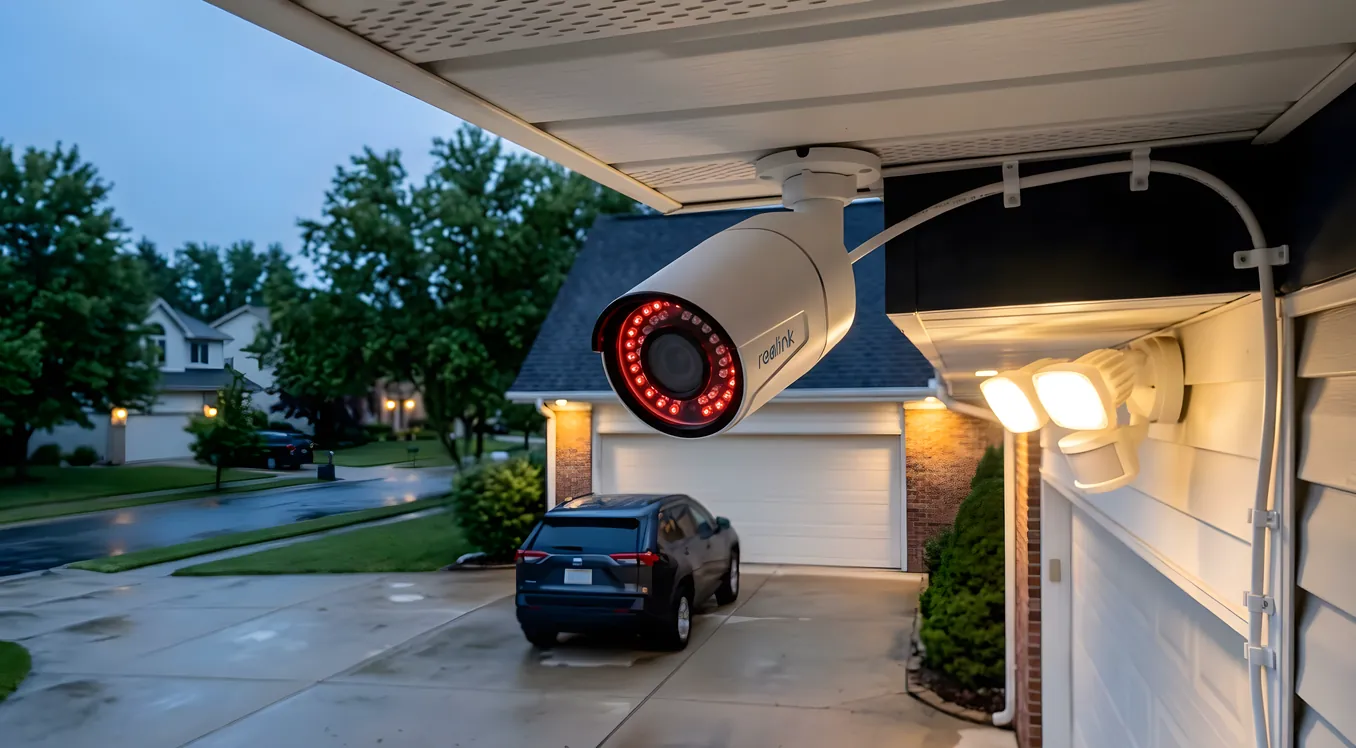
Buying a security camera used to mean choosing between a grainy analog system bolted to the eave or a monthly monitoring contract. Today the decision tree is considerably more complex, and that complexity actually matters. Where your footage lives, whether your camera runs on batteries or hardwired power, and how it connects to the rest of your home system all have real consequences for reliability, privacy, and cost over time. Getting those choices right before purchasing saves significant frustration later.
This article covers the decisions that homeowners doing serious research need to make, including where footage is stored, which camera types fit which situations, what integration with broader smart home security systems actually looks like in practice, and what you should expect to spend at various levels of the market.
The Storage Decision Changes Everything
Before you compare cameras by brand or resolution, understand storage architecture. It determines ongoing costs, data ownership, privacy exposure, and what happens when your internet goes down.
Cloud-Based Storage
Cloud cameras, including Ring (owned by Amazon), Google Nest Cam, Arlo, and Eufy’s cloud-enabled lines, record footage and upload it to the manufacturer’s servers. You access clips via a smartphone app. The appeal is obvious: no local hardware to manage, footage accessible from anywhere, and clips often survive even if the camera is stolen or destroyed.
The tradeoffs are real. Most cloud camera manufacturers charge monthly subscription fees to unlock event recording. Ring Protect plans run $4.99/month per camera or $10/month for unlimited cameras. Google Nest Aware starts at $8/month and goes to $15/month for 60-day history. Over a five-year ownership period, cloud storage costs frequently exceed the original camera purchase price. A four-camera Ring system at $300 upfront plus $10/month Ring Protect becomes a $900 investment by year five.
Privacy is the other issue. Your footage, including images of your family, guests, and daily routines, lives on servers you don’t control. Ring has a documented history of sharing footage with law enforcement under subpoena, sometimes without owner notification. Nest footage is associated with your Google account. For households that aren’t comfortable with this, cloud-based cameras require either accepting these terms or finding a different approach.
Local Storage and NVR Systems
Local storage keeps footage on hardware you own. Network Video Recorders (NVRs) are the traditional backbone of this approach. Systems like Reolink RLK16-816B (a 16-channel NVR with eight 4K cameras, around $700 to $900 as a bundle) record continuously to an internal hard drive. Hikvision and Dahua are the dominant manufacturers in professional-grade NVR equipment, used by integrators on higher-end residential projects.
The advantages: no monthly fees, footage stays on your property, and systems typically support continuous 24/7 recording rather than event-only clips. A 2TB hard drive in an NVR provides roughly 30 days of continuous recording from four cameras at 1080p. For an overview of how these storage tiers compare in more depth, see Security Camera Storage: NVR vs Cloud vs Hybrid Recording.
The practical downside is management overhead. NVRs require periodic hard drive replacement (typically every three to five years), local network configuration, and physical access for setup. If the NVR is stolen or destroyed in a fire, that footage is gone. Some homeowners add offsite backup to address this, either through a secondary NVR at a different location or by syncing critical clips to encrypted cloud storage.
Hybrid Systems
Several manufacturers now offer hybrid architecture: cameras record locally to a base station or NVR, but optionally sync clips to cloud storage as backup. Arlo’s Pro 5S 2K cameras pair with a local SmartHub base station that holds a microSD card or external USB drive, while also offering optional Arlo Secure cloud plans. Eufy’s Security line (2C Pro 2K, for example) records primarily to a local HomeBase 3 unit, with no mandatory cloud subscription.
Hybrid systems solve the “NVR stolen in a burglary” problem without requiring full cloud commitment. They also tend to offer the best combination of local reliability and remote access.
Wired vs Wireless: More Than a Convenience Tradeoff
The “should I go wired or wireless” question is often framed around installation difficulty, but the more important factors are reliability, video quality ceiling, and long-term maintenance.
Hardwired Cameras
Wired cameras, whether using traditional coaxial cable for analog systems or Cat5e/Cat6 for IP cameras over PoE (Power over Ethernet), offer consistent power and a stable network connection. There are no batteries to replace, no Wi-Fi dead zones to troubleshoot, and video quality isn’t constrained by wireless bandwidth limitations.
PoE cameras are now the standard for integrator-installed residential systems. A PoE switch with 8 ports runs $80 to $150. Cameras connect with a single Cat6 run that carries both power and data. Reolink’s RLC-810A is a well-regarded 4K PoE camera in the $80 to $100 range. At the professional tier, Axis Communications cameras (used by integrators installing Control4 or Crestron-based systems) start around $200 to $400 per camera and offer features like motorized varifocal lenses, built-in audio analytics, and ONVIF compatibility for deep platform integration.
The limitation is installation. Running cable through finished walls requires either existing conduit, attic access, or visible exterior conduit. New construction is the ideal time to wire cameras. Retrofitting an existing home with wired cameras typically costs $150 to $300 per camera in labor if a professional runs the cable, depending on difficulty of routing.
Wireless and Battery Cameras
Wireless cameras fall into two categories: Wi-Fi cameras that require an outlet nearby but transmit video over Wi-Fi, and fully wireless battery cameras that need neither power nor data cables.
Battery-powered cameras like the Arlo Pro 5S 2K (around $200 per camera), Ring Spotlight Cam Battery ($180), and Eufy SoloCam S340 ($130) offer genuine flexibility. You can mount them anywhere without regard for outlet or cable access. This makes them practical for locations where wiring would be expensive or impossible: detached garages, fence lines, rural outbuildings.
Battery life is the management cost you pay for that flexibility. Most battery cameras advertise three to six months per charge under “normal” conditions, but heavy traffic areas, cold climates, and aggressive motion sensitivity settings shorten that considerably. In practice, a camera covering a busy front walkway in a northern climate may need recharging every six to eight weeks. Arlo’s solar panel accessories ($30 to $50 per camera) can extend runtime significantly in locations with adequate sun exposure.
Video quality on battery cameras is typically limited compared to hardwired PoE cameras at similar price points. To preserve battery life, most battery cameras use on-demand recording triggered by motion rather than continuous recording, and they often reduce frame rates and resolution compared to their wired counterparts. The Arlo Pro 5S records at 2K (2560x1440) at up to 30fps when wired to a USB adapter, but battery-powered operation reduces effective frame rates.
Hybrid Wired/Wireless
Several manufacturers offer the same camera in both wired and wireless versions, or cameras that can run on either power source. The Arlo Essential XL can run on battery or plug into an outdoor outlet. Ring’s Spotlight Cam comes in battery, plug-in, and hardwired versions. This gives homeowners the option to start wireless for installation flexibility and wire in later if the location justifies it.
Resolution, Night Vision, and Field of View
Resolution matters, but not in the way most marketing implies. The jump from 1080p (2MP) to 4K (8MP) is significant if you need to read license plates or identify faces at 40 feet. For general activity monitoring at 15 to 20 feet, 1080p is more than adequate. Where resolution actually matters is in the ability to digitally zoom into recorded footage. A 4K recording lets you crop and enlarge a face or a vehicle without it turning to a pixelated blur.
Night vision comes in two practical flavors. Infrared (IR) night vision is standard on most cameras and produces black-and-white footage in low light, typically readable at 30 to 60 feet depending on the IR emitter strength. Color night vision uses a combination of a wider aperture lens and a supplemental spotlight to capture color footage after dark. The Reolink RLC-823A ($70 to $90) includes both IR and a built-in spotlight. Ring’s Spotlight Cam and Arlo’s Pro 5S both feature color night vision using their built-in floodlights.
Full-color night vision requires either a spotlight (which some homeowners find intrusive) or ambient lighting in the camera’s field of view. For discreet monitoring, IR night vision with a quality sensor, like those found in Amcrest cameras (IP8M-2523EW at around $70), is often the better practical choice.
Field of view affects how many cameras you need. Most cameras offer 90 to 110 degrees horizontal. Wide-angle models like the Nest Cam (Indoor, Wired) feature 135-degree FOV. Wider is not always better because extreme wide angles introduce barrel distortion at the frame edges and make distant objects appear farther and smaller. For a typical driveway or backyard, a 110-degree camera positioned at the right angle usually covers the necessary area without distortion issues.
How Cameras Integrate With Whole-Home Systems
For homeowners building a comprehensive smart home, the camera ecosystem connects to broader security architecture. This is where platform choice matters significantly.
Ring cameras integrate tightly with Alexa and Amazon Echo Show displays, which can show live feeds on command. They also work with Ring Alarm, Ring’s self-monitored alarm system. If you’re already in the Amazon ecosystem, Ring provides the most seamless experience at the consumer tier.
Google Nest cameras (the current wired and battery models) integrate deeply with Google Home and display on Nest Hub and Hub Max displays. The challenge is that Nest cameras require the Google Home app and have reduced compatibility with third-party platforms compared to ONVIF-based IP cameras.
For serious whole-home integration, particularly systems built on Control4, Crestron, Savant, or Lutron RA3 platforms, ONVIF-compatible IP cameras are the correct choice. ONVIF is an open protocol that allows cameras from different manufacturers to communicate with a central VMS (Video Management System) or NVR. Axis, Hanwha, and Dahua cameras are commonly specified by professional integrators. These cameras integrate with surveillance software like Milestone XProtect or Blue Iris, which can then connect to a Control4 or Crestron system to display live feeds on touchpanels or televisions.
The integration with smart alarm systems is worth planning before purchasing cameras. A professionally integrated system can trigger cameras to begin recording when an alarm sensor trips, push a live camera feed to your phone the moment a door sensor opens, or activate exterior lighting (via Lutron or Caseta switches) when motion is detected after dark. Consumer-grade cameras from Ring and Nest can approximate this through their respective ecosystems, but the logic is constrained to their own apps and compatible devices.
Similarly, if you’re installing smart locks on entry doors, a camera covering the same entry point adds verification capability. A video record of who unlocked the door at 2 PM complements the lock’s access log.
Outdoor vs Indoor Camera Considerations
Weather resistance ratings use the IP (Ingress Protection) standard. IP65 means dust-tight and protected against water jets, sufficient for most residential exterior use. IP67 adds submersion protection to one meter. Most mainstream outdoor cameras (Ring, Arlo, Reolink) are rated IP65 or IP66. True harsh-environment installations, like cameras exposed to heavy weather on a coastal property or in areas with heavy blowing rain, benefit from IP66 or better.
Operating temperature matters in climates with cold winters. Arlo’s Pro 5S battery cameras are rated to -4F, which covers most of the continental United States. Ring cameras are rated to 5F. In climates that regularly drop below these thresholds, wired cameras inside weatherproof housings with heaters (available from Axis and Hanwha) are the reliable solution.
Indoor cameras have different considerations. PTZ (pan-tilt-zoom) cameras like the Reolink E1 Outdoor Pro or the Nest Cam (Indoor, Wired) with its magnetic base can be repositioned or adjusted remotely. Privacy is a significant factor with indoor cameras. Some models include physical lens shutters (Logitech Circle View has a hardware privacy switch) that mechanically block the sensor. For households with children or regular guests, a camera that can be visibly, physically disabled is often preferable to one that relies on a software privacy mode.
What Professional Installation Adds
At the DIY tier ($150 to $500 total for a four-camera system), you’re making compromises. Camera placement is dictated by where outlets and Wi-Fi reach, cable runs may not be optimized for coverage, and integration is limited to whatever the manufacturer’s app provides.
Professional integrators add value in specific areas. Site surveys identify camera placement that actually covers blind spots rather than just convenient mounting locations. Cable routing through finished construction is done properly. Camera selection is matched to the specific conditions (lighting, distance, angle) at each location. And the integration with other systems, including access control for gates and garages and whole-home alarm systems, is handled at a level that consumer-grade ecosystems can’t match.
Expect to pay $200 to $500 per camera for a professionally installed system using IP cameras, NVR, and proper cable management. A six-camera system with a 16-channel NVR, proper cable runs, and integration into an existing smart home platform might run $3,000 to $5,000 installed. High-end systems using Axis cameras, Milestone VMS, and Control4 integration start around $8,000 to $15,000 for eight to twelve cameras.
The integrator model makes the most sense if you’re already investing in a broader smart home system. Adding cameras as a module of a Control4 or Crestron system is more efficient than trying to retrofit integration between consumer cameras and a professional platform later.
Making the Right Call for Your Home
The right camera system is one you’ll actually maintain and use. Here’s a practical framework:
If privacy and data ownership are primary concerns, look at Reolink or Amcrest NVR systems with local-only recording. No subscription, no cloud dependency, footage stays on your property.
If ease of setup and remote access matter most and privacy concerns are secondary, Ring or Nest cameras offer the smoothest consumer experience. Budget $10 to $15/month for cloud plans and accept the data tradeoffs.
If you’re building or remodeling and installing other smart home systems, wire for PoE cameras now even if you don’t install cameras immediately. Pulling Cat6 to camera locations during construction costs very little. Doing it later through finished walls is expensive.
If you’re integrating cameras into a Control4, Savant, or Crestron system, skip consumer brands entirely and work with your integrator on ONVIF-compatible cameras from Axis, Hanwha, or Dahua. The platform compatibility and quality ceiling are worth the additional cost.
Battery cameras are the right answer for specific locations where wiring is genuinely impractical. Use them there, and don’t let installation convenience drive you toward battery cameras in locations that could be wired.
Budgeting Realistically
A four-camera DIY system using a Reolink RLK4-800B4 (4K PoE NVR bundle) runs $280 to $350 and requires no ongoing subscription costs. Add 50 feet of pre-terminated Cat6 for exterior runs at $20 per cable and you have a capable local-storage system for under $400.
A mid-tier hybrid system mixing some hardwired cameras with battery cameras from Arlo, plus an Arlo SmartHub, might run $600 to $900 for four cameras with optional cloud backup. Factor in $10/month for Arlo Secure if you want event history beyond 30 days.
Professional systems, as noted above, start around $3,000 to $5,000 for six cameras installed, with no meaningful ceiling at the high end.
When comparing systems, calculate total cost of ownership over five years, not just purchase price. A $400 NVR system with no subscription versus a $250 four-camera cloud system at $10/month puts you $550 ahead with the NVR system by year three. The cloud system’s ongoing cost means it becomes the more expensive option by a wide margin over any realistic ownership period.
Getting the Placement Right Before You Buy
Camera coverage maps are the one thing most homeowners skip and most integrators do first. Before purchasing any camera, sketch the property and mark the zones that need coverage: front entry, driveway, back yard, side gates, garage. Then work backward to where cameras need to be mounted and what field of view is required to cover each zone.
This exercise often reveals that four cameras placed correctly covers more than six cameras placed at convenient but suboptimal locations. It also surfaces the wiring question early, because the ideal mounting location for a camera covering a back gate may be 80 feet from the nearest outlet.
Getting coverage right, combined with matching storage architecture to your privacy and cost priorities, produces a system you won’t resent two years in. The technology in any current-generation camera is good. The decisions around it are what determine whether the system actually works for your household.