Security Camera Storage: NVR vs Cloud vs Hybrid Recording
Picking a security camera system is the easy part. The harder question, the one that determines whether your cameras are actually useful when something goes wrong, is where the footage goes and how long it stays there. Security camera storage sounds like a boring infrastructure detail until you need it: a package theft, a hit-and-run in the driveway, a break-in while you were traveling. At that point, whether you have 72 hours of footage or 30 days, and whether it’s accessible at 2 AM from your phone or only from a recorder in your basement, matters enormously.
This article covers the three recording architectures available to homeowners right now: local NVR (Network Video Recorder), cloud, and hybrid. Each has real advantages, real limitations, and a specific type of homeowner it suits well. The goal here is to give you enough specifics to make an informed call rather than default to whatever the camera manufacturer recommends.
Why Storage Architecture Matters Before You Buy Cameras
Most homeowners research cameras first and figure out storage later. That’s backwards. The storage architecture you choose largely determines which cameras you can use, what the ongoing costs look like, and what happens to your footage if something goes wrong with the recording system itself.
A security camera system built around a local NVR locks you into cameras that support ONVIF (Open Network Video Interface Forum) protocol or the proprietary protocol of that NVR brand. A cloud-first system like Ring or Arlo requires monthly subscription fees for anything beyond the most basic local storage or a 24-hour rolling buffer. A hybrid system tries to get you the best of both but requires more planning to set up correctly.
The storage question also connects directly to your privacy posture. Every byte of footage stored on a third-party cloud server is footage that exists outside your physical control. That matters differently to different people, but it’s worth being explicit about rather than glossing over.
Local NVR Storage: How It Works and What It Costs
An NVR is a dedicated computer that pulls video feeds from IP cameras on your network, encodes the footage, and writes it to hard drives. It runs continuously, 24 hours a day, recording everything your cameras see. When the drives fill up, the oldest footage gets overwritten. The retention period you get depends entirely on the drive capacity you install and the resolution and bitrate of your cameras.
Here’s what that looks like in practice. A 4-camera system with cameras recording at 4MP resolution and moderate compression (H.265 at roughly 1.5 Mbps per camera) will consume about 65 GB per day across all four cameras. A 4 TB drive (around $80 to $100 for a surveillance-grade drive like a WD Purple or Seagate SkyHawk) gives you approximately 60 days of continuous recording. Add an 8 TB drive and you’re looking at 120 days. Most homeowners find 30 to 60 days more than sufficient for insurance purposes and practical incident review.
NVR Hardware Options at Different Price Points
Budget tier ($150 to $350 for the NVR unit): Reolink, Annke, and Hikvision’s HiLook brand offer 4-channel and 8-channel NVRs in this range. The Reolink RLN8-410, for example, lists for around $150 and supports up to 8 cameras at up to 4K. It includes one drive bay for up to 8 TB. These units work well for homeowners who want a functional system without complexity, though the software interfaces are basic and remote viewing apps are inconsistent.
Mid-range ($300 to $700): Hikvision’s DS-7600 series and Uniview’s NVR series offer more reliable H.265+ compression, better network stability, and cleaner ONVIF compliance for mixing camera brands. The Hikvision DS-7608NI-K2/8P (8-channel, PoE built in, dual drive bays supporting up to 12 TB total) runs around $350 to $450 and is the workhorse choice for residential integrators. It runs Hikvision’s iVMS software or connects via third-party VMS platforms.
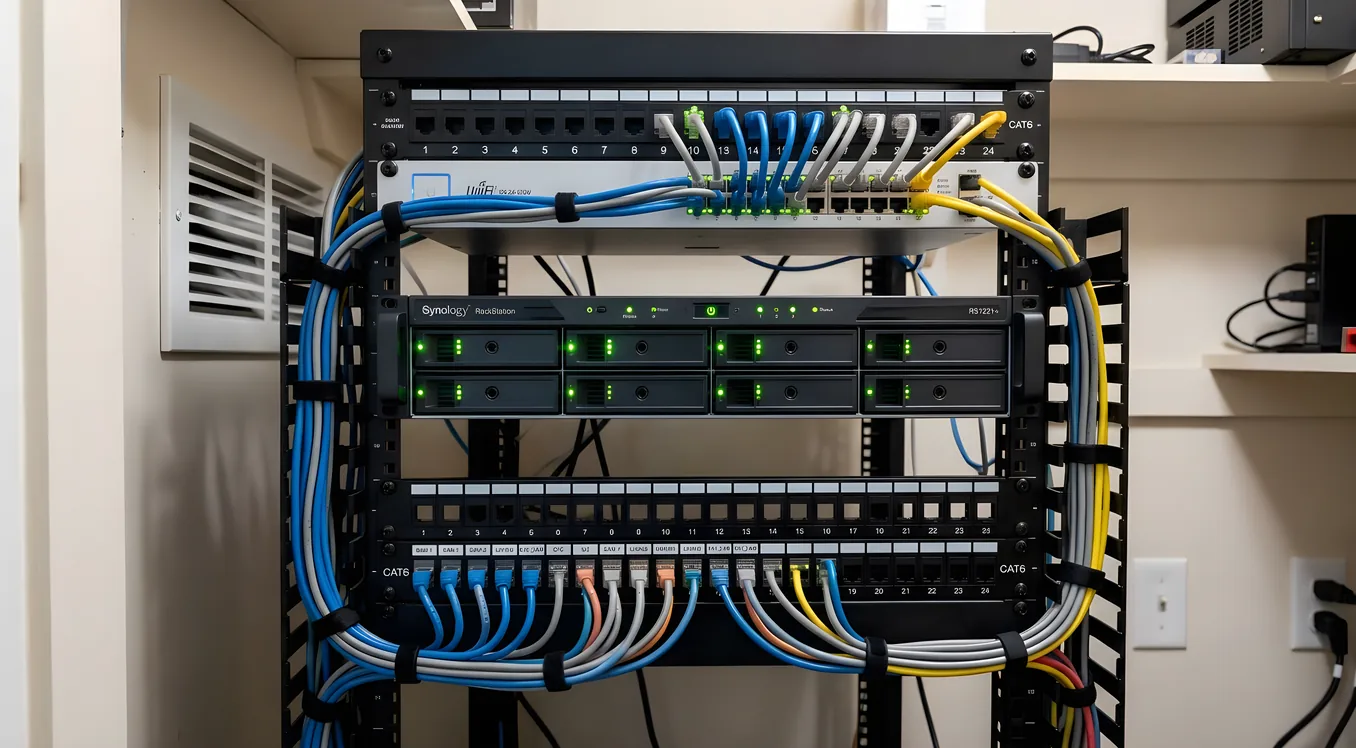
Professional tier ($700 and up): Synology NAS devices paired with Synology Surveillance Station, QNAP systems, or dedicated units from Milestone or Genetec represent the professional tier. A Synology DS923+ ($600) with Surveillance Station licenses ($50 per camera, one-time) and 4 WD Purple Pro drives gives you a redundant, enterprise-grade local recording system with excellent remote access tools. Integrators who work with Control4 or Crestron often recommend Synology or Milestone for clients who want high-end local recording that ties into a broader smart home platform.
PoE vs Wireless Camera Compatibility
Most NVR-focused systems use Power over Ethernet (PoE) cameras, which receive both power and data through a single CAT6 cable. PoE eliminates battery maintenance and WiFi dropouts from your camera infrastructure, which matters more than most buyers realize. A WiFi camera on a congested 2.4 GHz network can drop connection for 30-second windows, silently. A PoE camera runs reliably because it’s a wired connection. For any camera monitoring a point of entry, driveway, or high-value area, wired PoE is worth the installation cost.
Cloud Storage: Subscription Costs and What You Actually Get
Cloud recording means your cameras upload footage to servers operated by the manufacturer or a third-party storage provider, and you access it through an app or web browser. Ring, Arlo, Nest Cam (Google), Eufy (with cloud add-on), and Wyze all offer cloud storage plans.
The appeal is obvious: no hardware to maintain, footage survives even if your cameras or home network are destroyed, and you can access video from anywhere without configuring port forwarding or a VPN.
The costs are also significant over time. Here’s a comparison of current plans (as of early 2026):
Ring Protect Plus: $20 per month or $200 per year, covers unlimited cameras at one address, 60-day video history, 10% off Ring products. This is Ring’s most popular plan for multi-camera households.
Google Nest Aware Plus: $15 per month or $150 per year, covers all Nest cameras at one home, 60 days of event history (24-hour continuous recording for wired Nest cameras).
Arlo Secure Plus: $20 per month or $200 per year, unlimited cameras, 30-day cloud storage, plus 24/7 continuous recording for hardwired cameras.
Eufy Security: Eufy’s HomeBase 3 includes 16 GB of local storage free, with optional cloud plans starting at $3 per month per camera for 90-day rolling storage.
Over five years, a Ring Protect Plus subscription runs $1,000. That’s before any camera hardware costs. For a household with 6 to 8 cameras, cloud-only storage can make the total cost of ownership significantly higher than a local NVR solution, even accounting for the NVR hardware and drive replacements.
What Cloud Storage Doesn’t Tell You
Resolution throttling is common in cloud storage at lower subscription tiers. Many systems upload a compressed preview clip rather than full-resolution footage. When you go back to review footage at 2x or 3x zoom to read a license plate, the difference between a compressed 1080p upload and a local 4K recording becomes apparent.
Upload dependency is another real limitation. A camera recording locally to an SD card or NVR is unaffected by internet outages. A cloud-only camera that loses connectivity stops recording useful footage to any accessible location. During the events when you most need footage, power outages and internet disruptions are more likely, not less.
Hybrid Storage: The Architecture Most Residential Integrators Recommend
Hybrid storage systems record to both local storage and cloud simultaneously, or use local storage as primary with cloud as a backup for critical clips. This approach addresses the main failure modes of each pure solution: local-only recording loses footage if the NVR is stolen or destroyed; cloud-only recording loses footage when internet connectivity fails.
Several implementations deserve attention here.
NVR Plus Cloud Backup
The simplest hybrid approach: install a local NVR for continuous recording, then set up a cloud backup for a shorter retention window of critical events. Synology Surveillance Station supports this natively, pushing motion-triggered clips to Amazon S3, Backblaze B2, or Google Cloud Storage. Backblaze B2 charges $0.006 per GB per month for storage and $0.01 per GB for downloads, making it cost-effective for storing 30 days of event clips. For a household with 6 cameras generating 5 GB of event clips per day, Backblaze B2 storage costs roughly $0.90 per month.
Camera-Level SD Card Plus Cloud
Cameras like the Reolink Duo 3 PoE and Amcrest ProHD series support simultaneous local microSD recording and cloud upload. This gives you local high-resolution continuous recording on the camera itself and cloud backup of flagged events. A 256 GB microSD card (around $25 to $30 for a Samsung PRO Endurance card, which is rated for continuous video write cycles) in a 4K camera provides roughly 7 to 10 days of continuous recording at the camera level. Event-triggered cloud clips fill the gap for longer retention.
Professional Hybrid Systems
At the higher end, platforms like Avigilon Alta (formerly Openpath) and Milestone XProtect offer true enterprise hybrid recording where local NVR acts as a cache and cloud serves as the long-term archive. These are more relevant to small businesses than residences, but they represent the ceiling of what hybrid architecture can do.
For homeowners working with a residential integrator, hybrid setups built on Hikvision or Synology local recorders paired with selective cloud backup are the common recommendation. This pairs particularly well with broader security ecosystems that include smart alarm systems and access control, where you want footage retention tied to alarm events rather than a flat continuous recording.
Privacy and Data Ownership Considerations
This conversation is incomplete without being direct about the privacy implications of each approach.
Local NVR: Your footage stays on hardware you own and control. Law enforcement access requires a warrant served to you directly. The manufacturer has no access to your video. If the system is compromised, it requires physical access to your network or the NVR itself.
Cloud storage: Your footage is held by a third party under their terms of service. Ring, for example, has a history of sharing footage with law enforcement agencies under emergency requests, without a warrant in some documented cases. In 2023, Ring reached a settlement with the FTC over its data handling practices. Nest, Arlo, and others operate under similar legal frameworks. If you value footage privacy, this is not a minor consideration.
Hybrid: Depends on implementation. Local primary with cloud backup for only motion-triggered clips means most footage never touches third-party servers. Cloud-primary with local backup inverts that exposure.
For most homeowners, the threat model is “did someone steal my package” rather than “is a state actor monitoring me,” and cloud storage is a perfectly reasonable choice. But knowing the actual framework, rather than assuming your footage is private, leads to better decisions.
Calculating How Much Storage You Actually Need
The math is simpler than it looks. Here’s the formula:
Daily storage (GB) = (Bitrate in Mbps x Number of cameras x 86,400 seconds) / 8 / 1,000
For a 6-camera system with cameras recording at 2 Mbps each (typical for 4MP H.265):
(2 x 6 x 86,400) / 8 / 1,000 = 129.6 GB per day
At 30 days of retention: 3,888 GB, or about 4 TB. At 60 days: 8 TB.
Motion-only recording cuts this significantly. If your cameras are triggering motion 6 hours out of 24, you’re looking at about 25% of those numbers. Motion-only works for many residential applications, but continuous recording is worth the extra storage if you’re monitoring a high-traffic area like a driveway or front walk, because the event that matters might not trigger the motion threshold.
Most NVR systems let you set schedules, so you can record continuously during high-risk hours (overnight, when you’re on vacation) and motion-only during the day. This is a practical middle ground.
Integrating Camera Storage with Whole-Home Security
Camera storage doesn’t live in isolation if you’re building a comprehensive security system. The footage becomes most useful when it’s tied to alarm events, access control logs, and smart lock activity.
A professional-grade setup might work like this: an access control system paired with residential gate and entry systems logs every entry attempt with a timestamp. The NVR or cloud platform pulls the clip from that timestamp automatically. When a door sensor trips, the alarm system pushes the event to the NVR, which creates a flagged clip and sends a push notification with a thumbnail. You’re looking at exactly the footage you need rather than scrubbing through hours of recording.
Platforms like Alarm.com support this kind of integration natively, linking camera clips to alarm events across a range of compatible cameras and NVRs. Control4 and Savant can do this at higher integration levels, binding camera footage review to the same interface where you control lighting, locks, and HVAC. The video doorbell often serves as the front-of-house anchor for these systems, with the NVR or cloud platform handling the longer-term storage.
Choosing the Right Approach for Your Home
Go local NVR if: You have 4 or more cameras, plan to keep the system for 5-plus years, value footage privacy, have or can run ethernet to camera locations, and want the lowest ongoing cost after initial setup. Budget $600 to $1,500 for a quality setup including NVR, drives, and PoE switch.
Go cloud if: You’re renting, need a quick deployment with minimal setup, have fewer than 4 cameras, or want professional monitoring integration without additional hardware. Expect $10 to $25 per month ongoing, plus camera hardware.
Go hybrid if: You have a multi-camera system and want the reliability of local recording with the off-site backup for critical events. This is the configuration most integrators recommend for homeowners who are building a long-term security infrastructure. Budget $800 to $2,000 for local hardware and $5 to $15 per month for selective cloud backup.
The worst outcome is picking cameras first and discovering your preferred storage architecture doesn’t support them. If you’re working with an integrator to build a broader system that includes smart locks and alarm monitoring alongside cameras, bring the storage conversation into scope early. The decisions compound, and getting the architecture right from the start is much easier than retrofitting it.
Making the Storage Decision Work Long-Term
Whatever architecture you choose, three practices keep your system reliable over time.
First, schedule quarterly storage checks. NVR drives fail silently. Most NVR software will alert on drive errors, but only if you’ve set up notifications correctly. Surveillance-grade drives (WD Purple, Seagate SkyHawk) have better mean time between failures than desktop drives, but they still fail. Keep a spare on hand if your system doesn’t support RAID.
Second, verify your footage is actually recording after any system change, network change, or camera firmware update. “The system is running” and “the system is recording correctly” are not the same thing. Pull up footage from 24 hours ago as a spot check.
Third, know your retention window before an incident. If you discover a car was broken into on a Saturday and your system only keeps 3 days, you have until Tuesday to pull that clip. Set a calendar reminder if your retention is short, and consider longer retention for cameras covering high-risk areas.
Security camera storage is ultimately an insurance product. The cost is upfront and ongoing, and the value is episodic. Getting the architecture right means the footage is there when you need it, accessible in the format you need it, and retained long enough to actually matter.