Smart Pathway and Step Lighting: Safety Meets Automation
Smart Pathway and Step Lighting: Safety Meets Automation
A trip on a dark staircase at 2 a.m. is the kind of home safety failure nobody talks about until it happens. According to the National Safety Council, falls are the leading cause of unintentional injury deaths at home, and a significant portion involve stairs and exterior walkways in low-light conditions. Smart pathway and step lighting addresses this problem directly, and it does it in a way that passive landscape lighting never could: by responding to who’s actually there, what time it is, and what the rest of the home is doing.
This isn’t about novelty. It’s about putting the right amount of light in the right place at the right moment, automatically, without requiring anyone to flip a switch or remember to turn anything on.
Why “Automated” Changes Everything About Pathway Lighting
Traditional pathway and step lights operate in one of two modes: always on at night, or motion-triggered on a dumb timer. Both have obvious problems. Always-on fixtures waste energy all night even when nobody is outside. Dumb motion sensors light up for every passing cat, blast you with full brightness at midnight, and often reset to the wrong sensitivity after a power outage.
Smart pathway lighting systems solve these problems by adding context. Instead of reacting to motion alone, they can factor in time of day, occupancy elsewhere in the home, schedules, astronomical sunrise/sunset data, and even weather conditions. A well-programmed system might dim exterior step lights to 20% from 10 p.m. to 6 a.m. unless it detects motion from a trusted source (like a garage door opening), at which point it steps up to 80% brightness for five minutes before fading back. That behavior is impossible with a standard photocell timer.
The practical results: lower energy bills, no middle-of-the-night light blasts, and consistent reliable illumination when someone actually needs it.
The Hardware: Low-Voltage LED Fixtures for Paths and Steps
Most exterior pathway and step lighting runs on 12V AC or DC low-voltage systems. This is a deliberate design choice: low-voltage wiring is safer around landscaping, easier to run without an electrician in many jurisdictions, and more compatible with the LED fixtures that have become standard.
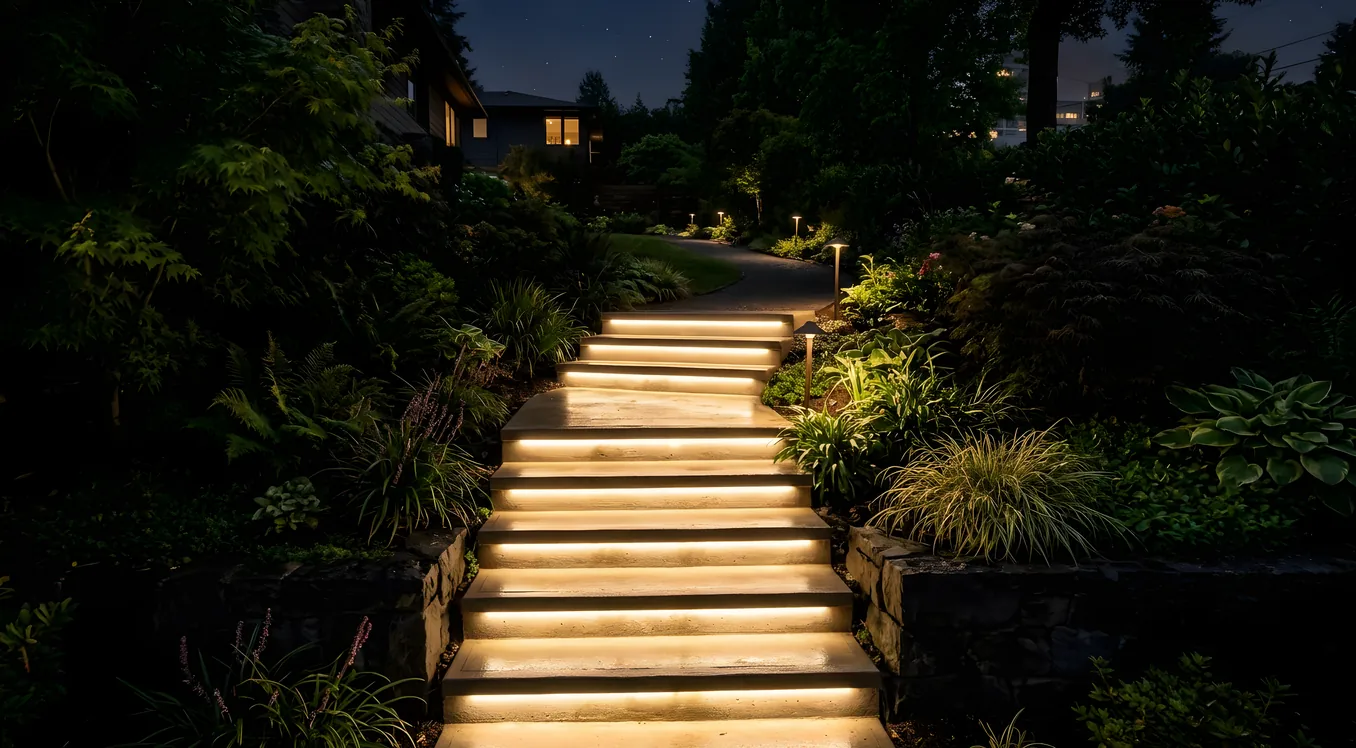
Step lights (also called stair riser lights or deck lights) mount flush into vertical surfaces: stair risers, retaining walls, deck framing. Common form factors include rectangular 3x5-inch or 4x8-inch recessed units. Popular options include the Kichler 15749 series (around $35 to $55 per fixture) and the WAC Lighting 4026 LED step light ($45 to $80), both of which offer photometric output in the 30 to 80 lumen range per fixture. That’s intentionally modest: step lights illuminate the tread immediately in front of you, not the whole yard.
Pathway fixtures stand on stakes or mount to short posts at 12 to 18 inches above grade and throw light downward onto the walking surface. The Hinkley Landscape 1550MZ series and the VOLT Lighting Pathmaster ($40 to $90 per fixture) are frequently specified by professional integrators. Lumen output typically ranges from 100 to 300 lumens per fixture, and color temperature matters: 2700K to 3000K renders warm without making the landscape look like a crime scene.
Hardwired vs. Low-Voltage Transformer Systems: Step lights set into concrete or stone typically run back to a low-voltage transformer, usually 12V or 24V. Transformers in the $150 to $500 range from manufacturers like Kichler, Hunza, or VOLT handle 150W to 600W loads. The transformer plugs into a standard outdoor GFCI outlet and connects to the control system through a smart relay or a dedicated landscape lighting controller.
Control Systems: How Smart Pathway Lighting Actually Gets Automated
The hardware is straightforward. The intelligence lives in the control layer, and this is where the differences between a $400 DIY setup and a $4,000 professionally integrated system become clear.
DIY and Entry-Level Smart Control
At the accessible end, Kasa Smart (TP-Link) and Govee both offer smart outdoor plug modules for $20 to $40 that add Wi-Fi control and scheduling to low-voltage transformers. You plug the transformer into the smart plug, set a schedule in an app, and you’re done. Integration with Google Home, Amazon Alexa, or Apple HomeKit is available depending on the device. This works, but it’s essentially a smarter timer. You get scheduling and remote control; you don’t get scene integration or responsive automation tied to other home events.
A step up: smart transformers from VOLT Lighting and Kichler include built-in Wi-Fi and their own apps. The VOLT Smart Pro ($180 to $250) handles scheduling, sunrise/sunset offsets, zone dimming, and basic app control without requiring additional hardware. It supports up to 300W of LED load and allows independent zone control if you’ve run separate circuits for path lights and step lights. Still no whole-home integration, but it covers most of what a homeowner actually needs.
Lutron Integration for Serious Lighting Control
When pathway lighting is part of a comprehensive smart home project, Lutron is the name that shows up most frequently. Lutron’s ecosystem handles both indoor and outdoor lighting, and their RadioRA 3 and Caseta systems can control low-voltage landscape lighting through compatible relay modules.
For a project using Lutron Caseta, the Caseta Outdoor Smart Plug ($29 to $45) connects a low-voltage transformer to the Caseta ecosystem. From there, the transformer’s output becomes part of any Caseta scene or schedule. Motion-activated paths that also respond to sunset offset schedules are straightforward to configure. Caseta pairs with Alexa, Google Assistant, Apple HomeKit, and Ring without additional bridges.
At the higher end, Lutron’s RadioRA 3 offers true dimming control over landscape fixtures via dedicated low-voltage relay modules, with scene-based control that ties into the home’s full lighting program. A RadioRA 3 project with integrated outdoor lighting typically adds $500 to $1,500 in hardware and programming costs beyond what you’d spend on Caseta, but the result is pathway lighting that participates in whole-home scenes. “Movie night” dims the interior, brings the entry path to 40%, and leaves the back deck at zero. That kind of coordination isn’t possible with an isolated smart plug.
Control4 and Savant: Whole-Home Integration
For homes running Control4 or Savant, exterior pathway and step lighting integrates directly into the home’s automation programming. Control4 drivers for Kichler, VOLT, and other landscape lighting manufacturers let the system control transformer zones as named lighting loads. A Control4 scene called “Arriving Home” can simultaneously trigger the garage door, set the entry foyer to full brightness, bring the front pathway to 80% for 10 minutes, and play a specific music playlist, all from a single button press or geofence trigger.
Savant’s approach is similar: the Pro App provides scene-level control over all registered loads, including landscape transformer zones. Savant’s strength is in touchscreen and in-app UI polish; the experience of managing a dozen exterior lighting zones feels cleaner in the Savant interface than in most competitors.
The tradeoff at this tier is cost. Adding landscape lighting control to an existing Control4 or Savant system requires driver licensing, programming time at $100 to $200 per hour, and possibly hardware for additional relay modules. Budget $1,000 to $3,000 for a professionally integrated landscape lighting expansion on an existing system.
Step Lighting Specifically: Different Design Rules Apply
Path lights and step lights serve different functions and require different approaches. Path lights mark a route and provide ambient fill. Step lights prevent falls by making tread edges visible, which is a functional safety requirement, not an aesthetic one.
The IES (Illuminating Engineering Society) recommends a minimum of 1 to 2 foot-candles on stair treads for safe navigation. Most residential step light fixtures deliver this at their rated output, but placement matters: the light source should illuminate the horizontal tread surface and the vertical contrast between riser and tread, not just wash the wall. A recessed step light mounted at the top of a riser (pointing downward onto the tread below) outperforms one mounted at the bottom pointing upward toward the next riser.
For automation purposes, interior and exterior step lighting often make sense to link. If someone is navigating interior stairs at 2 a.m., they’re probably heading toward the kitchen or the exterior, not triggering a full lighting scene. A motion sensor at the top of the staircase that activates both interior step lights at 15% brightness and pre-illuminates the path to the exterior door is a genuinely useful automation behavior, and it requires nothing beyond a decent control system and some planning during installation.
This kind of integration becomes more achievable with platforms like Lutron HomeWorks QSX, which handles both interior architectural lighting and exterior loads in a unified programming environment. HomeWorks QSX projects typically start around $30,000 installed, but for homes where lighting control is a priority throughout, the unified architecture is worth the investment.
Sensors and Triggers: Making the Lighting Responsive
The word “smart” in smart pathway lighting mostly comes down to what triggers the lights and how they respond. Common trigger types in professionally designed systems:
Astronomical clock with offset: Most smart transformers and lighting controllers can reference local sunrise/sunset data and apply a user-defined offset. “Turn on 30 minutes after sunset, turn off 60 minutes after sunrise” is a typical setting. This is more reliable than photocells in regions with variable cloud cover or for fixtures where the photocell may be shaded.
Occupancy and motion sensors: Lutron, Control4, Savant, and others support exterior-rated PIR and radar motion sensors that trigger lighting scenes when someone enters a zone. The key difference in a smart system: the sensor triggers a scene, not just a raw “on” command. The scene can vary based on time of day, current mode (Away, Night, Home), or other home state.
Garage door and entry sensors: When a garage door opens at 10 p.m., that’s a reliable indicator that someone is arriving or leaving. Using a garage door sensor to pre-illuminate the pathway from garage to door eliminates the half-second lag that characterizes motion-triggered lighting. Control4 and Savant handle this natively; Caseta can achieve similar behavior through third-party integrations or Lutron’s own bridge ecosystem.
Geofencing: Ring, Google Home, and some whole-home platforms use phone location to trigger lighting when you’re approaching home. This works best for driveways and entry paths, where the geofence can be set to a radius of a few hundred feet. Latency is the main limitation: geofencing triggers can lag 30 to 60 seconds depending on phone GPS update frequency, which may mean you’ve already reached the door before the path lights respond. Use geofencing as a supplement to motion sensing, not a replacement.
Time-based dimming curves: Rather than simply on or off, sophisticated systems can vary brightness across the night. A path might run at 60% from 8 to 11 p.m., drop to 25% from 11 p.m. to 5 a.m. (enough for safety without disturbing neighbors), and turn off at sunrise. This kind of tuning is standard in Control4 and Savant programming and available in RadioRA 3.
Color Temperature and Fixture Selection for Exterior Environments
Exterior lighting operates under different constraints than interior. Fixtures face UV exposure, moisture, temperature swings, and physical impact. The rating system to know: IP (Ingress Protection) ratings. IP65 means dust-tight and protected against water jets; this is the minimum for exterior step and path lights. IP67 and IP68 offer submersion protection, relevant for fixtures near water features.
For color temperature, 2700K remains the standard recommendation for residential exterior lighting. It reads warm and welcoming, it’s less disruptive to neighbors and nocturnal wildlife than cool white, and it renders landscape materials (stone, wood, concrete) more naturally than 4000K or 5000K. Some integrators spec 3000K for a slightly crisper appearance, which works well in contemporary architecture with a lot of concrete and steel.
Tunable white fixtures in exterior applications are relatively rare but growing. Systems like Ketra’s tunable lighting technology have historically been interior-focused, but the concept of varying color temperature with time of day has real benefits outdoors too: warmer light in the evening supports natural melatonin production, cooler light in the morning feels appropriately activating. A handful of exterior fixture manufacturers are now producing tunable white step and path lights, though integration with whole-home tunable systems requires careful specification work.
For color rendering, look for fixtures at CRI 90 or above. Lower CRI renders stone and plant colors as flat and washed out, which defeats much of the aesthetic purpose of landscape lighting.
Typical Installation Scenarios and Costs
Understanding what smart pathway lighting actually costs requires separating the scenarios. Here are three realistic project types:
Scenario 1: DIY Enhancement of Existing Fixtures (Budget: $150 to $500) You have existing low-voltage path lights plugged into a basic transformer. Adding a VOLT Smart Pro transformer ($180 to $250) replaces the dumb unit and adds scheduling, dimming zones, and sunset-offset control via app. If the transformer is compatible with your existing lights (check the wattage), this is a weekend project. No electrician required in most jurisdictions.
Scenario 2: New Pathway and Step Lighting with Caseta Integration (Budget: $1,500 to $4,500) New fixtures (8 to 12 path lights plus 6 step lights), a quality low-voltage transformer, and Lutron Caseta control via the Caseta Outdoor Smart Plug. An electrician installs the GFCI outlet and runs conduit to the transformer location. A landscape lighting company installs fixtures and buries low-voltage wire. Programming is straightforward and can be DIY via the Lutron app. This is a well-integrated, reliable setup for a typical suburban home without an existing whole-home platform.
Scenario 3: Professional Integration into Existing Control4 or Savant System (Budget: $3,000 to $8,000+) Existing whole-home platform with a certified integrator expanding the system to include exterior zones. New fixtures, transformer upgrades, Control4 or Savant driver programming, and integration into existing scenes and schedules. The high end of this range involves replacing all exterior fixtures, running new conduit, and extensive programming for complex multi-zone behaviors.
Connecting to the Broader Lighting System
Smart pathway lighting doesn’t need to be an isolated project. The homeowners who get the most value from it treat exterior lighting as part of their overall home lighting strategy, not a separate category.
That integration point matters for a few reasons. If you’re investing in a lighting control platform for your interior (whether that’s smart switches or smart bulbs), the exterior system should participate in the same ecosystem. A house where the interior runs Lutron and the exterior runs a disconnected Wi-Fi smart plug is a missed opportunity. The scene “Leaving for the weekend” should be able to set both interior and exterior lights to a secure pattern with a single command.
For homeowners early in the planning process, specifying the lighting control platform before selecting fixtures is the right sequence. The platform determines which transformer brands, sensors, and control devices are viable. Deciding on Caseta first, for example, narrows and simplifies the outdoor hardware selection considerably.
If you’re also planning interior lighting and care about how light supports sleep and daytime alertness, the principles behind circadian lighting design apply outdoors too. Evening exterior scenes that run warm and dim, gradually reducing blue content as the night progresses, support the same biological rhythms that circadian interior lighting addresses.
What to Ask a Lighting Integrator Before Signing
Before hiring anyone for a smart pathway lighting project, ask these specific questions:
- What low-voltage transformer brands do you specify, and why? (Look for integrators who can name brands and explain tradeoffs, not just default to whatever their distributor has in stock.)
- How do exterior lighting zones integrate with the rest of the system? Can they participate in scenes triggered by other home events?
- What happens when Wi-Fi or the control hub goes offline? Do the lights default to on, off, or their last state?
- How are step light placement and lumen levels determined? (An integrator who talks about foot-candle requirements and tread illumination angles knows what they’re doing. One who says “we put them wherever looks good” may not.)
- Is the transformer rated for the total wattage of the fixtures, with 20% headroom for safe continuous operation?
The answers tell you quickly whether you’re talking to someone who thinks about lighting as a system or someone who’s installing landscape lights the same way they’ve always done it.
Getting the Safety Outcomes You Actually Want
Smart pathway lighting is fundamentally a safety product that happens to look good and integrate with your home automation platform. The objective is zero trips and falls in low-light conditions around your home, and that objective is achievable with the right combination of fixture placement, lumen output, sensor positioning, and control logic.
The automation layer matters because human behavior is inconsistent. People forget to turn lights on before going outside. Guests don’t know which switch controls which exterior zone. Children and elderly family members need reliable illumination they don’t have to think about. A well-designed smart pathway system removes all of that friction and delivers appropriate light every time someone needs it, whether they’re arriving home at midnight or letting the dog out at 3 a.m.
That reliability is the real return on investment. It’s not measured in impressions or curb appeal, though both improve. It’s measured in the falls that don’t happen.