Retrofit Lighting Control: Adding Smart Lighting to Existing Homes
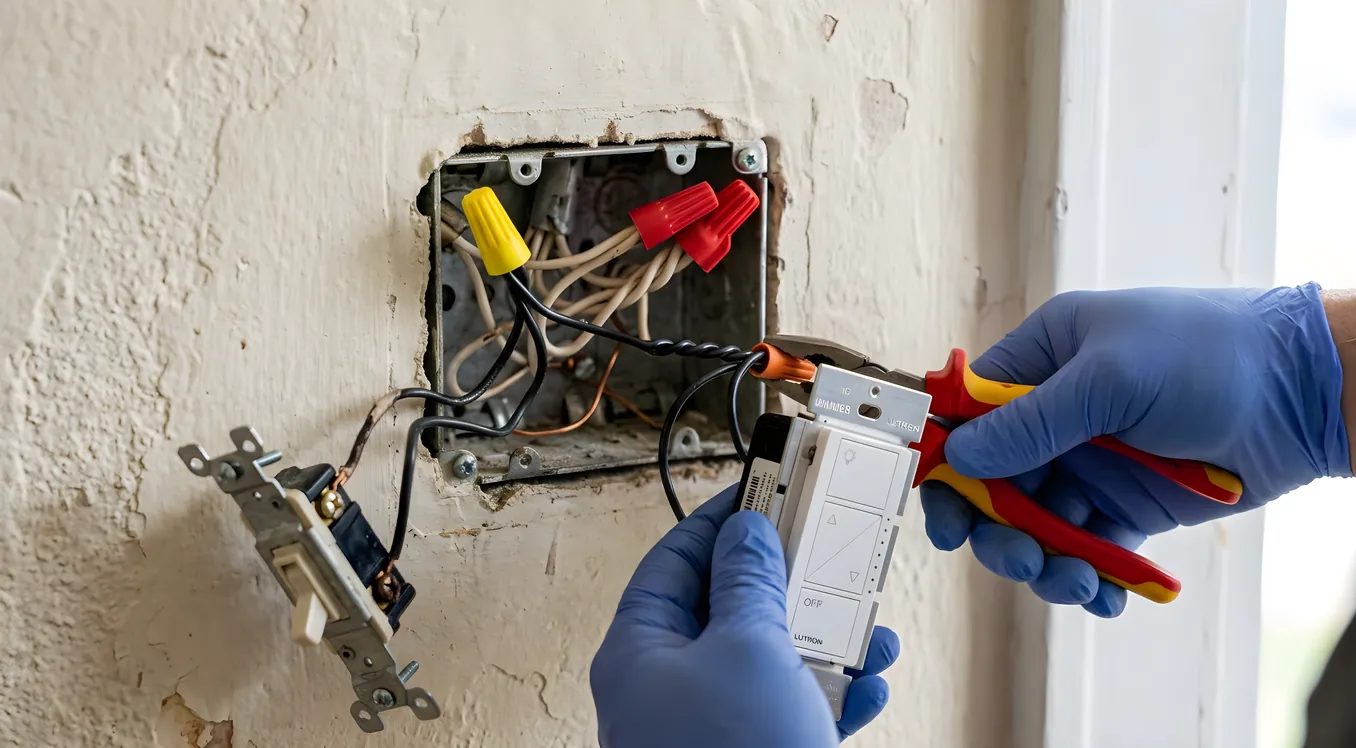
Most smart lighting content assumes you are building from scratch. New construction gives you the luxury of running conduit, pre-wiring for keypads, and selecting fixtures before the drywall goes up. But the overwhelming majority of homeowners live in existing houses, often with older wiring, minimal neutral wires, and electrical panels that were never designed with automation in mind.
Retrofit smart lighting is a real category with real solutions. It covers everything from a $20 smart bulb to a full Lutron RadioRA 3 system installed by a professional integrator. The range is wide enough that the most important thing you can do before buying anything is understand what problem you are actually trying to solve, because the cheapest path and the most capable path often require different infrastructure investments.
This article walks through the realistic options for adding lighting control to an existing home, including what limits you at each tier and what the upgrade path looks like if your needs grow.
Why Retrofit Is Harder Than New Construction
The fundamental challenge in retrofit smart lighting is the neutral wire. Most smart switches, dimmers, and smart switch modules require a neutral wire in the electrical box to function. Neutral wires are necessary because smart devices need a continuous trickle of power to stay connected to your network, receive commands, and maintain schedules even when the load (your bulbs) is switched off.
In homes built before roughly 1990, and in many homes built after that, the neutral wire was not run to switch boxes. Electricians only ran the hot wire down to the switch and back up (called a “switch loop” configuration). Opening a switch box and finding two black wires instead of a black and a white is the signal that you have a switch loop, and it significantly narrows your options.
You are not out of luck. But you need to know this before choosing hardware.
The other common retrofit complication is load type. Smart dimmers need to match the load they are controlling. LED bulbs have largely replaced incandescent, but LEDs are electronically different from incandescent bulbs and many older smart dimmers cause LED flicker, buzzing, or incomplete dimming. Modern smart dimmers from Lutron, Leviton, and others publish compatibility lists for specific LED bulb models. If you have existing LED fixtures and are adding smart dimming, checking that list before buying saves a lot of frustration.
Tier 1: Smart Bulbs
Smart bulbs are the lowest-friction retrofit option. You replace the existing bulb with a smart bulb, usually Zigbee or Wi-Fi based, and control it via app or voice assistant. No electrician required. No switch modification required. You can get a Philips Hue White and Color Ambiance A19 bulb for around $20 to $25 per bulb, or a basic white-only tunable Hue bulb for $15.
The appeal is obvious. The limitations are just as real.
Smart bulbs require the physical switch to stay on at all times. The moment someone flips the wall switch off, the bulb loses power and falls off your network. You cannot give it commands, it will not execute schedules, and it will not respond to automations. This is a workflow problem in any home where multiple people live and where the habit of hitting a light switch on the way out of a room is deeply ingrained.
There are workarounds. Lutron Aurora dimmers ($40) mount over an existing toggle switch, disable the physical toggle, and control a connected bulb system like Philips Hue via the Lutron bridge. This solves the “someone flipped the switch off” problem without any wiring work. Philips Hue also sells its own wall switch covers that do the same thing.
Smart bulbs make the most sense in specific scenarios: lamps without wall switches, fixtures where you want color-changing capability, areas where you live alone and control habitually through voice or app, and rental situations where you cannot modify the electrical. For a whole-home approach in a family home, the wall-switch interaction problem becomes significant enough that most people move up a tier.
Tier 2: Smart Switches and Dimmers
Smart switches replace the existing switch or dimmer in the wall box. Control stays at the wall, which means your household can continue using light switches normally, and the switch also responds to app, voice, and schedule commands. This is the most practical retrofit approach for most homeowners.
The two dominant brands in this space are Lutron Caseta and Leviton Decora Smart. Both work without a neutral wire in most configurations, which is why they are the go-to choice for retrofit installs.
Lutron Caseta uses a proprietary RF protocol called Clear Connect, which operates on 434 MHz and is designed to avoid interference with Wi-Fi and Zigbee. The Caseta Wireless Smart Dimmer (PD-6WCL) retails for around $60 and requires the Lutron Caseta Smart Bridge ($80) to connect to your home network. You can control up to 75 devices per bridge. Caseta works without a neutral wire and has one of the most reliable dimmer-to-LED compatibility records in the industry. The wall remotes (Pico remotes, $20 to $25 each) are battery-powered, mount anywhere, and turn any location into a legitimate 3-way or 4-way switch without any additional wiring. This is a significant retrofit advantage.
If you want to understand the difference between Caseta and the more capable RadioRA 3 system before spending money, the Lutron Caseta vs RadioRA 3 comparison covers where each system belongs and what you give up by staying at the Caseta tier.
Leviton Decora Smart (Z-Wave or Wi-Fi variants) offers a wider range at competitive prices, often $40 to $55 per dimmer, and integrates directly with most smart home hubs without a proprietary bridge. The Wi-Fi models work without a hub at all. Leviton also offers a “no-neutral” version of several switches (the DSL06 dimmer, for example) for switch-loop installations.
GE/Cync and TP-Link Kasa are two additional Wi-Fi switch lines worth mentioning for budget-conscious installs. Both are around $30 to $40 per switch, require a neutral wire (check your box first), and work without a hub via their respective apps. Integration with Google Home, Amazon Alexa, and Apple HomeKit is solid. These are not the choice for a high-end home or a system you expect to integrate with broader automation, but for a rental property or a first-time smart home experiment they perform well.
One practical note on 3-way and 4-way switches in retrofit: most smart switch systems solve multi-location switching either by replacing all switches in the circuit (the primary dimmer plus add-on switches at each additional location) or by using battery-powered wireless remotes. Lutron’s Pico remote approach is the cleanest because the battery-powered Pico mounts in a standard single-gang box and looks identical to a regular switch. Other systems require either purchasing add-on switches for each location or adding wiring, which can add cost.
The smart switches vs smart bulbs comparison digs into the tradeoffs between these two approaches in detail if you are still deciding which direction fits your home.
Tier 3: Professional Retrofit Systems
Smart switches at the consumer tier (Caseta, Leviton, Z-Wave) are capable and affordable. They stop making sense when you want whole-home coordination across dozens of circuits, scene control with precise dimming curves, integration with shading, HVAC, and AV systems, or the kind of interface that does not require anyone in the house to open an app to use the lighting.
Professional lighting control systems designed for retrofit installs include Lutron RadioRA 3, Lutron HomeWorks QSX, and Control4’s lighting modules. These systems share some characteristics that separate them from consumer products: they use more robust RF or wired communication protocols, they support custom programming for scenes and timeclock events, they integrate with professional AV and automation systems, and they require a certified dealer to specify and install.
Lutron RadioRA 3 is the mid-tier professional system and one of the most common retrofit choices for custom integrators. It operates on Lutron’s Clear Connect Type X mesh network, supports up to 200 devices per system, and integrates with Control4, Crestron, Savant, and most professional AV platforms. Devices include in-wall dimmers, switch modules for fluorescent and motor loads, hybrid keypads that allow scene recall directly from the wall, and compatibility with Lutron’s Sivoia QS roller shades. A RadioRA 3 system for a 3,000 square foot home with 30 to 40 dimmers and a handful of keypads typically costs between $12,000 and $20,000 installed, depending on fixture count and complexity.
Lutron HomeWorks QSX is the flagship residential system. It adds a processor-based architecture with wired and wireless device support, more sophisticated timeclock programming, and support for larger homes with hundreds of circuits. HomeWorks QSX is covered in detail in the full system guide, but at the retrofit level, the relevant advantage is its ability to mix wired and wireless devices in the same system, which means you can add hardwired keypads in the locations that matter most without needing to rewire every switch box.
Control4 handles lighting control through its Triad One and Triad Eight relay and dimmer modules, which live in a rack rather than in individual switch boxes. In a retrofit, this approach works well when you are installing Control4 as the whole-home automation backbone anyway. The lighting control integrates directly into Control4 scenes, schedules, and occupancy triggers without an additional protocol bridge.
One retrofit-specific consideration with professional systems: RF-based systems like RadioRA 3 can often be installed without any rough-in work, using existing switch boxes and running no new wire. This makes the retrofit cost significantly lower than a wired system like Crestron’s CLX lighting or a wired HomeWorks system. If a professional integrator tells you they need to open walls for a wireless RadioRA 3 system, push back and ask for specifics.
Addressing Wiring Constraints
Back to the neutral wire issue. Your options when there is no neutral wire:
Option 1: Choose switches designed for no-neutral installations. Lutron Caseta, Lutron RadioRA 3 dimmers, and certain Leviton and GE Cync models work without a neutral in the switch box. This is the cleanest path.
Option 2: Pull a neutral wire. An electrician can typically add a neutral wire in switch boxes during a retrofit, either by pulling new wire through existing conduit or by fishing wire through finished walls. Cost depends on your home’s construction. In a wood-frame house with accessible attic space, adding a neutral to several switch boxes might cost $500 to $1,500 for a few hours of electrician time. In a concrete-block or plaster-and-lathe home, it can cost significantly more or not be feasible without opening walls.
Option 3: Use a relay module in the panel or a ceiling box. Some systems allow the switch to be just a signal device (sending a wireless command) while the actual load switching happens at a module in the electrical panel or above the ceiling. Lutron’s Caseta plug-in lamp dimmers and Radio Powr Savr occupancy sensors work this way. For more complex installs, in-wall relay modules (Fibaro, Qubino, Shelly) can be tucked into ceiling boxes behind fixtures, taking their neutral from the fixture itself and eliminating the need for a neutral at the switch box.
Dimmer Compatibility and LED Bulbs
If you are retrofitting smart dimmers onto LED fixtures, the dimmer-LED pairing matters. Most LED drivers have a minimum load requirement and a specific dimming curve. Lutron maintains a comprehensive LED compatibility list at lutron.com/en-US/Products/Pages/LED-Bulb-Compatibility.aspx. This list shows tested combinations of Lutron dimmers and specific LED bulb models with notes on whether dimming is smooth, whether it goes low enough (some LEDs pop off at 20% rather than going all the way down), and whether buzzing occurs.
If you have existing LED fixtures and cannot change the bulbs (recessed cans with integrated LEDs, for instance), the safest approach is to bring a photo of the fixture label to your integrator and ask them to verify compatibility before specifying a dimmer. Replacing a dimmer that causes buzzing is annoying. Replacing a fixture that cannot be dimmed smoothly is expensive.
One area where retrofitting pays long-term dividends beyond convenience is circadian lighting. Systems that control both dimming level and color temperature can shift your home’s light from cool and energizing in the morning to warm and dim in the evening, aligning your lighting with your natural sleep-wake cycle. This is not a gimmick: the research on how light temperature affects melatonin production and alertness is robust. Circadian lighting systems and how they work is worth reading if this aspect of smart lighting matters to you, since the hardware choices you make now either enable or prevent it later.
Color Tuning and High-End Retrofit Fixtures
Consumer smart lighting from Philips Hue, LIFX, and Govee supports color and color temperature adjustment. At the professional level, Ketra (a Lutron company) produces fixtures and retrofit kits that offer full-spectrum tunable white and color with much higher accuracy and light quality than consumer smart bulbs. Ketra’s N3 and S38 LED light engines can produce color temperatures from 1400K (very warm candlelight) to 10000K (daylight-bright), with 90+ CRI rendering quality.
Ketra fixtures cost more (retrofit bulbs run $100 to $200 per lamp, panels are several hundred dollars each) and require a professional system (HomeWorks QSX or RadioRA 3 with Ketra integration). For homeowners who care about the actual quality of light rather than just its controllability, Ketra tunable lighting represents the high end of what is achievable in a retrofit install.
Whole-Home Retrofit: Planning the Project
If you are retrofitting smart lighting across an entire house rather than one room at a time, a few planning principles will save you from expensive mistakes:
Decide on the control platform first. Lighting control does not exist in isolation. It should integrate with your HVAC, shading, security cameras, door locks, and AV system. The platform you choose determines the integration options. Caseta integrates well with Nest, Ring, and SmartThings but is limited for deeper professional automation. RadioRA 3 integrates with every major professional platform. If you are also thinking about Control4 or Savant for whole-home control, make that decision before specifying your lighting control hardware because it affects which system makes sense.
Map your switch boxes before buying anything. Identify which boxes have neutrals and which do not. Identify all 3-way and 4-way switch locations. Count total circuits. This information shapes your hardware choices and cost estimate more than any other factor.
Budget for keypads in high-use locations. A dimmer at every switch box is the minimum. Hybrid keypads (dimmers with additional buttons for scene recall) in kitchens, master bedrooms, and main entries add meaningful convenience and are not much more expensive when planned in advance. Adding them later typically requires additional programming time from your integrator.
Think about integration with the main lighting guide for your home’s overall lighting strategy. A room-by-room approach works for a pilot project but tends to produce a patchwork of systems if you are not thoughtful about where you want to end up.
Realistic Costs by Tier
For a 2,500 square foot single-family home with 20 to 30 lighting circuits:
Consumer smart switches (Caseta, Leviton, Z-Wave): $1,200 to $2,500 in hardware for 20 to 30 switches, plus installation labor of $1,000 to $2,000 if you hire an electrician. DIY installation is feasible for most homeowners. Total: $1,200 to $4,500.
Lutron RadioRA 3 (professional install): $8,000 to $18,000 depending on device count, keypad placement, and shade integration. This includes equipment, programming, and installation.
Lutron HomeWorks QSX (professional install): $15,000 to $40,000 for a full home, depending heavily on scale and whether integration with shading and other systems is included.
Ketra integration on top of RadioRA 3 or HomeWorks: Add approximately $150 to $300 per fixture for Ketra lamp modules or light engines, plus integration time.
These ranges are wide because homes are different. A sprawling ranch house with long wire runs and difficult attic access costs more to retrofit than a two-story colonial with an accessible basement panel room. Get multiple bids from CEDIA-certified integrators before committing to a budget.
Getting Started Without Overcommitting
The smartest retrofit lighting approach for most homeowners is staged: start with Caseta in a few high-use areas, learn whether you like the control paradigm, and expand or upgrade from there. Caseta is forward-compatible with RadioRA 3 in many scenarios, and if you outgrow Caseta, you can reuse the wiring work and the approach, if not the devices themselves.
If you are already certain you want a professional system or you are undertaking a significant renovation where walls are open anyway, it is worth spending the time with a qualified integrator to specify the right system now rather than layering consumer devices and then replacing them in three years. The labor cost of retrofitting twice usually exceeds the hardware cost savings of starting cheap.
Retrofit smart lighting is not a one-size-fits-all problem. But it is a solved one. The hardware, protocols, and installation methods exist to add meaningful lighting control to almost any existing home without opening walls, and to add exceptional control when you are willing to invest in a professional system. The question is simply where on that spectrum your home, your household, and your budget sit.