Smart Smoke and CO Detectors: Connected Safety Systems
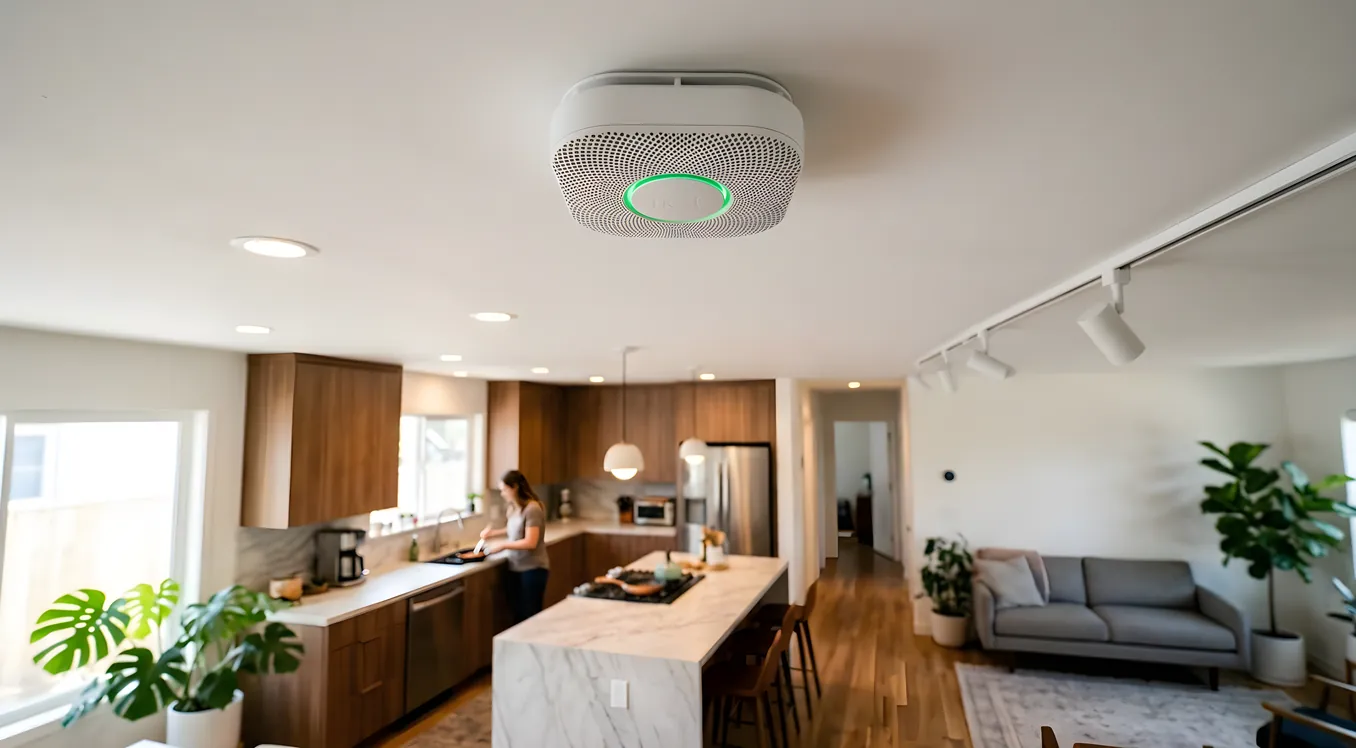
A smoke alarm going off at 2 AM in a distant bedroom is not something you want to hear about from your neighbor the next morning. Traditional detectors do one thing: they scream when they sense something. Connected smoke and CO detectors do the same thing, but they also tell you which detector triggered, why it triggered, whether the event is still active, and they can send that information to your phone, your monitoring station, or your home automation system before you have had time to sit up in bed.
That difference matters more than most homeowners expect until they actually live with it.
This article covers how smart smoke and carbon monoxide detectors actually work, what separates the consumer devices from professionally integrated systems, where the costs land, and how to think about integrating fire detection into a larger home security and automation strategy.
What “Connected” Actually Means in Smoke Detection
Every smoke detector sold in the United States operates on one of two detection technologies, and this distinction matters more than whether the device is “smart” or not.
Ionization detectors use a small radioactive element (Americium-241) to ionize air inside a sensing chamber. When smoke particles enter and disrupt that ionization current, the alarm triggers. Ionization detectors respond quickly to fast, flaming fires. They are slower to respond to slow, smoldering fires, which are statistically more dangerous because they often occur during sleeping hours and produce large quantities of carbon monoxide before visible flames appear.
Photoelectric detectors use a light source and a sensor positioned at an angle. Under normal conditions, the light beam misses the sensor. When smoke particles enter the chamber and scatter the light, some of it reaches the sensor and triggers the alarm. Photoelectric detectors respond more quickly to slow, smoldering fires and are less prone to nuisance alarms from cooking steam or shower moisture.
Dual-sensor detectors combine both technologies. The Nest Protect (Second Generation, $119 per unit from Google) uses a split-spectrum photoelectric sensor plus a carbon monoxide electrochemical cell. Kidde’s i4618AC dual-sensor wired interconnect alarm includes both ionization and photoelectric sensing in a single unit. The National Fire Protection Association’s NFPA 72 standard recommends combination or dual-sensor devices for sleeping areas specifically.
The “smart” layer adds networking, remote notification, inter-device communication, and integration hooks on top of whichever detection technology the device uses. A smart smoke detector that uses only ionization sensing is still only an ionization detector. The connectivity does not change the fundamental physics.
The Nest Protect: Consumer Smart Detector Benchmark
Nest Protect remains the reference product for consumer smart smoke detectors after more than a decade on the market. The Second Generation model ($119 for battery-powered, $119 for wired 120V with battery backup) offers a feature set that most homeowners use as the comparison baseline.
What it does well: Nest Protect speaks aloud before the alarm fully triggers, telling you “Heads up, there’s smoke in the Kitchen.” This is genuinely useful at 3 AM when you need to assess whether the situation is a nuisance event or a real emergency. It uses a split-spectrum photoelectric sensor that covers both fast and slow fires better than a single-technology device. The carbon monoxide sensor uses an electrochemical cell (the appropriate technology for CO) rather than a cheaper solid-state sensor. The Pathlight feature illuminates the device when you walk past at night, useful for hallway devices.
The Nest Protect integrates with Google Home and displays status on the Google Home app. It sends push notifications to your phone for alarms, low battery, and sensor tests. Multiple Nest Protect devices interconnect wirelessly over the Nest network, so an alarm in the basement notifies devices and app users throughout the home.
What it does not do: The Nest Protect does not integrate directly with most professional home automation platforms without a third-party integration layer. It does not support Z-Wave or Zigbee. It does not communicate with traditional hardwired alarm panel systems. If you have a Control4, Crestron, or Savant system, connecting Nest Protect devices typically requires a driver that polls the Nest/Google API or uses an integration hub, which adds latency and failure points.
The $119 per unit price scales quickly. A 2,500 square foot home typically needs eight to twelve detectors for NFPA-compliant coverage (one per bedroom, one outside each sleeping area, one per level, one in living areas). Budget $950 to $1,450 in hardware alone, before installation.
Hardwired Interconnect Systems and Professional Integration
Most homes built after 1993 have hardwired smoke detectors that interconnect via a three-wire system: hot, neutral, and a travel wire that signals all alarms to trigger when one detects smoke. This interconnect is an NFPA 72 requirement in new construction and substantially increases the probability of occupant survival by alerting the entire home simultaneously.
If your home already has hardwired detectors, replacing them with smart detectors that maintain hardwired interconnect is technically possible but requires careful product selection. Not all smart detectors maintain the three-wire interconnect protocol.
First Alert’s OneLink Safe and Sound ($120 per unit) is a hardwired smart detector that maintains the traditional three-wire interconnect while adding Wi-Fi connectivity, Amazon Alexa integration, and a Bluetooth speaker. Kidde makes similar hardwired-plus-Wi-Fi units. The critical specification to verify before purchasing: the replacement unit must match the existing wiring configuration (120V AC with battery backup, and the same travel wire voltage as the existing system).
For homes with professional automation systems, the approach shifts significantly. Integrators typically connect to fire detection through one of three paths:
First, a professionally-rated fire alarm panel (Honeywell Vista series, DSC PowerSeries, or Napco Gemini) handles all detection devices, and the home automation controller reads from and communicates with the panel via RS-232 serial, IP, or dedicated driver protocols. Control4 has certified drivers for Honeywell and DSC panels. Crestron similarly has certified control drivers. This approach keeps life-safety hardware on its own dedicated system, which is generally the correct architecture.
Second, some smart detector manufacturers offer API access or Z-Wave/Zigbee communication that integrates directly into home automation hubs. The Z-Wave Smoke Sensor from Fibaro (model FGSS-001, around $45) reports status to any Z-Wave controller, including SmartThings, Hubitat, and professionally supported platforms that include Z-Wave. The First Alert Z-Wave Combo Alarm (ZCOMBO-G, around $35 to $45) reports both smoke and CO status over Z-Wave.
Third, for high-end integration projects with Control4, Crestron, or Savant, the preferred approach is a UL-listed fire alarm panel with a certified integration driver. This maintains code compliance, supports monitoring station connection, and gives the home automation system reliable real-time status without depending on consumer cloud APIs that can change without notice.
Carbon Monoxide: The Detection Technology Matters
Carbon monoxide detectors are legally required in most states in new residential construction, and the technology inside the detector determines how reliably it works.
Electrochemical CO sensors use a chemical reaction that produces a current proportional to CO concentration. They are accurate, reliable across the normal range of temperatures and humidity found in homes, and are the technology used in commercially certified detectors. The Nest Protect uses an electrochemical CO sensor. Most UL-listed CO detectors do as well.
Metal-oxide (solid-state) semiconductor CO sensors are cheaper to manufacture and appear in some low-cost devices. They are less accurate, more prone to false alarms from other gases (including hydrogen from battery charging, which is relevant if you have an EV garage), and typically not suitable for life-safety applications.
CO operates differently from smoke in one critical respect: it has no smell, no visible presence, and produces no sound of its own. The behavioral pattern that causes CO poisoning is that people feel unwell, assume they are coming down with something, and lie down to rest. The symptom overlap with flu (headache, nausea, dizziness) is close enough that people do not always connect cause to effect.
For this reason, CO detection redundancy matters more than it does with smoke. Smoke is visible and the source is usually identifiable quickly. CO is invisible and the source may not be obvious until someone with a combustion analyzer investigates. Having CO detectors in sleeping areas and on every level of the home is the standard recommendation.
Combination smoke-CO detectors simplify installation and compliance, but there is a legitimate argument for separate devices in high-priority areas. Some fire marshals note that combination units can occasionally complicate diagnosis of which hazard actually triggered an alarm. Dedicated CO detectors from Kidde (the Nighthawk KN-COPP-3, around $30 to $40) allow precise location-to-alarm mapping that combination units can obscure.
What Smart Detectors Do That Dumb Detectors Cannot
The practical value of a connected detector goes beyond remote notification, though that is the feature most homeowners think about first.
Alarm source identification: When a traditional interconnected alarm triggers, every device in the home screams simultaneously. You know there is a problem but not where it originated. Smart systems identify the triggering device by name and location. “Kitchen smoke alarm” versus “Basement CO detector” produces different responses from a household at 2 AM.
Hush and test status: Smart detectors provide app-level confirmation that you actually silenced an alarm (and when the event fully cleared) rather than just suppressing the audible alert. They also report the results of self-test cycles remotely.
Battery and sensor health: Consumer detectors typically give you a low-battery chirp when the battery gets low. Smart detectors report battery percentage, sensor status, and device health continuously. A detector with a degraded sensor is not a detector.
Integration with automation responses: A smoke or CO event in a properly integrated system can trigger a sequence of responses automatically. Doors on a Control4 or Crestron system can unlock (relevant for smart locks and keyless entry systems when emergency access matters). Lighting can go to full brightness throughout the home to aid evacuation. HVAC systems can shut down to avoid circulating smoke through ductwork. A video doorbell or security camera can pull up a live view of the entry path on a touchscreen panel. These automations require integration, not just standalone smart detectors.
False alarm suppression feedback: Nuisance alarms from cooking or shower steam are the primary reason people disable smoke detectors entirely, which is a genuinely dangerous behavior pattern. Some smart detectors give you a way to signal “this is a nuisance” rather than a full alarm acknowledgment, and systems like Nest Protect use a 60-second pre-alarm heads-up before going to full alert, giving you time to assess and silence if you are standing in a steamy kitchen.
Integration with Alarm and Monitoring Systems
Standalone smart detectors and professionally monitored alarm systems are different categories, and most homeowners underestimate how different.
A Nest Protect sends you a push notification if there is smoke in your kitchen. If you are asleep with your phone on silent, if your phone battery is dead, or if the event incapacitates you before you see the notification, no one else is called. Professional monitoring calls your home, calls your contacts, and dispatches emergency services without requiring you to do anything.
Smart alarm systems that include fire and CO monitoring close this gap. Systems from ADT, Brinks, Ring Alarm Pro (which supports smoke/CO listeners that detect 85dB alarm patterns from existing detectors), and SimpliSafe all offer fire and CO monitoring as add-ons. Ring’s Alarm Smoke and CO Listener ($29 per unit) is a clever device that attaches near an existing smoke detector, listens for the T3 pattern (three beeps, pause, repeat) that indicates smoke, and the T4 pattern (four beeps, pause, repeat) that indicates CO, and reports those patterns to the Ring Alarm system and monitoring center. This approach lets you keep existing hardwired detectors while adding professional monitoring capability, which is useful in homes where replacing all hardwired detectors is not practical.
For professionally installed systems with dedicated fire panels, the integration with monitoring is direct and UL-listed. A Honeywell Vista 20P panel connects to a central monitoring station via a communicator module, and fire events trigger a different priority response than burglary events. Monitoring stations handle UL-listed fire signals under a separate protocol that requires faster response and automatic dispatch to fire services rather than police. This distinction matters when choosing between a DIY system and a professionally installed one.
Homes with comprehensive automation systems benefit from connecting security cameras to the same integration layer as fire detection, so that a triggered detector can automatically begin recording and provide visual confirmation of what is happening to both the homeowner and the monitoring station.
Costs Across the Spectrum
Consumer standalone (Nest Protect): $119 per unit, 8 to 12 units for adequate coverage: $950 to $1,450 in hardware. No monitoring fees unless added separately.
Consumer with monitoring (Ring Alarm + Smoke/CO Listeners): Ring Alarm Security Kit (8-piece, around $250) plus Ring Alarm Smoke and CO Listener units ($29 each, 4 to 6 needed for a typical home, $116 to $174). Ring Protect Plus monitoring runs $20 per month or $200 per year and includes professional monitoring for fire, CO, and intrusion.
Professional panel integration: Honeywell Vista 20P panel runs approximately $150 to $200 in hardware, plus hardwired photoelectric smoke detectors at $30 to $70 per unit, plus heat detectors for kitchens and garages ($25 to $45 each), plus CO detectors ($30 to $60 each), plus installation labor typically running $800 to $2,000 depending on home size and wiring complexity. Monitoring through a professional station runs $25 to $50 per month.
High-end integrated system (Control4, Crestron, Savant): Fire panel plus integration driver plus professionally installed detection devices across the home, wired to the main automation controller. Total installed costs for this layer in a home already receiving a full automation project typically add $3,000 to $8,000 depending on scope. The fire detection layer is usually a fraction of total project cost when done alongside lighting, access control, and AV integration.
What to Check Before You Buy
The NFPA 72 standard provides the baseline coverage requirements, and your local jurisdiction may have additional requirements. Before specifying any detection system, verify the required placement for your occupancy type (single-family, multi-family, square footage), whether your jurisdiction requires UL-listed devices only, and whether you need an interconnected system versus standalone units.
For new construction or major remodels: hardwired interconnected detectors are typically code-required. This makes the choice of smart hardwired units (like First Alert OneLink or equivalent) the natural starting point, with a professional fire panel if the project includes a broader security and automation scope.
For existing homes: evaluate whether your current hardwired system is in good condition. Detectors older than ten years should be replaced regardless of technology, as sensors degrade. If you are replacing aging hardwired detectors, it is a logical moment to assess whether the wiring can support smart replacements or whether the project scope warrants a professional panel.
For apartments and rental properties: battery-powered smart detectors like Nest Protect are practical where hardwiring is not an option. Verify lease or building requirements before installation.
Making Smart Detection Work in Practice
The most common failure pattern with connected smoke and CO detectors is buying smart hardware and then leaving it partially configured. Detectors that require app setup sit unregistered. Notification settings default to settings that cause homeowners to miss alerts. Devices on separate ecosystems (a Nest Protect in one room, a Ring listener in another, a hardwired First Alert in a third) create a fragmented picture where no single system has full visibility.
Integration takes work up front. Define what your detection system should do when an alarm triggers: who gets notified, what automations fire, whether monitoring is in the loop, and what your household protocol is for a middle-of-the-night alarm. Document that protocol and test it annually. The NFPA recommends testing smoke detectors monthly using the physical test button, and replacing batteries annually unless the device uses a 10-year sealed battery (as the Nest Protect does).
The investment in a well-configured connected detection system pays its return on a timeline that you genuinely hope never arrives. But the difference between a system that wakes you up, tells you exactly where the problem is, and has already contacted help versus one that just screams is the difference that matters most when time is the scarce resource.
Selecting the Right Approach for Your Home
The right detection system depends on what else is happening in your home from an automation and security perspective.
If you have a professionally installed Control4, Savant, or Crestron system, or if you are planning one, coordinate with your integrator on the fire detection layer from the beginning. A UL-listed fire panel integrated with your automation controller is the correct architecture, and the incremental cost within a larger project is typically modest.
If you have a Ring Alarm or SimpliSafe system, or a self-monitored setup, adding Ring Smoke/CO Listeners or manufacturer-compatible detection devices to your existing monitoring is usually the cleanest path. You get professional monitoring for fire without rebuilding your detection infrastructure.
If you are starting from scratch with no existing system and want a consumer smart option, the Nest Protect ecosystem is well-tested and the interconnected wireless behavior works reliably in most homes. Accept that it requires app setup for full functionality and that Google Home integration, while improving, is less capable than what a dedicated security panel provides.
What is not a good approach is leaving aging detectors in place because the project feels complex, or buying smart detectors and leaving them unconfigured. Connected safety systems earn their value in the first alarm event. That is the test you want to pass.